Choose the operating system required by your build tools before comparing laptop specifications: current Xcode needs a supported Mac, while native Visual Studio workflows call for a supported Windows setup. For general development, 16GB of memory is a practical starting point; consider more memory and SSD space when builds run alongside containers, emulators or other local services.
Who needs which setup?
Developers tied to a platform-specific toolchain
Your build target determines the operating-system choice. Apple Developer specifies a Mac with a supported macOS release for Xcode 26; for native Visual Studio work, check the Windows editions and architectures supported by Microsoft Learn.
Full-stack and DevOps developers running local services
If you compile while an IDE, browser, database, containers and test services are open, compare memory and SSD configurations for the whole working setup, not just the compiler.
Mobile developers and heavy local-build users
Android emulators, virtual machines or large codebases can make memory headroom a more important choice than it is for light coding. Check the tools you intend to run together before choosing a configuration.
What should you check first?
Settle the operating-system route required by your toolchain, then choose capacity for the builds and other tools you expect to run locally.
Mac laptop
Choose when: You need current Xcode for Apple-platform builds; Apple Developer says Xcode 26 requires a Mac running macOS Sequoia 15.6 or later.
Trade-off: Check your packages, target architecture and any Windows-only workplace tools before committing to macOS.
Windows laptop
Choose when: Your work relies on native Visual Studio development or Windows-specific tools.
Trade-off: Confirm the supported Windows edition and architecture for your exact toolchain; substantial professional projects may also need more hardware headroom than light coding.
Linux-focused setup
Choose when: Your projects and deployment workflow depend on Linux tooling or a native Docker Engine setup.
Trade-off: Check distribution and architecture compatibility. Docker Docs notes that Docker Desktop for Linux runs in a virtual machine, separately from Docker Engine.
| Concern |
What to check |
Who this matters to |
| Toolchain and OS compatibility |
Check required IDEs, SDKs, compilers and target architectures against the OS and its supported version. |
If my project needs a particular compiler or target platform, that requirement decides my laptop route before processor specifications do. Around 34% of consumers put toolchain compatibility first. |
| Local-build capacity |
Compare configured RAM and usable SSD space for builds, containers and other tools running together. |
When I keep local services, tests and an IDE open during builds, I need enough capacity for the combined workload. Local-build headroom is the primary concern for around 33% of consumers. |
| Daily portability |
Compare weight, screen size, ports and the actual memory configuration rather than choosing by chassis size alone. |
I carry my laptop regularly but still need it to run my development tools. Around 20% of consumers place that portability balance first. |
| Demanding local workloads |
Check the exact memory, processor, storage and any GPU requirements for large builds, VMs or graphics-assisted work. |
If large projects or several virtual environments are routine, I need to judge whether a heavier-duty configuration is warranted. That is the leading concern for around 13% of consumers. |
Common buying pitfalls
-
Choosing a processor before checking the operating system
Processor specifications cannot make an incompatible IDE or SDK run. Apple Developer requires a supported Mac and macOS release for Xcode 26, while Microsoft Learn lists supported Windows setups for Visual Studio.
List your essential IDEs, compilers, SDKs and workplace tools, then rule out incompatible operating systems before comparing hardware.
-
Assuming 8GB of memory suits every development workload
Builds may run alongside a browser, database, containers and tests. Box.co.uk describes 16GB as a practical starting point for most developers, rather than a guarantee for every workload.
Compare 24GB or 32GB configurations if you routinely run several local development tools together, and check the memory fitted to the exact laptop.
-
Assuming every workstation model has the same features
Memory, professional graphics and other workstation options vary by configuration. A feature described for a product family may not be fitted to the laptop you select.
Check the exact model and its configured components, ports, support terms and upgrade options.
-
Running overlapping Docker environments without a plan
Docker Docs says Docker Desktop for Linux uses isolated virtual-machine storage and that running it alongside Docker Engine can create resource or port conflicts.
Decide which environment you intend to use and check its container context, image storage and port allocation before setting up both.
Relevant brands to consider
Apple
MacBook Air is a Mac laptop line to consider when your development requires macOS and you favour a portable format.
- Apple UK lists MacBook Air configurations with 16GB unified memory and options for 24GB or 32GB.
- Check the installed macOS version, required Xcode release, package architecture and any Windows-only tools before choosing a configuration.
Lenovo
ThinkPad P-series models provide a mobile-workstation route for developers considering Windows or Linux-capable hardware.
- Lenovo describes the P series as ISV-certified and lists ThinkPad P16v Gen 3 configurations with 32GB DDR5 memory and a 1TB SSD.
- Certification and components must be checked against the exact model and configuration; a product-line description does not specify every laptop.
Dell
Precision is a mobile-workstation line to consider when a particular professional application or configured workstation feature matters to your work.
- Dell describes application testing and ISV certification for its Precision workstations.
- Confirm the application coverage and selected components on the exact Precision model rather than assuming every option is included.
Joybuy laptop choices
These laptops offer Mac and Windows routes for development with local builds. Match each configuration to your required tools and the number of services you run at once; listed hardware alone does not establish compile times for your projects.
 No image available
Lenovo Legion Pro 7 16IAX10H, 83F5000UUK
Consider this Windows configuration if you run several local tools alongside builds; it lists 64GB RAM and a 2TB SSD.
The 16-inch model lists an Intel Core Ultra 9 processor, NVIDIA GeForce RTX 5090 graphics and Windows 11 Home. Confirm that this Windows edition supports your required development and workplace tools.
Joybuy
 No image available
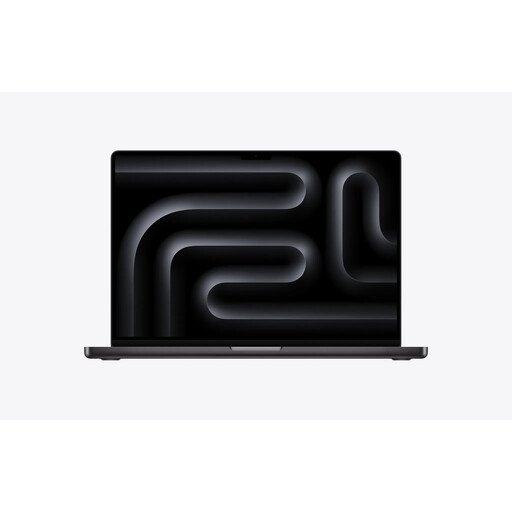
Apple MacBook Pro 16.2-inch M5 Max, 48GB, 2TB, Space Black
Consider this Mac for Apple-platform development and substantial local project files; the listed configuration has 48GB unified memory and a 2TB SSD.
It lists an 18-core CPU and 40-core GPU. Check the installed macOS version against your required Xcode release, as well as package and target-architecture compatibility.
Joybuy
 No image available
Stormforce Exobook 16 QHD+, Ultra 9, 32GB, 4TB, 5080
Consider this for local development projects that need substantial file storage; it lists 32GB memory and a 4TB SSD.
Confirm the operating-system configuration and compatibility with your IDEs, SDKs and target architecture before choosing it for a particular build workflow.
Joybuy
 No image available
MSI Stealth 18 AI Studio A1VGG-001UK, 32GB, 2TB
Consider this 18-inch laptop if you want 32GB RAM and a 2TB SSD for concurrent development tools and local files.
The listed configuration has an Intel Core Ultra 9 processor and NVIDIA GeForce RTX 4070 graphics. Check its carrying size and your toolchain requirements before choosing it for mobile work.
Joybuy
 No image available
MSI Summit 16 AI Evo, Core Ultra 7 255H, 32GB, 1TB
Consider this 16-inch model if you want a development laptop with 32GB RAM and a 1TB SSD for tools and project files.
Its title lists a QHD+ 165Hz display and Intel Arc graphics. Confirm the operating system and your IDE and SDK compatibility before buying.
Joybuy
Frequently asked questions
How much memory do I need for compiling software?
For general development, 16GB is a practical starting point according to Box.co.uk; consider 24GB or 32GB if builds routinely share the laptop with containers, emulators or other local tools. Microsoft Learn says Visual Studio runs best with 64GB RAM and a CPU with 16 cores or more, but that is not a minimum for every project.
Do I need a Mac to compile Apple-platform software?
You need a Mac running a supported macOS release for current Xcode: Apple Developer specifies macOS Sequoia 15.6 or later for Xcode 26. Check which Xcode release your project requires before buying an older Mac.
Can a Windows laptop handle Docker and Linux-oriented projects?
Yes, Docker Desktop for Windows supports WSL 2, Hyper-V and Docker VMM backends, according to Docker Docs. Check your Windows setup and whether your project needs Linux or Windows containers before settling on a configuration.
Should I run Docker Desktop and Docker Engine together on Linux?
Run both only if you have a reason to use their separate environments and can manage potential conflicts. Docker Docs says Docker Desktop for Linux keeps images and containers in an isolated virtual machine, while running it alongside Docker Engine can cause port conflicts or extra resource use.


