Choose a laptop whose operating system supports your development tools, then check the memory and SSD capacity of the exact configuration against your local builds, services and project files. For prolonged work at a standing desk, plan to raise the screen while using a separate keyboard and mouse, as the Health and Safety Executive advises; check how your display and other peripherals will connect.
Who this is for
Local-build developers
If you compile projects and run local services, containers or tests on your laptop, check whether its operating system, memory and storage suit those workloads. Capacities can differ within a model family: Dell lists several memory configurations for the Precision 5690.
Standing-desk regulars
If you work at a standing desk for extended periods, consider the laptop as part of a workstation rather than relying on its built-in keyboard. The Health and Safety Executive advises a separate keyboard and mouse so the screen can be raised on a riser or similar support.
Developers who move between desk and mobile work
If you connect a monitor and wired peripherals at your desk, check the exact laptop’s ports as well as its built-in screen. Lenovo documents Thunderbolt 4, HDMI and USB-A on a cited ThinkPad P16s configuration; Apple lists Thunderbolt and HDMI on current MacBook Pro models.
What to check before buying
Start with toolchain and operating-system compatibility, then assess the exact laptop configuration and the workstation you will use with it.
| Concern |
What to check |
Who this matters to |
| Local compilation capacity |
Confirm that the operating system and processor architecture support your tools. Check the exact memory and SSD capacities against your projects, containers and build outputs. |
If my builds run alongside local services and tests, I need enough capacity for them to work together. Around 42% of consumers put local-build capacity first. |
| Standing-desk ergonomics |
Check that you can raise the screen on a stable support and use a separate keyboard and mouse for prolonged work. |
When I spend long periods standing, I want to position the screen without raising the typing surface with it. Roughly 33% of consumers make workstation ergonomics their primary concern. |
| Mobile use and desk connections |
Match the exact laptop’s display output and ports to your monitor, dock, cables and wired peripherals. |
I take my laptop away from the desk but need to reconnect my display and peripherals when I return. About 25% of consumers prioritise that balance of portability and connectivity. |
Buying pitfalls
-
Treating the laptop as the complete standing-desk setup
A laptop’s specifications do not solve screen and keyboard positioning. For prolonged laptop use, the Health and Safety Executive advises a separate keyboard and mouse so the screen can be elevated.
Plan where the laptop, input devices and any external display will sit, then check that the laptop can connect to the peripherals you intend to use.
The setup may also require a riser or stand and, depending on your connections, a dock.
-
Assuming every variant has the same configuration
Dell lists different memory and storage options for the Precision 5690, while Apple’s MacBook Pro memory options vary by chip and model. A product-family description does not identify the capacity of the laptop you are ordering.
Check the exact model and configuration for memory, SSD, operating system and any graphics capability your tools require.
-
Choosing an operating system before checking the toolchain
Neither the availability of a Windows, Linux or macOS laptop nor its hardware specifications establish that your particular compiler, container image, driver or deployment tools will run on it.
Check the required compiler, SDK, package manager, debugger, virtualisation setup and target-platform tools before choosing a configuration.
A mismatch can mean changing your tools or development environment after purchase.
-
Assuming a listed port guarantees monitor compatibility
Lenovo and Apple list connection types for the cited laptops, but a port list alone does not establish support for a particular display, dock, resolution and refresh-rate combination.
Compare the laptop, monitor, dock and cable documentation for the setup you intend to use.
Your chosen connection may require a compatible dock, adapter or cable.
Relevant brands to consider
These model families illustrate different configurations and connections to check; features vary by model and variant.
Dell
Precision mobile workstations are relevant if your development environment calls for a Windows or Linux configuration and you need to choose memory and storage for local work.
- Dell lists Windows 11, Ubuntu Linux 22.04 and Red Hat Linux 9.4 options for the Precision 5690, alongside 16GB to 64GB LPDDR5x memory configurations and SSD options up to 4TB.
- Dell lists the Precision 5690’s memory as onboard. Confirm the capacity of the configuration you select rather than assuming you can change it later.
Lenovo
The ThinkPad P16s family is worth checking if you want a 16-inch laptop with direct connections for a standing-desk display and peripherals.
- Lenovo lists two Thunderbolt 4 ports, HDMI and USB-A 3.2 on a cited ThinkPad P16s configuration.
- Connections and other features vary by generation and SKU; check the particular P16s you are considering.
Apple
MacBook Pro is a route to consider when your required development tools and deployment environment support macOS.
- Apple lists three Thunderbolt 4 or 5 ports and HDMI, among other connections, on current MacBook Pro models.
- Memory options vary by chip and model. Confirm compatibility for each required compiler, container image, virtual machine, driver and target platform.
Joybuy laptop choices
These laptops offer different stated memory, storage and screen configurations for local development. Choose by your required operating system and tools, then check how the exact model will connect to your standing-desk setup.
 No image available
MSI Stealth 18 AI Studio A1VGG-001UK, 18-inch, Core Ultra 9, 32GB RAM, 2TB SSD, RTX 4070
Consider this configuration if its stated memory and storage suit your local projects and you want an 18-inch laptop at your desk.
The product name specifies an Intel Core Ultra 9 processor and NVIDIA GeForce RTX 4070. Confirm that your development tools support the chosen operating system and that your desk connections suit your display and peripherals.
View on Joybuy
 No image available
Stormforce Exobook 16-inch QHD+, Ultra 9, 32GB, 4TB, 5080
This configuration is worth comparing if local project files and build outputs make the stated 4TB storage capacity relevant to you.
Before choosing it for your toolchain, confirm its operating system. Check the exact monitor and dock connections needed at your desk.
View on Joybuy
 No image available
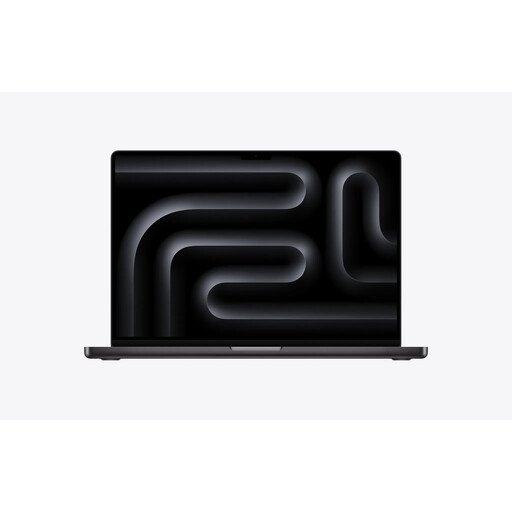
Apple MacBook Pro 16.2-inch M5 Max, 18-core CPU, 40-core GPU, 48GB/2TB, Space Black
Consider this macOS configuration if your compiler, containers and deployment tools support that environment and its stated capacity fits your work.
Confirm support for your specific virtual machines, drivers and external-display setup before ordering.
View on Joybuy
 No image available
Lenovo Legion Pro 7 16IAX10H 83F5000UUK, 16-inch, Core Ultra 9, 64GB RAM, 2TB SSD, RTX 5090
The stated 64GB memory configuration may be relevant if your local builds and other development tools need that capacity.
The product name specifies NVIDIA GeForce RTX 5090 and Windows 11 Home. Check your toolchain’s Windows requirements and the exact connections for your desk display.
View on Joybuy
 No image available
MSI Summit 16 AI Evo, 16-inch QHD+ 165Hz, Core Ultra 7 255H, 32GB LPDDR5, 1TB SSD
Consider the stated 32GB memory and 1TB storage against the size of your projects and local build files.
The product name also specifies Intel Arc graphics. Confirm operating-system compatibility for your tools and check wired-display connections before planning a docked standing-desk setup.
View on Joybuy
Frequently asked questions
Do I need a separate keyboard and mouse at a standing desk?
For prolonged laptop use with the screen raised, the Health and Safety Executive advises a separate keyboard and mouse. This lets you position the screen and typing surface independently; check how both devices will connect to your laptop.
Does workplace display-screen guidance apply when I work from home?
It can apply to employees working from home: the Health and Safety Executive says employers must assess workstations when workers use display screen equipment daily as part of their normal work for continuous periods of an hour or more. The regulations concern workers who regularly use that equipment as a significant part of their normal work; the assessment obligation is on the employer.
Can I choose a compilation laptop by processor alone?
No. Check the operating system and architecture required by your project, then the memory and SSD capacity of the exact configuration. Dell lists multiple capacities for the Precision 5690, and Apple’s MacBook Pro memory options differ by chip and model.
Will a Thunderbolt or HDMI port work with my monitor and dock?
A listed port does not establish that your whole display setup will work. Check the laptop, monitor, dock and cable documentation for the resolution, refresh rate, charging and operating-system support you need; Lenovo’s and Apple’s cited port lists do not establish compatibility with every accessory.


