For contact-form layout, choose a laptop that fits your essential software and peripherals, then compare its screen and memory for working with an editor, browser tools and previews. A macOS laptop suits an established Mac workflow; an Intel Windows laptop is a route for Windows-dependent tools, while Windows-on-Arm needs additional app and driver checks. For a quiet study, assess noise under your intended workload rather than judging it by size or processor alone.
Who needs this laptop?
Browser-based form designer
You work in HTML/CSS or a browser-based builder, moving between developer tools, previews and tabs. You also need to check how the form adapts to different screen sizes and whether its controls have clear labels, as described by MDN Web Docs.
Windows-tool-dependent creator
Your editor, workplace utility or peripheral depends on Windows. If you are considering Windows-on-Arm, check the applications and any device drivers separately; Microsoft Support notes that driver-dependent hardware needs drivers designed for Arm-based Windows.
Portable quiet-study worker
You want a laptop you can move between study spaces without giving up a workable screen. Check noise for the exact model under the tasks you expect to run, rather than treating portability or a battery-life claim as evidence of quiet operation.
What matters when choosing?
Start with anything your workflow cannot run without, then weigh screen space and memory against the size of laptop you want to use in the study.
| Concern |
What to check |
Who this matters to |
| Software and peripherals |
Check essential apps and devices against the operating system. For Windows-on-Arm, confirm required drivers with their vendors; Microsoft Support says driver-dependent hardware needs Arm-designed drivers. |
If my editor, work utility or peripheral cannot run, screen features will not rescue the workflow. Around 45% of consumers put this compatibility need first. |
| Workspace and memory |
Check the installed memory and exact screen configuration, including size and aspect ratio. Use responsive-design tools to test the form at other viewport sizes, as MDN Web Docs advises. |
When I keep the editor, developer tools and a preview open together, I want enough room to follow the layout without constantly switching views. Around 33% of consumers prioritise this workspace need. |
| Portable study setup |
Compare the size you will carry and use at your desk; seek exact-model noise measurements or try your usual workload in person if quiet operation is decisive. |
I move my laptop around the study and want a screen I can work on without overlooking operating noise. This setup is the primary concern for around 22% of consumers. |
Checks worth making before you buy
-
Assuming a thin laptop will be quiet
Battery-life, weight and processor claims do not tell you how a particular laptop sounds during browser work, charging, calls or use with an external display.
Look for noise testing of the exact model under a relevant workload, or try it yourself if possible.
-
Choosing Windows-on-Arm without checking devices
Microsoft Support says many x64 apps can run through emulation, but driver-dependent hardware needs Arm-designed drivers. Ordinary browser work does not establish that a printer, dock or specialist utility will work.
Confirm each essential app and peripheral with its vendor before ordering.
-
Relying on a product-family specification
Memory, display and other details can differ between configurations of the same laptop family. A feature listed for one variant should not be assumed for another.
Match the full model code and installed specifications to the configuration you intend to buy.
-
Testing only how the form looks on your laptop
A layout that looks right at one viewport can still be awkward at other sizes. MDN Web Docs also explains why form controls need descriptive names or labels for assistive-technology users.
Test multiple viewport sizes and check the label of every control.
Relevant brands to consider
Apple
The MacBook Air 13-inch with M5 is a macOS option for a browser-led workflow that already supports Mac apps.
- Apple lists a 13.6-inch 2560 × 1664 display, 16GB starting unified memory and two Thunderbolt 4 ports for the cited UK model.
- Check Windows-only tools before switching platforms, and allow for adapters if your existing devices need USB-A or HDMI.
Lenovo
The Intel-based ThinkPad E14 Gen 6 is a conventional Windows option for people whose workflow depends on that platform.
- Lenovo describes memory and storage in this product line as upgradeable.
- Check the installed memory and other details of the exact configuration; upgradeability does not tell you what is fitted when you buy it.
Microsoft
The Surface Laptop 13-inch (1st Edition) offers a compact Windows-on-Arm route with a touchscreen.
- Microsoft Support describes this Surface family with 16GB memory or greater.
- Microsoft Support says driver-dependent hardware needs drivers designed for Arm-based Windows; confirm essential apps and peripherals for your setup.
ASUS
The Zenbook 14 OLED UX3405 is a Windows option for a 14-inch, 16:10 display and built-in connections.
- ASUS lists two Thunderbolt 4 ports, USB-A, HDMI and an audio jack for the UX3405 line.
- Check the exact SKU for its display resolution, touch support, processor and installed memory; UX3405 configurations differ.
Joybuy laptops for this workflow
These laptops offer different screen sizes and platform choices for contact-form layout. Match the exact configuration to your tools and desk setup, and check quiet operation separately if it will affect where you work.
 No image available
ASUS Vivobook 15 X1504VA, 15.6-inch, Cool Silver
Consider this configuration if you want a 15.6-inch screen for working with a form editor and browser preview.
- Intel Core 5 120U; 24GB memory; 1TB SSD.
If quiet operation matters, assess this model under your intended workload.
View on Joybuy
 No image available
ASUS Vivobook 14 X1407QA-LY003W, Quiet Blue
This 14-inch option suits a more compact browser workspace if your essential tools work on Windows-on-Arm.
- Snapdragon X; 16GB memory; 512GB SSD.
Confirm required apps and device drivers with their vendors, and check noise under your usual workload.
View on Joybuy
 No image available
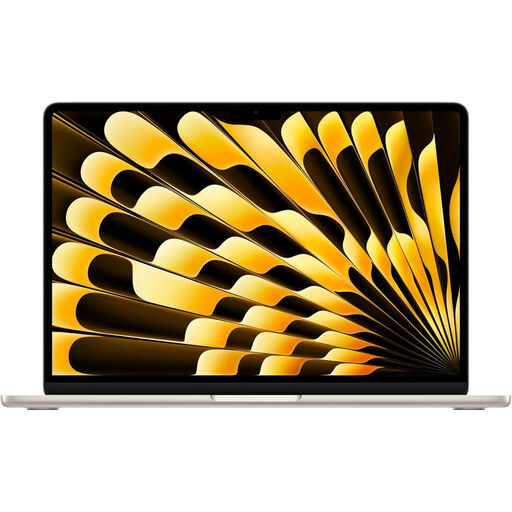
Apple MacBook Air 15-inch (2026) M5, Starlight
The 15-inch format is worth considering when you want more room for form layout and your applications support macOS.
- M5 with 10-core CPU and 10-core GPU; 16GB memory; 512GB SSD.
Confirm required workplace and testing tools before changing platforms. If resolution or operating noise will decide your purchase, check this configuration specifically.
View on Joybuy
 No image available
MSI Modern C2RMG-282UK, 9S7-15H431-282
This 15-inch configuration gives you a Full HD screen for a browser-led layout workflow.
- Intel Core 5; 16GB DDR IV memory; 512GB SSD.
Confirm the installed Windows edition for any software requirements, and assess operating noise if you will work in a quiet room.
View on Joybuy
 No image available
Microsoft Surface Laptop 7 15-inch, Maya Color
The 15-inch touchscreen provides another workspace choice if your form-design tools and peripherals work on Windows-on-Arm.
- Snapdragon X Elite; 16GB memory; 256GB SSD; PixelSense touchscreen.
Check essential apps and driver-dependent devices with their vendors, and assess noise under your intended workload.
View on Joybuy
Common questions
Do I need a gaming laptop to lay out a contact form?
Not for a typical browser-based HTML/CSS contact form. Choose around the applications you actually run together, your screen workspace, installed memory and software compatibility; MDN Web Docs advises testing responsive layouts across screen sizes rather than relying on one laptop display.
Can I use a Windows-on-Arm laptop for form-design work?
Yes, if your essential applications and peripherals are compatible with Windows-on-Arm. Microsoft Support says many x64 apps can run through emulation, while driver-dependent hardware needs Arm-designed drivers, so check specialist tools and devices before buying.
What should I check to make the contact form accessible?
Give each control an appropriate HTML element and a descriptive name or label. MDN Web Docs explains that these help assistive-technology users understand a control’s purpose; a larger or sharper laptop screen does not replace those checks.
What if a laptop bought from a UK trader is faulty?
A faulty laptop bought by a consumer from a UK trader is covered by the Consumer Rights Act 2015. GOV.UK describes repair or replacement where a fault is discovered more than 30 days after purchase or delivery; contact the seller with your order details. Fault remedies are separate from any change-of-mind return policy.


