Regular laptop-based desk workers
If you work at a home desk for extended periods, consider your screen and input arrangement alongside your employer’s workstation assessment where it applies.


Connect a monitor, keyboard and mouse directly if they meet your regular desk-work needs; prioritise a headset or webcam if meetings are the bigger concern. A dock becomes useful when you repeatedly connect several devices through one laptop connection, but its displays and charging depend on the laptop’s capabilities. Before buying for a managed work laptop, check compatibility and your employer’s equipment and IT arrangements.
If you work at a home desk for extended periods, consider your screen and input arrangement alongside your employer’s workstation assessment where it applies.
If meetings shape your working day, microphone connection, listening comfort and compatibility with your meeting platform may matter more than extra desk ports.
If you regularly attach a display, power, network connection and peripherals, check whether your laptop and managed-device arrangements can support a hub or dock.
Start with the equipment you use repeatedly, then check how it connects to your particular laptop. The same USB-C connector shape does not establish its video, charging or docking capabilities, as Microsoft Support explains.
| Concern | What to check | Who this matters to |
|---|---|---|
| Laptop and work-device compatibility | Check the laptop’s exact video and charging capabilities, then confirm whether your employer permits the intended accessory. | If I connect several devices to a managed laptop, I need them to work through its available ports and permitted software. Around 29% of consumers put compatibility first. |
| Screen and input arrangement | Check the monitor connection and available desk space; follow your employer’s workstation assessment where applicable. | For long stretches of desk work, I want a screen, keyboard and mouse arrangement suited to my workstation. Around 29% of consumers prioritise this need. |
| Online meetings | Check headset connection and meeting-platform requirements, or whether a separate webcam addresses your video needs. | When calls are frequent, I want the other person to hear me clearly and my video setup to fit the call. This is the main concern for around 24% of consumers. |
| Simple connections | Count the devices you actually connect and check whether the laptop’s existing ports can accommodate them. | If I only attach a few essentials, I would rather connect them directly than manage a dock I do not need. Around 18% of consumers put simplicity first. |
A fitting connector does not establish video output, USB4, Thunderbolt or the charging level you need. Microsoft Support notes that USB-C functionality depends on the hardware and software combination.
Check the laptop model’s port and charging specifications, the dock’s compatibility information and the supplied cable’s requirements.
A dock’s stated display modes can depend on the connected laptop. Anker’s hub information, for example, distinguishes modes according to the host’s DisplayPort capability.
Match your intended number of screens, resolution and refresh rate to both the laptop’s and the exact dock’s specifications.
The Health and Safety Executive says workers cannot be charged for equipment provided as an action identified by an applicable display screen equipment assessment. Acas advises agreeing equipment provision, repairs and technical support with the employer.
Ask about your employer’s assessment, equipment and approval processes before purchasing for a work laptop.
A headset, webcam or dock may have the connector you need without being supported on an employer-managed device.
Confirm the exact variant, required software or receiver, meeting-platform requirements and employer approval.
Relevant when choosing keyboards, mice, webcams or headsets for a desk and meeting setup.
Relevant when frequent calls make headset connections and meeting-platform requirements important.
Relevant when considering a compact USB-C hub for displays and other desk connections.
Relevant when considering a Thunderbolt dock for a compatible laptop and a more connected desk.
These products cover separate screens and input devices, meeting equipment and a dock for connecting several desk devices. Choose the part that addresses your regular work rather than treating the items as one required bundle.
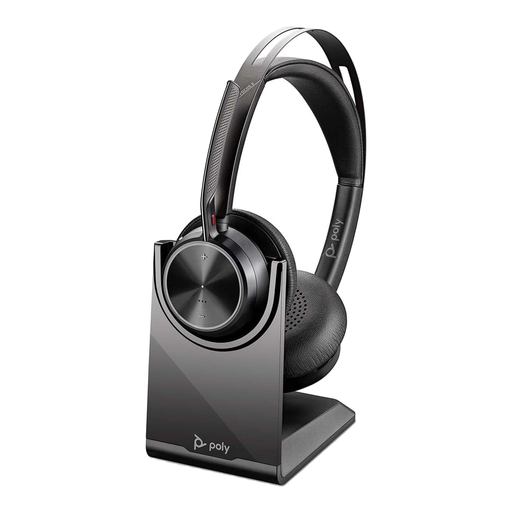 No image available
A headset to consider when recurring online meetings are the main reason for adding equipment. Check which connection your work laptop permits and supports.
The named variant includes a USB-C/A adapter and charging stand.
 No image available
A separate screen to consider for regular desk work, subject to your workspace needs and any applicable employer assessment.
Check that your laptop can connect to the intended display at the mode you need.
 No image available
A dock to consider if you regularly reconnect multiple desk devices. Confirm the laptop’s USB-C video support, intended display configuration and accepted charging input; the dock’s stated capabilities do not establish what the laptop can use.
An external 100W+ adapter is required. Check whether it is included, and confirm approval for a managed work laptop.
 No image available
A separate webcam to consider if your current camera or its placement does not meet your video-call needs.
Confirm its actual resolution before buying: the product title says 2K, while other product information describes Full HD 1080p at 30 fps. Check the laptop connection and employer support too.
 No image available
A keyboard-and-mouse combination to consider when separate desk input devices meet your needs without a dock.
Check that your laptop can accommodate the required USB-A receiver connection and that its use is permitted on a managed device.
No universal equipment list applies. Acas advises agreeing what is needed and who provides equipment and support; the Health and Safety Executive says a worker cannot be charged for equipment provided as an action identified by an applicable display screen equipment assessment.
Yes, they can apply to workers who routinely split their time, according to the Health and Safety Executive. Where the rules apply, the workstation assessment should reflect the worker’s circumstances rather than assume everyone needs the same accessories.
No. A USB-C connector alone does not establish the video, charging, USB4 or Thunderbolt features a particular dock needs. Check the exact laptop model, dock and cable requirements before buying.
The laptop’s display capability can limit the available modes. Anker identifies different display modes for one of its hubs depending on whether the host supports DisplayPort 1.4 or 1.2, so check your laptop’s specification as well as the hub’s sockets.
Ask whether the exact accessory and any required software are approved or supported, and who handles equipment and technical support. Acas also identifies information security and the handling of work devices as matters to agree with the employer.