What to check before buying
Decide which part of your current laptop setup limits your work most, then check compatibility before buying a monitor or dock. Screen space, connections, typing position and calls lead to different additions; they need not all be solved by the same device.
| Concern | What to check | Who this matters to |
|---|
| Screen space |
Match the monitor input to the laptop's video output. For two external displays, check the laptop's supported display count as well as available desk space. |
If documents and reference material compete for room on my laptop screen, I want space to view them together. Around 31% of consumers would put screen space first. |
| Connections |
Check the exact USB-C, Thunderbolt or other port capabilities, required cable and charging requirements against the chosen dock or hub monitor. |
Moving between desks makes reconnecting several devices inconvenient, but one cable must work with my laptop. Compatibility and connections come first for around 31% of consumers. |
| Desk comfort |
Check whether the screen can be positioned suitably and whether a separate keyboard and mouse will fit on the desk. |
During longer sessions, I need to position the screen without making typing awkward. For around 25% of consumers, that arrangement is the primary concern. |
| Compact setup and calls |
Check what can be packed away, whether call accessories connect to the laptop and whether the home connection meets your call needs. |
A shared table leaves little room for permanent equipment, and calls still need to work reliably. Around 13% of consumers would prioritise a compact, call-ready setup. |
Joybuy workspace accessories
These accessories address separate input devices and call audio for an existing laptop desk. Choose a keyboard or mouse to suit how you type and point, or a headset if calls are the specific limitation; check each connection against your laptop.
 No image available
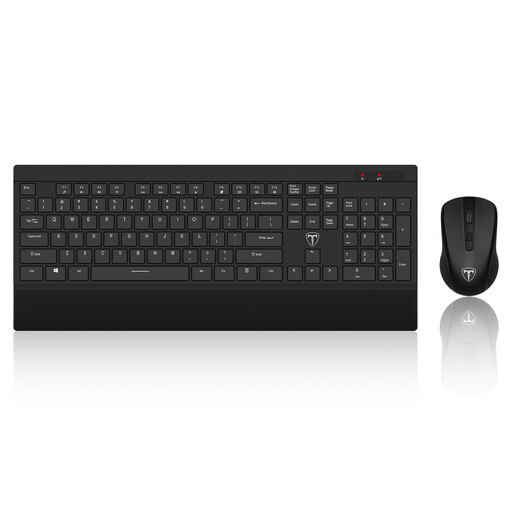
ET Silent Wireless Keyboard and Mouse Combo, US layout
A separate keyboard and mouse suit a desk where the laptop screen is raised or an external display is used. This full-size, 2.4GHz wireless combination has a US keyboard layout; check that the layout suits you and that your laptop can connect to its shared USB receiver.
View on Joybuy
 No image available
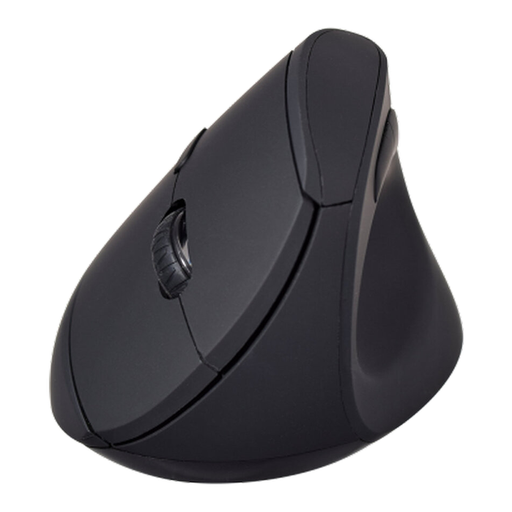
V7 MW500BT Bluetooth Vertical Mouse
This is a mouse-only option if you want a vertical shape for desk use, rather than a complete keyboard-and-mouse arrangement. Its name specifies Bluetooth and 2.4GHz wireless modes, six buttons and an adjustable sensor rated up to 1600 DPI. Check the connection and operating-system requirements for your laptop.
View on Joybuy
 No image available
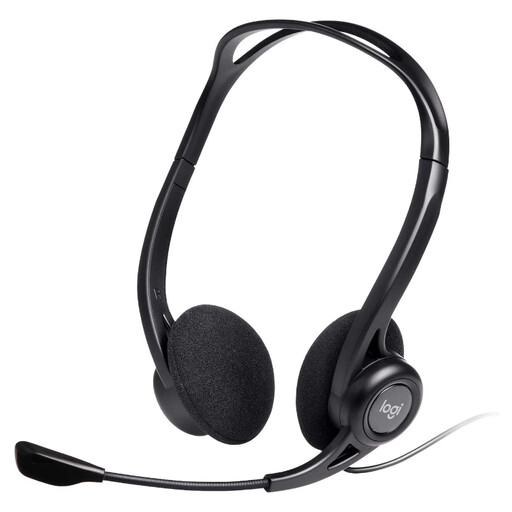
Logitech 960 Wired USB Headset
Consider this wired headset when call audio, rather than screen space or desk connections, is the limitation. It has a microphone and inline controls. Check that its USB connection fits your laptop or an adapter you intend to use.
View on Joybuy
Questions about laptop desk setups
Will any USB-C laptop port work with a monitor or dock?
No. USB-C describes the connector, not a guarantee of video output, charging, USB4 or Thunderbolt support. Check the exact laptop model's port specifications and the monitor or dock requirements, including the cable.
Will a dock give me two independent external screens?
Only if the laptop and the chosen connection support that display arrangement. Microsoft Support notes that a splitter duplicates a signal rather than creating independent desktops; Apple Support likewise advises checking the supported external-display count for the particular Mac model.
Do I have to buy my own equipment for a home-work desk?
Not necessarily if this is an employed-work setup. The Health and Safety Executive says employers must assess workstations for workers who use display screen equipment daily for continuous periods of an hour or more, and workers cannot be charged for equipment an assessment identifies as needed. Ask about your employer's process; a suitable existing home setup may not require additional equipment.
What should I add when using a laptop for long desk sessions?
A separate keyboard and mouse let you position the screen independently of where you type. The Health and Safety Executive advises this arrangement when elevating a laptop on a riser; a separate display is another way to position the screen while keeping the input devices on the desk.
Should I buy a headset or webcam to improve video calls?
Choose one only if it addresses the call problem you actually have, such as microphone audio or camera positioning. If calls break up, check the home connection and household network use before assuming a new accessory will resolve it.


