Buying priorities
Choose the connection route after checking the laptop, then build the desk around screen position, peripheral needs and the way you work each day.
Direct monitor connection
Choose it when: You need one external monitor and the laptop has a confirmed compatible HDMI, Thunderbolt or USB-C video output.
Trade-off: It keeps the setup simple but does not add broad peripheral expansion or guarantee laptop charging.
USB-C hub
Choose it when: You move the laptop regularly and need modest expansion, such as one HDMI display, USB accessories or pass-through charging.
Trade-off: Hubs are easier to carry than desk docks but may offer fewer ports and less workstation-oriented expansion.
Powered dock
Choose it when: A permanent desk needs charging, several peripherals and, where the laptop supports it, multiple independent displays through one connection.
Trade-off: Multi-display operation depends on the laptop, cable, operating system and display configuration, not only on the dock’s ports.
| Priority |
What to check |
Your needs |
| Screen and input position |
Check whether the screen can sit around eye level and about an arm’s length away. If using a laptop riser, add a separate keyboard and mouse. Confirm desk space for a separate display or monitor arm. |
I want to raise the laptop screen without leaving the keyboard and trackpad too high for regular typing. HSE guidance supports separating screen and input-device placement for prolonged laptop work. |
| Display compatibility |
Confirm the exact laptop model, operating system, video-capable port, supported number of independent displays, resolution and refresh rate. Check whether a multi-output adapter extends screens or mirrors them. |
I need the planned monitor arrangement to extend my desktop at the resolution and refresh rate I use, rather than simply connect physically. Microsoft notes that display-adapter limits can prevent additional monitors from working. |
| Peripheral expansion and charging |
Match the required monitor, USB, Ethernet, card-reader and audio connections to the hub or dock. Compare the power delivered to the laptop with its original charging requirement, allowing for hub operation where stated. |
I want to connect my usual monitor, keyboard, mouse, storage, audio and power without rebuilding the desk each time. A fixed dock may suit this better than a portable hub when several accessories stay connected. |
| Call equipment |
Check operating-system support, connection type, available ports and comfort requirements. Treat webcam light correction and microphone noise-reduction features as model-specific claims. |
I only need an external webcam or headset if the laptop’s built-in camera or audio does not suit my calling environment. A wired headset can be practical when calls are frequent and a cable arrangement is acceptable. |
Joybuy product options
Joybuy product options for a laptop-based home-work desk, including external displays, a docking station and a wired call headset.
 No image available
ASUS ProArt PA248CRV IPS WUXGA
A separate 24.1-inch display with a fully adjustable stand can help separate screen placement from the laptop keyboard and trackpad.
Stated connections include USB-C with video, data and up to 96W Power Delivery, plus HDMI, DisplayPort and USB-hub connectivity. The panel resolution is 1920 × 1200.
Check that the laptop USB-C port supports the required video mode and charging path. Confirm the exact UK-delivered USB-hub configuration.
Joybuy
 No image available
ASUS ProArt PA278CV IPS WQHD
This 27-inch WQHD display is intended for a regular fixed desk where independent screen positioning is useful.
The listing states a 2560 × 1440 IPS panel, height, tilt, swivel and pivot adjustment, HDMI, DisplayPort, USB-C and a two-port USB hub.
Check the laptop’s USB-C video support, cable requirements and intended resolution and refresh rate. Compare any USB-C charging output with the laptop’s original charging requirement.
Joybuy
 No image available
Targus USB-C Universal Dual HDMI 4K Docking Station
For a fixed desk with several accessories, this dock brings common monitor, USB, Ethernet and card-reader connections together.
The listing states two HDMI 2.0 outputs up to 4K 60Hz, USB ports, Gigabit Ethernet, SD and microSD readers, and up to 100W Power Delivery pass-through.
Two HDMI ports do not by themselves guarantee dual extended displays. Check the laptop’s independent-display limit, the required cable class and, for macOS, the dock’s display technology. The charging route is stated to require an external 100W+ power adapter; confirm inclusion and suitability.
Joybuy
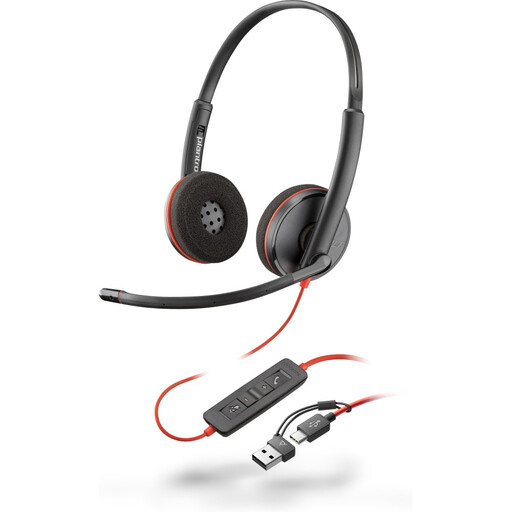 No image available
Poly Blackwire 3220 Stereo USB-C Headset
A wired headset can suit regular calls where an adjustable microphone and direct laptop connection are preferred.
The listing states a USB-C connection, an included USB-C-to-USB-A adapter, adjustable microphone, volume, mute and call controls, plus Windows, macOS and ChromeOS compatibility.
The noise-cancelling claim applies to the microphone, not necessarily to listening isolation. Check the available laptop port, cable arrangement and comfort requirements.
Joybuy
 No image available
Dahua 32-inch 4K 165Hz Curved OLED Monitor
This large separate display may suit a spacious fixed desk where a 31.5-inch curved screen fits the intended document or creator workflow.
The listing states a 3840 × 2160 display, height, tilt and swivel adjustment, VESA compatibility, HDMI 2.1, DisplayPort 1.4, USB hub and Type-C power delivery at 65W.
Check desk depth and viewing distance, along with the laptop’s ability to output the intended resolution and refresh rate. Confirm that 65W is adequate for the laptop’s original charging requirement.
Joybuy
Frequently asked questions
Will any USB-C port connect my laptop to a monitor?
No. USB-C describes the connector shape, not guaranteed video capability. Check the exact laptop documentation for USB-C DisplayPort Alt Mode, Thunderbolt or USB4 support, then check that the cable, adapter or dock supports the monitor connection, resolution and refresh rate you need.
Do I need a dock for one external monitor?
Usually not if the laptop has a confirmed compatible HDMI, Thunderbolt or USB-C video output and you only need one screen. A direct cable or single-output adapter is simpler; consider a hub or dock when you also need peripheral ports, charging or a repeatable one-cable desk connection.
Can a dual-HDMI adapter give my Mac two independent extended screens?
Not automatically. The supported display count depends on the exact Mac model, chip, resolution and refresh rate. Plugable states that a USB-C MST adapter generally cannot provide multiple independent extended displays on macOS and may mirror instead, so check both the Mac specification and the adapter’s display technology.
How should I judge whether a hub or dock will charge my laptop adequately?
Compare the laptop manufacturer’s required charging power with the power the exact hub or dock delivers to the laptop, rather than its highest advertised input or pass-through figure. Some hubs reserve power for their own operation; Anker’s UK-listed 555 hub, for example, states up to 100W pass-through minus 15W for operation and does not include a wall charger.
Does UK home-working law require a particular monitor, dock or chair?
No named product is required by HSE guidance. For employees who work at home permanently or long term, or routinely split time between home and a workplace, display screen equipment rules can apply; workers using display screen equipment daily for continuous periods of an hour or more may require an individual workstation assessment. The employer should assess suitability and help achieve a comfortable, sustainable posture.


