Start with the part of your laptop desk setup that limits your work: consider a riser with a separate keyboard and mouse for screen positioning, an external monitor when you need a separate display, or a dock when you regularly connect several desk devices. Before buying a dock or monitor, match its connections and display requirements to your exact laptop; for employer-managed equipment, check the workplace equipment and security policy too.
Who these setups suit
Laptop-only desk workers
If you work for long periods at one desk, decide whether you need to raise the laptop screen, use separate input devices or add a display. The Health and Safety Executive describes a raised laptop with a separate keyboard and mouse, or a separate display, as options for prolonged laptop use.
Hybrid workers using a fixed desk
A dock may simplify reconnecting displays and peripherals when you move a laptop between locations. Its usefulness depends on the exact laptop's supported connection protocols and display configuration, not just the presence of a USB-C port.
Home workers with frequent video calls
If camera position or call audio is the main limitation, a webcam or headset may matter more to your setup than another display. Check its connection and meeting-platform requirements, particularly on an employer-managed laptop.
What to consider when buying
Choose the screen and input arrangement you need before adding connections for other desk devices. If calls are the main issue, assess meeting peripherals separately rather than assuming a monitor or dock will address it.
| Concern | What to check | Who this matters to |
|---|
| Screen position and display space |
For a riser, check laptop support and room for a separate keyboard and mouse. For a monitor, check desk fit and compatible video connections. |
If I work for long stretches on a laptop, I want to position the screen without relying on the built-in keyboard at that height. Roughly 31% of consumers put screen position or separate display space first. |
| Limited desk space |
Measure usable desk depth and width, allowing for a monitor stand, keyboard and cables. |
On a compact desk, I would rather keep the arrangement manageable than add equipment I will not use. Around 23% of consumers prioritise a simpler, space-conscious setup. |
| Connections and charging |
Match the exact laptop and dock protocols, supported display setup and charging requirements; check the cables needed. |
When I reconnect several desk devices, I need the displays and charging to work with my laptop rather than relying on the dock's advertised maximum. Roughly 31% of consumers make connectivity their primary concern. |
| Calls and portable peripherals |
Check camera placement, headset or microphone needs, connection type and workplace device permissions. |
If regular meetings shape my working day, I may need suitable call hardware or input devices I can move between locations. For around 15% of consumers, that need comes first. |
Buying pitfalls
-
Assuming every USB-C laptop port can run a dock's displays
A dock's ports do not establish what the connected laptop can output. Lenovo says its USB-C and Thunderbolt docks depend on supported host protocols, while actual video output can depend on the system.
Check the exact laptop's port specification and supported external displays against the dock model before ordering.
-
Raising the laptop but continuing to use its built-in keyboard
Moving the screen upwards also moves the keyboard and trackpad. The Health and Safety Executive pairs a raised laptop screen with a separate keyboard and mouse in its guidance for prolonged laptop use.
Plan space and connections for separate input devices, or consider whether a separate display suits the desk better.
-
Assuming a personal accessory is approved for a work laptop
An employer-managed device may have equipment and security requirements that affect which docks and peripherals can be used. Employer provision also depends on the working arrangement and any relevant assessment.
Ask your employer which equipment it provides or approves before making a personal purchase for work.
-
Choosing a dock by its maximum specification alone
A stated multi-display capability does not establish the result for every laptop. Lenovo notes that actual video output for its ThinkPad USB-C Dock Gen 2 depends on the host system.
Compare the complete setup: laptop, operating system, monitor count, resolution and refresh rate, charging requirements and cables.
Brands to consider
Lenovo
Relevant when comparing USB-C and Thunderbolt docks for a fixed laptop desk.
- Lenovo lists charging, display and peripheral connections across the cited ThinkPad dock models.
- Lenovo says dock functions depend on the host laptop's supported protocol; display output can also depend on the system and exact dock model.
Kensington
Relevant when comparing docks, hubs and desk-positioning accessories for different laptop setups.
- Kensington describes dock ranges using Thunderbolt, USB4 and USB-C connections.
- Check the chosen model's host protocol, operating-system support, displays and charging requirements rather than applying range-wide descriptions to every dock.
Logitech
Relevant when separate input devices or video-call equipment are the priority.
- Logitech's business range includes keyboards, mice, webcams and headsets with differing connection options.
- Confirm device compatibility, receiver or Bluetooth access, meeting-platform requirements and workplace policy for the particular product.
Dell
Relevant when comparing USB-C and Thunderbolt dock connections for a fixed desk.
- Dell lists dock products with video, data, network and power-pass-through functions.
- Published functions vary by model; confirm charging and other requirements for the exact laptop, including when it is not a Dell system.
Joybuy product choices
These choices cover desk connections, separate displays, external input and video calls. Choose the type of accessory that addresses your setup first, then check its fit with your laptop and workspace.
 No image available
Targus USB-C Universal Dual HDMI 4K Docking Station, 100W Power Delivery Pass-Thru
Consider this for a fixed desk where you want to connect external displays and peripherals through a dock. The listed variant has dual HDMI connections and 100W Power Delivery pass-through; check the laptop's video and charging support, and whether a suitable power adapter is included.
Joybuy
 No image available
KOORUI E2412F 24-inch FHD Monitor
This is a separate-screen option for laptop desk work. Check its footprint and inputs against your desk, laptop output and available cable before choosing it.
Joybuy
 No image available
HP 680 CFT Dual-Mode Keyboard and Mouse Set
A separate keyboard and mouse can accompany a raised laptop or a separate display. Check the keyboard layout and whether your laptop and workplace policy permit the intended connection method.
Joybuy
 No image available
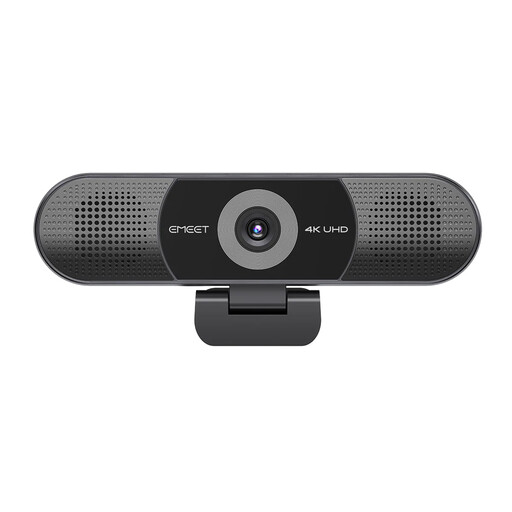
EMEET All-in-One 4K Webcam with Sony Sensor, 4-Mic Array and Dual Speakers
Consider integrated camera and audio hardware if video calls are the main reason to add a desk peripheral. This variant lists fixed focus and a 98° adjustable field of view; check its connection, mounting arrangement and meeting-platform compatibility.
Joybuy
 No image available
AOC Q32V4 31.5-inch IPS Monitor
This separate display is worth considering if a larger screen fits your desk. Confirm its exact physical dimensions and listed screen size, then check that your laptop output and chosen cable match the monitor inputs.
Joybuy
Frequently asked questions
Will any USB-C laptop work with a monitor dock?
No: the connector alone does not confirm display or charging capability. Lenovo says its USB-C and Thunderbolt docks require the relevant laptop protocol, and actual video output can depend on the host system. Compare the exact laptop and dock specifications, including supported displays and charging.
Should I start with a laptop riser or a monitor?
Consider a riser with a separate keyboard and mouse if positioning the existing laptop screen is your main need; consider a monitor if you need a separate display. The Health and Safety Executive describes both arrangements for prolonged laptop use. Check desk space and video connections before choosing a monitor.
Should I buy my own accessories for an employer-managed laptop?
Check your employer's equipment, reimbursement and security policies before buying. The Health and Safety Executive says employers have responsibilities for applicable long-term and hybrid home-working arrangements, and workers cannot be charged for action required by an employer's risk assessment; that does not mean every accessory is required for every worker.
Can I cancel an online order for a home-office peripheral?
For a qualifying UK distance sale of goods, the Consumer Contracts Regulations 2013 generally give a cancellation period ending 14 days after the consumer receives the goods, subject to the applicable conditions and exceptions. Check the retailer's cancellation process; change-of-mind cancellation is distinct from remedies if goods are faulty, damaged or misdescribed.


