Relevant brand references
These manufacturer examples show why dock and monitor specifications must be checked against the exact computer; they do not describe every product from each brand.
Dell
Dell’s Pro Thunderbolt 4 Smart Dock SD25TB4 is an example to examine when charging through a desk dock matters.
- Dell specifies power delivery of up to 130W for Dell systems and 96W for non-Dell systems for this model.
- Those stated figures do not establish the charging or display configuration available with every connected laptop; check the intended system.
Lenovo
Lenovo’s ThinkPad Universal Thunderbolt 4 Dock 40B0 illustrates the importance of host-port compatibility.
- Lenovo identifies USB-C Alt Mode or Thunderbolt support on the laptop as a requirement for its USB-C and Thunderbolt docks.
- Available dock features can vary with the connected notebook; check the exact model and intended connections.
HP
HP’s USB-C 100W G6 Dock and E27u G5 monitor provide separate examples of charging and display-output checks.
- HP specifies 100W power delivery for the USB-C 100W G6 Dock.
- HP states that driving the E27u G5 at 2560 × 1440 and 60 Hz requires suitable graphics output from the connected computer.
Joybuy options for a laptop-led setup
These options cover a portable computer, external displays and a multi-port adapter for building a laptop-led home desk. Check each connection and the space available before combining products.
 No image available
ASUS ZenScreen MB249C IPS USB-C monitor
Consider a separate display when the laptop screen needs to be positioned independently for sustained desk work. Check USB-C video compatibility, whether its charging capability meets your laptop’s needs, and which mounting accessories come with this variant. Confirm the weight if you intend to carry the monitor frequently.
View on Joybuy
 No image available
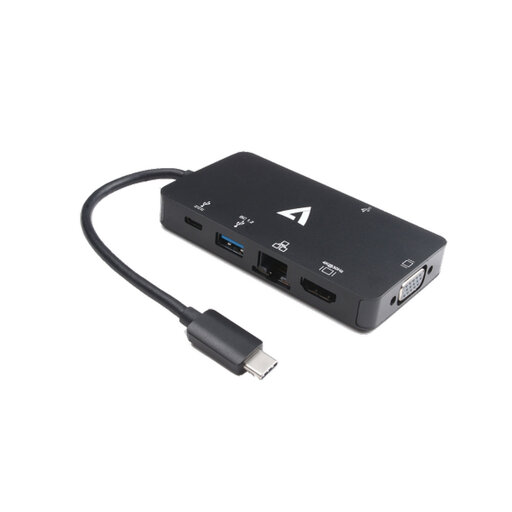
V7 V7UC-U3CRJ45HDVG-BLK USB-C adapter
This adapter is an option for reconnecting one external display and desk peripherals. Its stated connections include HDMI up to 4K at 30Hz, VGA, Gigabit Ethernet, dual USB 3.0 ports and 100W power-delivery pass-through. It is specified for a single display; check the laptop’s USB-C video support and charging requirements.
View on Joybuy
 No image available
HP OmniBook Ultra Flip 14-fh0006na 2-in-1, 16GB RAM, 1TB SSD
A laptop route keeps the same computer available for work in more than one location. This Windows 11 Home model has a 2-in-1 design, 16GB RAM and a 1TB SSD. For prolonged desk sessions, plan separate screen and input-device placement; confirm its exact port capabilities before pairing it with a dock or display.
View on Joybuy
 No image available
Dahua 32-inch 4K 165Hz curved OLED monitor, USB-C 65W
A separate monitor lets you arrange the laptop’s input devices without relying on its built-in screen position. This curved OLED model is described as 4K with a 165Hz refresh rate, a USB hub and USB-C 65W charging. Check that it fits the desk and that your computer supports the intended video mode and charging arrangement.
View on Joybuy
 No image available
Lenovo L32p-30 31.5-inch 4K UHD USB-C monitor
This is a separate-screen option for a home desk with room for a 31.5-inch monitor. Before choosing it for a one-cable setup, confirm its native display mode, the computer’s supported output and whether USB-C charging meets your laptop’s requirements.
View on Joybuy
Common questions
When is an external monitor worth planning for?
Plan for a separate display when prolonged laptop work calls for a screen position that the built-in keyboard and mouse cannot accommodate. The Health and Safety Executive advises either raising the laptop screen with a separate keyboard and mouse or using a separate display. Check desk space and the computer’s video output before choosing a monitor.
Do I need a dock or just a USB hub?
A dock is worth considering when you repeatedly connect charging, a display and peripherals at the same desk; a simpler hub may suit occasional extra-port needs. Check the laptop’s supported port protocol and the exact video and charging functions you expect from either device.
Will any USB-C laptop port run a monitor through a dock?
No: the connector alone does not establish video or charging support. Lenovo specifies that its USB-C and Thunderbolt docks require a compatible laptop port supporting USB-C Alt Mode or Thunderbolt protocols. Check the laptop and dock specifications for the display configuration you intend to use.
Does working from home change display-screen equipment duties?
For employees, the Health and Safety Executive says UK display-screen equipment rules can apply to permanent or long-term home working and to workers who routinely split time between home and the workplace. Where an employee uses display-screen equipment daily for continuous periods of an hour or more, the employer must carry out a workstation assessment; that does not require an individual to buy a particular monitor or dock.
Should I ask my employer before buying a monitor or dock?
Yes, particularly if it will connect to an employer-managed computer or handle work data. Acas advises agreeing what equipment is needed, who provides or pays for it and repairs, what technical support is available, and how information security will be handled.


