What to check before buying
Start with a laptop that can connect to your existing monitor and peripherals. Once that is clear, decide whether separate cables or a compatible dock make more sense for your daily routine.
| Concern | What to check | Who this matters to |
|---|
| Monitor and peripherals |
Match the monitor’s input and required display mode to the exact laptop’s documented HDMI or USB-C video output. Check how the keyboard and mouse will connect. |
I want my existing screen and peripherals ready when I get home, without discovering that the laptop cannot drive the screen. Roughly 33% of consumers put desk compatibility first. |
| Travel practicality |
Compare the weight and charger you would carry, and decide which accessories can remain at the desk. |
If I take the laptop away regularly, carrying it and setting it up elsewhere matter as much as using it at home. Around 27% of consumers make travel practicality their primary concern. |
| One-cable reconnection |
Confirm the laptop’s required USB-C or Thunderbolt video connection and compare its charging needs with the dock’s stated host output. |
I would rather reconnect one cable than plug in the screen, power and peripherals separately. About 20% of consumers put that desk routine first. |
| Refurbished condition and support |
Confirm the exact model and processor, Windows 11 eligibility, battery condition, included charger and seller terms. |
When considering a refurbished machine, I need its condition and usable support life to make sense before I commit. Roughly 20% of consumers prioritise those checks. |
Laptops for desk work and travel
These portable laptops offer configurations to assess for an existing home desk and occasional travel. Match each model’s documented display connection to your monitor before deciding whether you also need a dock.
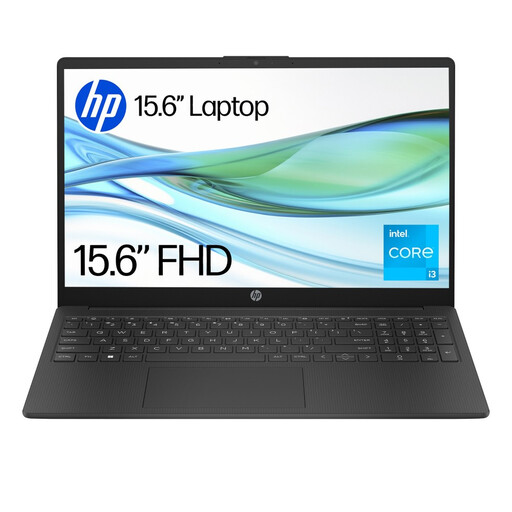 No image available
HP 15-fd0060na, Core i3-N305, 4GB RAM, 128GB UFS
Consider this laptop if its documented display output matches your home monitor; confirm the monitor mode you need before buying.
Core i3-N305, 4GB RAM, 128GB UFS and Windows 11 Home S are specified in the product name.
If you plan to use a dock, confirm USB-C video and dock charging compatibility for this exact model.
Joybuy
 No image available
ASUS Vivobook 14 X1407QA-LY003W, Snapdragon X, 16GB RAM, 512GB SSD, Quiet Blue
Consider this model for one computer to use at your desk and take away; check that its display output supports your monitor’s required mode.
Its named configuration includes a Snapdragon X processor, 16GB RAM and a 512GB SSD.
Before choosing a dock, confirm its charging compatibility with this exact laptop.
Joybuy
 No image available
Acer Aspire Lite AL15-36P-C29Z, 15.6-inch Full HD, Intel N150, 8GB RAM, 128GB SSD, Silver
Consider this laptop if a 15.6-inch screen suits how you work at home and away; confirm the connection and display mode needed for your existing monitor.
The named configuration has an Intel N150 processor, 8GB DDR4 RAM, a 128GB SSD and Windows 11 Home.
Check USB-C video and dock charging support before planning a one-cable desk setup.
Joybuy
 No image available
Lenovo IdeaPad 1, 15-inch Full HD, Ryzen 3 7320U, 8GB RAM, 128GB SSD, Cloud Grey
Consider this portable computer only after confirming how this exact configuration will connect to your home monitor.
The named configuration includes an AMD Ryzen 3 7320U processor, 8GB RAM, a 128GB SSD and Windows 11 Home in S Mode.
Check the video capability of the intended port and whether dock charging works before purchasing desk accessories.
Joybuy
Common questions
Is a USB-C port enough to connect a laptop to my monitor?
No: check whether that port on the exact laptop supports video output and the display mode your monitor needs. The Video Electronics Standards Association says DisplayPort Alt Mode enables DisplayPort video over USB-C and can work with suitable display adapters.
Can one dock handle my monitor, keyboard, mouse and laptop charging?
Yes, if the laptop supports the dock’s required connection, the dock supports your monitor setup and its host power output meets the laptop’s needs. Check the specifications for the exact combination: Dell, for example, lists different host charging outputs for Dell and non-Dell systems on its Pro Thunderbolt 4 Smart Dock.
What should I check on a refurbished Windows laptop?
Confirm the exact model and processor, installed Windows version, battery condition, charger and seller terms before buying. Microsoft says Windows 10 support ended on 14 October 2025; assess Windows 11 eligibility for the individual machine rather than assuming that enough RAM and storage settle the question.
What should I keep from a refurbished laptop purchase?
Keep the listing’s condition grade, battery and charger description, and your communications with the seller. Check the seller’s stated return and warranty process so you know how to raise a problem if the laptop arrives faulty or differs from its description.


