Who this setup suits

Home users replacing a failing desktop

You need one Windows laptop for documents, email, browsing and video calls, while keeping a familiar monitor-and-keyboard arrangement at home. Prioritise documented display output, suitable charging and the ports required by your existing peripherals rather than choosing by the USB-C connector shape alone.

Portable workers with a fixed home desk

You take your computer away regularly but want to return quickly to a monitor, keyboard, mouse, Ethernet or storage at home. Lenovo and Anker docking guidance describes how a compatible powered dock can reconnect these devices and charge the laptop through one host connection.

Value-focused refurbished-laptop buyers

A refurbished business laptop can be worth considering when the individual unit’s ports, battery condition, memory, storage, charger and warranty or returns terms are clear before purchase. Citizens Advice notes that consumer rights apply to faulty secondhand goods as well as new goods.

Buying priorities

Direct laptop connections

Choose it when: One monitor, a keyboard and a mouse are all you need at the desk, and the laptop has documented HDMI or video-capable USB-C output.

Trade-off: It keeps the setup simpler, but charging, display and USB devices may need separate connections.

USB-C dock or hub

Choose it when: You often reconnect a laptop to a monitor, peripherals, Ethernet and charging through one cable.

Trade-off: Display and charging functions remain limited by the laptop’s port protocol and power requirements.

Refurbished business laptop

Choose it when: Value matters more than having the newest processor, and the exact unit’s condition and ports are documented.

Trade-off: Battery wear, charger inclusion, keyboard layout and configuration can vary between individual units.

Priority What to check Your needs
External-monitor compatibility Check the laptop’s documented HDMI, USB-C, USB4 or Thunderbolt video support; match it to the monitor input, resolution and refresh rate; choose an adapter for the actual display mode required. I want my existing or planned monitor to work at the connector type, resolution and refresh rate I use, rather than finding out after purchase that a USB-C port cannot provide video.
One-cable desk reconnection Compare laptop USB-C charging input with dock host power; count the USB, Ethernet, audio and display ports needed; check the supplied host cable and its required protocol. I want to return to my desk without reconnecting a separate charger, monitor cable, keyboard, mouse and network cable every time.
Capability for everyday work For a basic desk, verify documented video output and charging support; for higher-bandwidth or multi-display use, check the exact Thunderbolt or USB4 implementation; compare the desk workload with the hardware you plan to add. Documents, browsing, video calls and ordinary peripherals are my priority, so I would rather not pay for a more complex dock unless my display or device setup benefits from it.
Refurbished condition and support Confirm the exact model, port layout, battery condition, memory, storage, charger and keyboard layout; read the condition grade, seller warranty and returns terms; keep the listing and invoice. I am comfortable buying refurbished only if the individual laptop is accurately described and there is a clear route to resolve a fault or mismatch.

Buying pitfalls to avoid

  • Assuming every USB-C port supports a monitor and charging

    A USB-C connector can carry different combinations of USB data, DisplayPort Alt Mode, USB Power Delivery, USB4 or Thunderbolt. A hub bought before checking the laptop may provide no video output, insufficient charging or fewer displays than expected.

    Read the exact laptop model’s technical specification or manual. Confirm the video protocol, charging input, required display count, resolution and refresh rate, plus the dock’s host requirements.

  • Comparing a dock’s total wattage with the laptop charger

    The useful figure is the power delivered to the host laptop after the dock’s own needs and connected devices are considered. Dell’s dock specifications, for example, distinguish power supplied to Dell systems from that supplied to non-Dell systems.

    Match the stated host-delivery figure to the laptop maker’s charging requirement, and keep the original laptop charger available if the dock cannot meet it.

  • Buying a multi-display dock from its headline resolution claim

    Multi-monitor support depends on the laptop, operating system, host protocol, dock, cable and each monitor’s required mode. A dock’s maximum display claim may not apply to a particular laptop or display arrangement.

    Use the manufacturer’s display-configuration table for the exact laptop and dock, then compare it with your monitor count, inputs, resolution and refresh rate.

  • Treating a refurbished business-laptop name as a condition report

    Ports, RAM, storage, battery wear, charger inclusion and keyboard layout can differ by generation, configuration and seller. Consumer rights do not remove the inconvenience of returning a unit that was poorly described.

    Verify the exact model number, photographed ports, battery and condition statement, included charger, warranty, return period and seller identity before ordering. Keep the listing and invoice.

Relevant brand references

Lenovo

Relevant when choosing a ThinkPad or another Windows laptop for a USB-C, USB4 or Thunderbolt desk setup.

  • Lenovo’s UK product pages list Universal USB-C and Universal Thunderbolt 4 docks with multi-port and multi-display configurations.
  • Lenovo states that dock functions depend on a Type-C port supporting the relevant Alt Mode, DisplayLink or Thunderbolt protocol, and some functions may be unavailable on non-Lenovo laptops.

Dell

Relevant for a Dell business laptop paired with a branded Thunderbolt desk dock where stated power delivery and display configurations matter.

  • Dell’s UK Pro Thunderbolt 4 dock pages give model-specific host-power and display-mode information.
  • Those specifications apply to the stated dock and host configuration, not automatically to every Dell or non-Dell laptop.

HP

Relevant for buyers considering current business-laptop configurations for everyday productivity and desk expansion.

  • HP’s UK business-laptop listings include configurations with USB-C and Thunderbolt options, alongside configurable memory and storage.
  • Port support varies by exact model and configuration, so confirm the selected laptop’s charging and display specification.

Anker

Relevant for an independent USB-C desk dock instead of a laptop-maker-branded option.

  • Anker’s UK docking products cover combined display, charging, Ethernet and peripheral connections.
  • Anker’s guidance says compatibility depends on the laptop port, operating system, power requirement and display support.

Joybuy product options

These Joybuy options cover portable laptops with direct desk connections and docks or hubs for adding display, network and peripheral connections to a compatible laptop.

ASUS Vivobook 14 X1407QA-LY003W laptop

ASUS Vivobook 14 X1407QA-LY003W, 16GB RAM, 512GB SSD

A portable Windows option for a one-monitor desk with direct display and peripheral connections.

Stated specifications include two USB4 Type-C ports with DisplayPort and Power Delivery, HDMI 2.1, 16GB memory, a 512GB SSD and a 65W USB-C adapter.

Check ASUS display-output support for your intended monitor count, resolution and refresh rate. The stated 16GB onboard memory is the maximum system memory.

Joybuy

Apple 13-inch MacBook Air with M5 chip

Apple 13-inch MacBook Air (2026) M5, 24GB, 1TB SSD

A compact main computer for desk peripherals where your required applications and accessories support macOS.

The listing states two Thunderbolt 4 ports, MagSafe 3 charging, 24GB unified memory and a 1TB SSD.

Confirm macOS support for required software and peripherals, plus the display modes supported by the intended monitor setup.

Joybuy

THUNDEROBOT Radiant S16 gaming laptop

THUNDEROBOT Radiant S16, Ryzen 7 7745HX, 16GB RAM, 1TB SSD

A Windows laptop with direct wired connections for a fixed desk that also needs portability.

The listed connections include HDMI, Mini DisplayPort, RJ-45 Ethernet, two USB-A ports and two USB-C ports, with 16GB DDR5 memory and a 1TB NVMe SSD.

Verify USB-C video and charging functions, charger wattage and supported display modes before planning a one-cable dock setup. Allow clear ventilation on the desk.

Joybuy
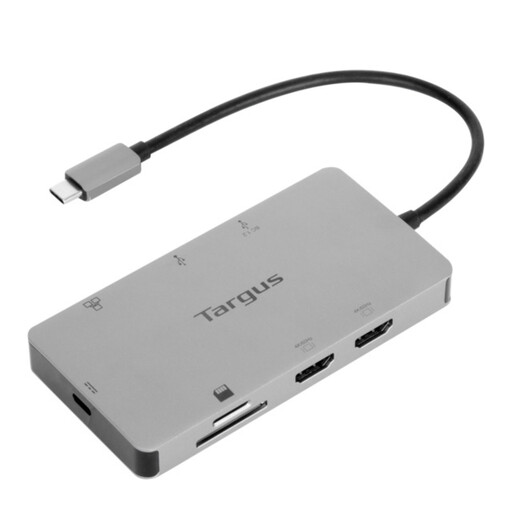
Targus USB-C Universal Dual HDMI 4K Docking Station

Targus USB-C Universal Dual HDMI 4K Docking Station

A desk-expansion option for a compatible laptop that regularly reconnects to displays, network and USB peripherals.

The listing specifies two HDMI 2.0 ports, Gigabit Ethernet, USB 3.2 ports, SD and MicroSD readers, USB-C Alt Mode and up to 100W Power Delivery pass-through.

It requires a laptop with USB-C DisplayPort Alt Mode. Check the laptop-and-dock display matrix, and confirm whether the specified external 100W-plus power adapter is included.

Joybuy

Baseus Metal Gleam Series II 10-in-1 USB-C hub

Baseus Metal Gleam Series II 10-in-1 USB-C Hub

A hub for a compatible laptop returning to a desk with displays, USB devices and wired network access.

The listing includes dual HDMI, 10Gbps USB-A and USB-C data ports, Gigabit Ethernet, SD and TF card readers, plus a 100W USB-C PD input.

The 100W figure refers to PD input rather than confirmed host power delivery. Confirm the laptop’s DisplayPort Alt Mode, charging needs and simultaneous dual-display support.

Joybuy

Frequently asked questions

Does a USB-C port automatically let a laptop connect to a monitor?

No. USB-C describes the connector rather than guaranteed video capability. Check the exact laptop specification for DisplayPort Alt Mode, USB4 or Thunderbolt display support, then confirm that the dock, cable or adapter supports the monitor input and display mode you need.

When is a dock worth adding instead of plugging cables straight into the laptop?

A dock is useful when you reconnect several desk devices frequently, such as charging, one or more monitors, a keyboard, mouse, Ethernet, audio or external storage. With one monitor and ordinary USB peripherals, direct connections can be simpler if the laptop already has the required ports.

How should I check whether a dock can charge my laptop properly?

Compare the laptop maker’s required charger wattage with the dock’s stated power delivered to the host laptop, not only the dock’s total power figure. Also check that the laptop accepts USB-C Power Delivery, as some docks provide different power levels to same-brand and non-brand laptops.

Do UK consumer rights apply to a refurbished laptop?

Yes. Citizens Advice states that rights apply whether goods are new or secondhand: they must be of satisfactory quality, fit for purpose and as described. Keep the listing, condition description, invoice and written warranty terms because battery condition, charger inclusion, ports and cosmetic wear can vary by unit.

What should I do with the failing desktop after moving to a laptop?

Do not put electrical equipment in household rubbish. GOV.UK says electrical products displaying the crossed-out wheelie-bin symbol should go to an appropriate recycling collection point; when buying a new electrical product, a retailer must take back an old item free on a like-for-like basis, including for online purchases.