If your card reader already fits a laptop USB data port, you may not need a dock. Otherwise, start with a compact USB-C hub that has either the SD or microSD slot you need or a matching data port for a separate reader. Consider a larger dock when you also need more desk connections, but check the reader type and your laptop’s charging and display capabilities before ordering.
Who needs which connections?
Single-reader study-space users
If you mainly connect an SD or microSD card, or one separate USB reader, a compact hub may provide enough connections for a mouse, keyboard or occasional monitor. Match its slots to the reader and its host connection to your laptop.
Charging-and-display desk users
If the reader stays connected while you charge your laptop and use a monitor, check the laptop’s USB-C display support and the power the dock can deliver to the laptop, not just its stated power input.
Peripheral-heavy room workstation users
If one desk also needs Ethernet, external storage and multiple displays, a larger USB-C or Thunderbolt dock may make sense. The laptop’s own connection and display limits still determine which functions you can use.
What should you check before buying?
Identify the card reader first, then check the laptop’s host port. Only after those connections match is it useful to choose between a small hub and a more extensively equipped desk dock.
| Concern |
What to check |
Who this matters to |
| Reader and laptop compatibility |
Identify the card format or separate reader’s USB plug; check for a matching slot or data port and any required software. |
If my reader uses a particular card or USB plug, I need a connection that actually works with it. Around 36% of consumers put reader and host compatibility first. |
| Charging and display |
Check the laptop’s external-display support and charging requirement against the dock’s stated host power delivery; confirm the charger and cable. |
I want to leave the reader connected while charging my laptop and using a monitor, without assuming that any USB-C port can do both. For around 29% of consumers, charging and display capability is the primary concern. |
| Space and unused ports |
Count devices connected at the same time and consider the available desk space before choosing a hub with more ports. |
When my desk is small and I carry my laptop elsewhere, I would rather choose connections I will use than accommodate a larger dock. Around 21% of consumers primarily need a compact, appropriately equipped setup. |
| Fixed-desk expansion |
Check the required Ethernet, storage and display connections, plus the exact laptop’s host-port and display limits. |
I keep several peripherals at one desk and need to know whether the laptop can use the dock’s extra connections. Expanded workstation connectivity comes first for around 14% of consumers. |
Mistakes to avoid
-
Assuming an SD slot works with every card reader
An integrated SD or microSD slot reads those memory-card formats; it does not replace a connection for a separate payment, smart-card, ID or specialist reader.
Identify the exact reader and its connector. Choose an integrated slot for matching memory cards, or reserve a suitable USB data port for a separate reader.
-
Choosing HDMI without checking the laptop
A dock’s HDMI socket does not establish that the laptop can send video through its USB-C port or run the number of displays you want.
Check the exact laptop model’s external-display specifications against the dock’s connection and display requirements.
-
Reading pass-through power as guaranteed laptop charging
The power available to a laptop can be lower than a hub’s stated input maximum because the hub uses some power itself.
Compare the laptop’s charging requirement with the dock’s host-delivery specification, charger output and cable rating.
Anker UK states that the wall charger is not included with its 555 hub, so pass-through charging with that model requires a separate compatible charger.
-
Crowding a powered setup around an unsafe socket
Damaged equipment, overloaded extension leads or signs of an electrical fault need attention before adding a powered dock and peripherals.
Follow Electrical Safety First’s student guidance: avoid overloaded sockets, keep powered equipment ventilated and report scorching or repeated circuit trips to your accommodation provider rather than attempting electrical work yourself.
Brands and product lines to consider
UGREEN
UGREEN UK lists the Revodok 1071 as a compact USB-C hub with SD/TF slots, USB data ports, HDMI and pass-through power.
- Its listed connections offer an integrated slot for matching memory cards alongside USB peripherals.
- The listed HDMI output is limited to 4K at 30Hz, and this model has no Ethernet port.
Anker
Anker UK’s reader-equipped USB-C range includes the portable 555 and the more extensively equipped 565.
- Both models list SD and microSD slots; the 565 also lists 10Gbps USB-C and USB-A data ports.
- The 555 reserves 15W from its stated 100W pass-through input for operation. Check laptop-specific display support before choosing the 565 for multiple monitors.
Belkin
Belkin UK lists reader-equipped options ranging from its portable CONNECT USB-C 7-in-1 adapter to the Pro Thunderbolt 4 Dock for a fixed desk.
- The 7-in-1 lists SD and microSD slots; the Pro Thunderbolt 4 Dock lists an SD reader and Ethernet among its 12 ports.
- The Pro dock’s display results depend on the laptop. Check its connection requirements rather than assuming every laptop can use every output.
StarTech.com
StarTech.com UK lists the DKT30CHVAUSP mini dock for setups needing an SD slot alongside connections such as Ethernet, audio, HDMI and VGA.
- Its stated connections may suit a desk that mixes a memory card with older display or wired-network equipment.
- The dock reserves 15W for operation and specifies up to 85W for the laptop; check whether that meets your laptop’s charging requirement.
Joybuy options for your card-reader setup
These options include hubs with SD/TF slots for matching memory cards and an adapter with USB data ports for a separate reader. Choose by the reader you have, then check any display and charging functions against your laptop.
 No image available
MOVESPEED DK5A1 USB-C 10-in-1 docking station
Consider this hub if your reader uses SD or TF/microSD cards and you also need USB peripherals. The listed connections include USB-C and USB-A data ports, HDMI rated at 4K 60Hz, and 3.5mm audio. Check the laptop’s video capability; the listed USB-C power output does not establish laptop charging pass-through.
View on Joybuy
 No image available
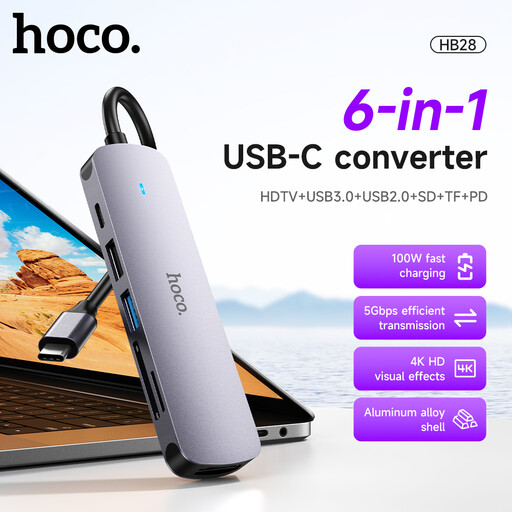
HOCO HB28 USB-C converter, Metal Grey
Its listed SD/TF slots suit matching memory cards, while USB 3.0 and USB 2.0 ports provide connections for other peripherals. The product name also lists HDTV output and PD. If you need a particular monitor setting or laptop charging level, check the display and host-power specifications before relying on either function.
View on Joybuy
 No image available
Baseus Metal Gleam Series II 10-in-1 USB hub, Cosmic Black
This is an option if SD/TF card access needs to share a desk connection with Ethernet and several USB peripherals. The product name lists RJ45, USB-A and USB-C data ports, and two HDMI outputs. Video requires a laptop USB-C port supporting DisplayPort Alt Mode; check the laptop’s display arrangement and host charging requirements separately from the hub’s PD input.
View on Joybuy
 No image available
V7 V7UC-U3CRJ45HDVG-BLK USB-C adapter
Consider its two USB 3.0 data ports if your card reader is a separate USB device with a matching plug. The product name also lists HDMI, VGA, Gigabit Ethernet and 100W Power Delivery. Confirm any reader software requirements, the laptop’s display support and the power available to the laptop in your setup.
View on Joybuy
 No image available
Mokin 2USBC to TB+ dock with SD/TF slots
Its listed SD/TF readers provide a route for matching memory cards alongside USB connections. The product name specifies two USB-A 3.0 ports, one USB-C 3.0 port and HDMI rated at 4K 60Hz. Check the dock’s host-connection requirements and your laptop’s video support before counting on the HDMI output.
View on Joybuy
Frequently asked questions
Do I need a dock just to connect one card reader?
No, not if a separate reader already fits a working USB data port on your laptop. A compact hub becomes useful when you need a matching SD/microSD slot or additional connections for peripherals, charging or a monitor.
Will any USB-C dock run an external monitor?
No; video output depends on the laptop’s port and display capabilities as well as the dock. Apple Support says a USB-C or Thunderbolt display adapter for a Mac must support the relevant DisplayPort Alt Mode or Thunderbolt standard, while Belkin UK directs buyers to their device’s display specifications. Check your exact laptop model and intended display arrangement.
Does a 100W pass-through rating mean my laptop receives 100W?
No. The charger, cable, laptop and dock all affect the available power. Anker UK states that its 555 hub reserves 15W from its stated 100W pass-through input for operation; compare the dock’s host-delivery figure with your laptop’s charging requirement.
Can a dock’s SD slot connect my smart-card or payment reader?
An SD or microSD slot is for the corresponding memory-card format, not a substitute for a separate smart-card or payment reader. Check that the reader has a matching USB data connection and that its required software supports your laptop.


