Who this setup suits

Hybrid workers completing coursework

You need one computer for documents, browser work, online meetings and study tasks at home and away from a fixed desk. Prioritise portability alongside confirmed employer, university and video-call software compatibility. Microsoft Learn and Which? provide the relevant software and workload guidance.

Students with mainly writing and research workloads

You primarily use word processing, presentations, spreadsheets, email and web research rather than specialist media, design or engineering software. Which? notes that these common study tasks do not usually require a highly powerful laptop, provided your course has no specialised software requirement.

Desk-based laptop users needing a larger workspace

You still need a portable computer but expect to use an external monitor, keyboard, storage or wired network at home. Check the exact port and charging specifications before choosing a dock; Intel notes that realised Thunderbolt performance depends on the hardware and software configuration.

Buying priorities

Portable all-round laptop

Choose it when: You work or study in more than one place and mainly handle writing, presentations, spreadsheets, email, web research and routine video calls.

Consider: The built-in screen, keyboard, webcam and port selection need checking on the exact configuration, not just against operating-system minimums.

Laptop with dock and monitor

Choose it when: You need portability but regularly use a larger screen, wired network, storage or several peripherals at one desk.

Consider: A USB-C connector alone does not confirm data, video or charging capability, so the laptop, dock, cable and display must work together.

Fixed desktop setup

Choose it when: Your work and coursework can reliably be completed at one desk and you do not need to take the same device elsewhere.

Consider: A desktop simplifies a permanent monitor-and-peripheral arrangement but does not meet a need for one portable computer.

Priority What to check Your needs
Software compatibility Confirm the required operating system, browser, security tools and applications before purchase. Microsoft lists Windows 11 minimums of a supported 64-bit processor or SoC, 4 GB RAM and 64 GB storage, but these are installation baselines rather than a guide to demanding workloads. I need the laptop to run mandatory employer or course software, not merely start Windows or a video-call app.
Online meetings Check that the exact configuration includes a webcam, microphone and speakers. For Teams, Microsoft Learn lists a camera, microphone and speakers among the relevant hardware, and gives 1024 × 768 as the desktop-client minimum display resolution. I want to join routine calls without immediately adding a camera, microphone or speakers.
Desk expansion Compare the laptop port specification with the dock’s protocol, video outputs, power delivery and supplied cable. For a compatible Thunderbolt 4 setup, Intel specifies up to 40 Gbps, but actual results depend on the complete hardware and software configuration. At home, I want a larger monitor and peripherals while still being able to carry the laptop elsewhere.
Portability and charging Compare the exact weight, dimensions and charger size. Read battery claims alongside their test conditions, and confirm the supplied charger and charging-port compatibility before planning a replacement or spare. I need one computer that is manageable to carry between home, campus and work, with charging that fits my routine.

Buying pitfalls to avoid

  • Choosing by processor label or Windows 11 minimums alone

    A laptop can meet Windows 11 and Teams installation requirements while still being poorly matched to several simultaneous applications, large files or required specialist software. Your course or employer may also specify an operating system, browser, security tool or application.

    Get the required-software list before comparing models. Match the operating system, memory, storage and application requirements first, then compare portability, display and ports.

  • Assuming every USB-C port has the same dock, display and charging capability

    USB-C connector shape alone does not establish equivalent bandwidth, display support or charging. Intel states that realised Thunderbolt performance depends on the particular hardware and software configuration.

    Before buying accessories, compare the laptop’s exact port specification with the dock’s required protocol, video outputs, charging delivery, supplied cable and your monitor resolution.

    An incompatible dock, cable, display adapter or replacement charger may need replacing.

  • Treating a manufacturer battery figure as your working-day result

    Battery claims can differ between configurations and test conditions, so advertised endurance is not automatically comparable across models.

    Check the exact configuration’s battery-test conditions and consult independent battery testing for your shortlist. Allow for video calls, screen brightness, external devices and charging availability.

  • Buying an unverified replacement charger

    The Office for Product Safety and Standards reported a counterfeit Type-C laptop charger with a serious fire risk in 2025. London Fire Brigade advises using the supplied charger where possible, or a genuine branded replacement from a trusted supplier.

    Confirm compatibility with your laptop manufacturer before buying a replacement, and do not charge on beds or cover chargers during use.

    A failed or unsafe charger can require replacement and may create a fire or electric-shock risk.

Relevant laptop brand references

Lenovo

Relevant for buyers considering business-oriented ThinkPad laptops or portable 2-in-1 models for work and study. Lenovo UK positions the ThinkPad line around mobility, privacy features, durability and business use.

  • Lenovo says selected ThinkPad models can include a webcam privacy shutter, durability testing, rapid charging and security features.
  • These are not universal across every ThinkPad or Lenovo laptop; verify the exact model’s ports, screen, battery test, memory and warranty terms.

HP

Relevant for buyers wanting a broad UK home-laptop range spanning basic work-and-study models, larger-screen configurations and 2-in-1 options.

  • HP Store UK lists configurations ranging from 8 GB RAM and 256 GB SSD entry models to 16 GB RAM with 512 GB or 1 TB storage, including touchscreen convertibles.
  • Store-listed performance and battery claims apply to named configurations rather than the whole range.

Dell

Relevant for buyers comparing everyday home-and-work laptops and convertible models in the UK.

  • Dell markets selected everyday models for work, home and school, including configurations positioned for portable productivity, eye comfort and fast charging.
  • Dell states that starting prices and capabilities depend on configuration; confirm the selected model’s final specification, battery claim, port set and included support.

Joybuy laptop options

Joybuy laptop options for portable documents, coursework, routine online meetings and home desk use. Confirm required software and any planned dock or monitor setup against the exact model before purchase.
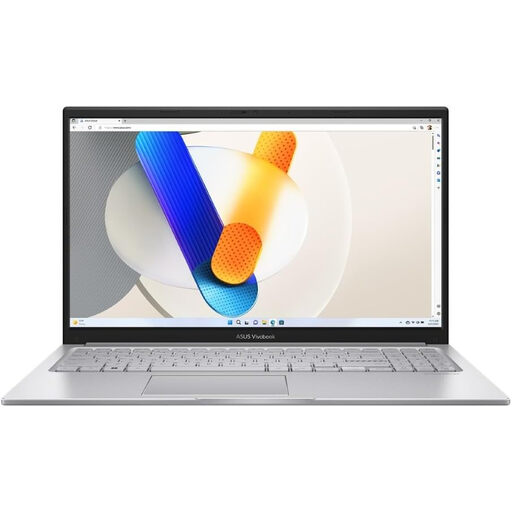
ASUS Vivobook 15 X1504VA laptop

ASUS Vivobook 15 X1504VA – Core 5 120U, 24 GB, 1 TB SSD

A Windows laptop for routine documents, browser work, coursework and home video calls.

Stated specifications include a 15.6-inch Full HD IPS anti-glare display, Windows 11 Home, 24 GB RAM, 1 TB SSD, HDMI, an integrated HD webcam and microphone.

Check whether either USB-C port supports video output or Power Delivery before buying accessories. The listed battery figure is standby time, not a comparable working-use result.

Joybuy

ASUS Zenbook DUO UX8406CA-QL135W dual-screen laptop

ASUS Zenbook DUO UX8406CA-QL135W – Core Ultra 7, 16 GB, 1 TB SSD

A portable Windows laptop for users who regularly compare documents or multitask at home and away.

It is stated to have 16 GB LPDDR5X RAM, a 1 TB SSD, two Thunderbolt 4 ports with Display and Power Delivery, HDMI, an FHD IR webcam and a detachable keyboard.

The catalogue gives conflicting display-resolution information, so verify the exact panel specification. The stated up-to-18.5-hour battery figure should be checked against its test basis.

Joybuy
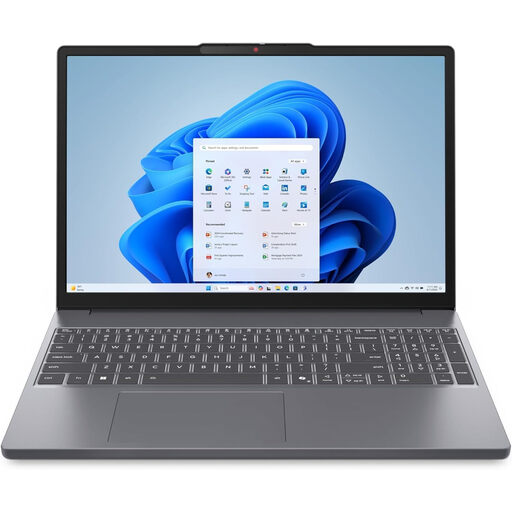
Lenovo IdeaPad Slim 3 15.3-inch WUXGA laptop

Lenovo IdeaPad Slim 3 83K7009MUK – Ryzen 5, 24 GB, 512 GB SSD

A portable Windows option for documents, routine multitasking and online meetings between home, work and study locations.

Stated features include a 15.3-inch WUXGA anti-glare display, 24 GB DDR5 RAM, 512 GB PCIe SSD, Wi-Fi 6, HD webcam with privacy shutter, stereo speakers and a 1.59 kg weight.

Verify the external-display, dock, USB-C charging and battery specifications before planning a desk setup or regular mobile use.

Joybuy
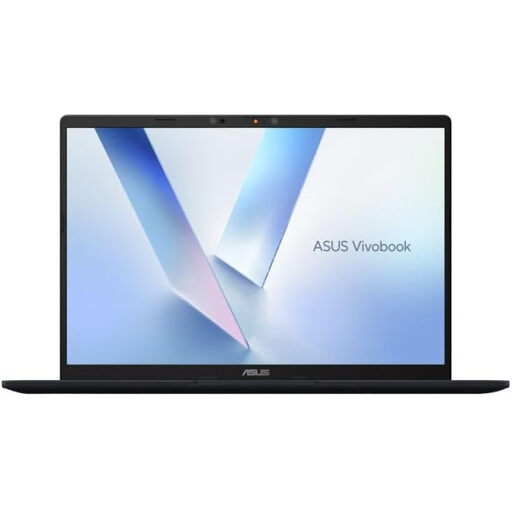
ASUS Vivobook 14 X1407QA-LY003W laptop

ASUS Vivobook 14 X1407QA-LY003W – Snapdragon X, 16 GB, 512 GB SSD

A compact Windows laptop for portable work and study with provision for a larger desktop workspace.

Stated features include a 14-inch WUXGA 16:10 anti-glare display, 16 GB RAM, 512 GB SSD, two USB4 Type-C ports with DisplayPort and Power Delivery, HDMI 2.1, Wi-Fi 6E, FHD IR camera and 1.49 kg weight.

Confirm mandatory applications and peripherals on this Snapdragon-based Windows configuration. Also check the intended monitor, dock, cable and charging combination.

Joybuy
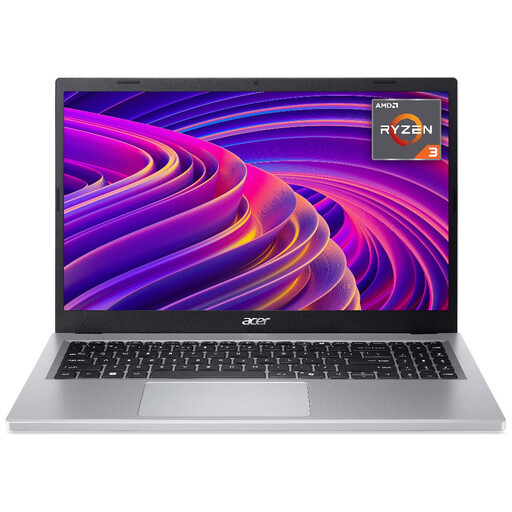
Acer Aspire Go 15 AG15-21P laptop

Acer Aspire Go 15 AG15-21P – Ryzen 3, 8 GB, 256 GB SSD

A Windows laptop for writing, research, online learning and routine office tasks.

Stated specifications include a 15.6-inch Full HD IPS display, 8 GB RAM, 256 GB SSD, Wi-Fi 6, HD webcam, HDMI and an approximate 1.6 kg weight.

Verify USB-C display-output, dock and charging support before planning a one-cable desk setup. Check requirements carefully if you use large files, many simultaneous applications or specialist course software.

Joybuy

Frequently asked questions

Will a basic laptop handle coursework and home-office work?

For essay writing, presentations, spreadsheets, email and web browsing, an all-round laptop can be more appropriate than a highly specified machine. Which? notes that these common study tasks do not require a very powerful laptop, but you should confirm exact course and employer software requirements first; specialist media, design and engineering applications can require more capable hardware. Microsoft’s Windows 11 and Teams figures are installation minimums, not a comfort-performance target.

Can any USB-C laptop use a one-cable dock and two monitors?

No. A USB-C-shaped connector does not by itself confirm the data, video, charging or multi-display capabilities needed for a particular dock. Thunderbolt 4 has defined minimum capabilities, but Intel states that realised performance depends on the specific hardware and software configuration, so confirm the laptop port, dock, cable, monitor and charging specifications together.

Should I buy a laptop advertised with Windows 10?

Treat this as a compatibility and support check. Microsoft states that support for Windows 10 ended on 14 October 2025. If your work or course requires Windows, confirm that the laptop is supplied with, or is eligible for, a supported Windows 11 installation and that your required applications support it.

Is it safe to replace a lost laptop charger with a cheap generic USB-C charger?

Use the supplied charger where possible. London Fire Brigade advises choosing a branded, genuine replacement from a trusted supplier; an Office for Product Safety and Standards report in 2025 identified a counterfeit Type-C laptop charger with a serious fire risk. Confirm voltage, wattage, connector and manufacturer compatibility for your exact laptop before purchase.

What return protection applies when buying a laptop online in the UK?

Citizens Advice states that consumers normally have a 14-day cooling-off period for online, phone or mail-order purchases, beginning the day after receipt and subject to exceptions. Check the seller’s return process, return-postage terms, warranty coverage and whether the seller is UK-based before ordering; separate rights may apply if an item is faulty.