Choose a dock by checking the complete connection from each laptop to the external drive, then the other devices that must remain attached to the desk. An explicitly rated 10Gbps USB path is worth considering for frequent large-file transfers, but its capability depends on the laptop, dock, drive and cable; at a mixed-laptop desk, confirmed host compatibility may matter more than a higher port rating.
Who needs this setup?
Frequent external-drive users
If project files or backups regularly move through an external SSD or HDD, check the dock’s data port and the drive’s cable before paying attention to display extras. The USB Implementers Forum identifies distinct 5Gbps, 10Gbps and 20Gbps USB 3.2 signalling tiers; the connected devices must support the capability you intend to use.
People coordinating a mixed-laptop desk
If users bring different laptop ports or operating systems, check each dock’s stated host support rather than relying on connector shape. Kensington’s SD4781P supports both USB-C and legacy USB-A hosts, but Kensington says USB-A devices require an alternative power source sold separately.
One-connection workstation users
If the same desk also needs monitors, a keyboard, mouse, Ethernet and laptop charging, count those connections alongside the drive. Display support and charging depend on the particular dock and laptop, so check both before treating one cable as a complete desk setup.
What matters when choosing?
Start with the laptops and external drive that will actually use the desk. Then decide whether faster drive transfers, simpler handovers or a fuller workstation determines the choice.
| Concern | What to check | Who this matters to |
|---|
| External-drive data path |
Check the stated data rating of the laptop port, dock port, drive and cable. The USB Implementers Forum distinguishes 5Gbps, 10Gbps and 20Gbps USB 3.2 signalling tiers; a port rating is not a promised file-copy speed. |
If large project files move regularly, I want the drive connection to suit that work rather than choose by socket shape. Around 31% of consumers put the external-drive data path first. |
| Laptop compatibility |
List the laptops’ host-port technologies and operating systems, then check the dock’s stated support. Confirm USB-A host behaviour separately if older laptops use the desk. |
When colleagues bring different laptops, I need the desk connection to work with their actual machines. For around 31% of consumers, that compatibility is the primary concern. |
| Desk handovers |
Check plug-and-play conditions for the intended hosts and whether the host cable and drive port are practical to access during repeated changes. |
With frequent changes of user, I want a straightforward connection without disturbing the devices left at the desk. Handover simplicity comes first for around 23% of consumers. |
| Complete workstation |
Count the required displays and peripherals; check monitor conditions and laptop-specific charging against the dock’s stated support. |
If the drive is only one part of my desk, I also need the displays, network connection and charging arrangement to fit. Around 15% of consumers prioritise that broader setup. |
Mistakes to avoid
-
Choosing by the USB-C socket alone
USB-C identifies a connector, not a guaranteed data rate. The USB Implementers Forum specifies different USB 3.2 signalling tiers, and a slower connection in the chain can limit the capability available to the drive.
Check explicit data-rate labels for the laptop, dock, drive and cable.
-
Assuming every USB-C laptop works with the dock
Dock makers set model-specific host and operating-system conditions. For example, Kensington describes SD4843P plug-and-play support for specified Thunderbolt, USB4 and USB-C Alt Mode laptops running Windows 10 or Windows 11.
Record the laptops, operating systems, display requirements and charging needs at the desk, then compare them with the exact dock’s support information.
-
Equating USB-A host support with laptop charging
A hybrid dock can provide connections to a USB-A laptop without supplying its charging power. Kensington states that USB-A devices using its SD4781P require an alternative power source sold separately.
Check power arrangements for each host type before making the hybrid dock the desk’s regular connection.
Relevant brands to consider
Kensington
Kensington has distinct approaches for a shared desk: the SD4843P is aimed at specified compatible Windows USB-C hosts, while the SD4781P also accommodates legacy USB-A hosts.
- For the SD4781P, Kensington specifies up to 10Gbps through six USB ports and a screw-lock USB-C host cable.
- Kensington says USB-A devices using the SD4781P need an alternative power source sold separately; the SD4843P’s plug-and-play claim is limited to its stated hosts and operating systems.
Dell
Dell’s WD25Z is a reference point for a desk that needs several USB data ports and laptop charging, particularly when Dell commercial laptops are among the hosts.
- Dell lists four USB-A 3.2 Gen 2 ports and one USB-C 3.2 Gen 2 port for the WD25Z.
- Dell specifies different Power Delivery figures for this model: 130W for Dell systems and 96W for non-Dell systems. Check the requirements of each laptop using the desk.
Targus
Targus’s DOCK570EUZ addresses a more display-heavy desk where an external drive shares the setup with monitors, networking and other peripherals.
- Targus lists four USB 3.0 ports, a powered USB-C 3.0 port, Gigabit Ethernet and a USB-C-to-USB-A cable for the DOCK570EUZ.
- Its stated four-display configuration uses DisplayLink technology. Check the display setup and host requirements if those screens are central to the desk.
Joybuy product choices
These USB-C desk connections offer ways to attach an external drive alongside other peripherals. Match each product’s stated ports to the drive, and check host compatibility and charging separately for every laptop that will use the desk.
 No image available
Targus USB-C Universal Dual HDMI 4K Docking Station with 100W Power Delivery Pass-Thru
Consider this dock when a shared desk needs an external-drive connection alongside two HDMI display connections. Its name specifies 100W Power Delivery pass-through; check the required power adapter, each laptop’s charging needs and USB-C Alt Mode support before choosing it.
View on Joybuy
 No image available
MOVESPEED DK5A1 USB-C 10-in-1 Docking Station
Consider the DK5A1 if the external drive needs a stated 10Gbps USB-C or USB-A connection while other desk devices stay attached. Its name also specifies 5Gbps USB-A connectivity, 4K 60Hz HDMI, SD/TF readers and 3.5mm audio. Check the intended laptops’ host and video support, and confirm charging requirements separately.
View on Joybuy
 No image available
Baseus Metal Gleam Series II 10-in-1 USB Hub, Cosmic Black
This hub suits a desk that needs an external-drive port together with displays and wired networking. Its name specifies one 10Gbps USB-A port, one 10Gbps USB-C port, two 480Mbps USB-A ports, two HDMI outputs, RJ45, SD/TF and a USB-C Power Delivery input. Check USB-C DisplayPort Alt Mode support on laptops that need video, plus the power equipment and charging arrangement.
View on Joybuy
 No image available
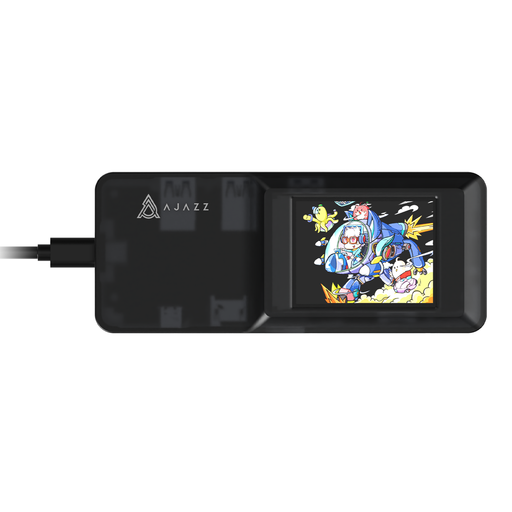
AJAZZ AKP01E Visualization Hub 8-in-1 Expansion Dock
Consider this expansion dock when the external drive shares a desk with devices using USB connections, HDMI or SD/TF card slots. Check the drive’s required USB data rating and the actual laptops’ host and video compatibility before choosing it; check SD and TF card-slot use if both are needed at once.
View on Joybuy
Common questions
Do I need a 10Gbps dock for an external drive?
Choose an explicitly rated 10Gbps USB path if frequent large-file transfers matter and the laptop port, drive and cable also support it. The USB Implementers Forum distinguishes 5Gbps, 10Gbps and 20Gbps USB 3.2 signalling tiers; a 10Gbps dock on its own does not guarantee a 10Gbps transfer.
Will any USB-C laptop work with a shared-desk dock?
No: check the exact dock’s stated host technologies and operating systems. Kensington, for example, limits its SD4843P plug-and-play statement to specified Thunderbolt 5, Thunderbolt 4, USB4 and USB-C Alt Mode laptops running Windows 10 or Windows 11.
Can a USB-A/USB-C dock charge every laptop at the desk?
Do not assume that USB-A host support includes laptop charging. Kensington states that USB-A devices using its SD4781P require an alternative power source sold separately; check power separately from data and display support for each laptop.


