Students connecting a scanner first
You need a suitable data connection for the scanner while leaving room for everyday accessories. Try a spare laptop port before deciding whether a small hub would help.


If your scanner connects to a spare, compatible laptop USB port, you may not need a dock at all; Microsoft says a USB scanner can usually begin Windows setup when connected and switched on. If you need more data ports, consider a hub before a larger dock. Choose a dock for additional desk connections or charging only after checking the laptop’s supported functions, power requirements and any driver needs.
You need a suitable data connection for the scanner while leaving room for everyday accessories. Try a spare laptop port before deciding whether a small hub would help.
Your scanner shares desk space with devices such as a keyboard, storage or a monitor. The number and type of connections matter more here than the scanner connection alone.
You need to check the dock’s laptop connection before considering USB-C-only models. If you also want monitor expansion through a DisplayLink dock, check its software requirements.
Start with the scanner cable and a spare laptop port. If another connection is needed, choose its data port first; assess charging and display features only if they are part of your desk setup.
| Concern | What to check | Who this matters to |
|---|---|---|
| Scanner data connection | Compare the scanner cable with a spare laptop port or the hub’s stated USB data ports. Try direct connection first. | If I have no suitable spare port, I need a place to connect the scanner without repeatedly unplugging coursework accessories. Around 42% of consumers put that connection first. |
| Laptop compatibility | Identify the laptop’s host connector and check its supported data, video and charging functions against the chosen device. | With an older USB-A laptop, or uncertain USB-C capabilities, I need a connection that works with my actual machine. Around 33% of consumers prioritise laptop compatibility. |
| Charging and desk connections | Check the available USB ports, intended charging support and whether the required power hardware is included. | If my scanner stays beside several other devices, I want to know whether one desk connection can also meet my charging needs. Around 17% of consumers make broader desk connections their primary concern. |
| Desk space and setup | Consider how often the scanner stays connected, where the cables will sit and whether the device needs a mains socket. | For occasional scanning, I would rather store a small hub than leave extra equipment on the desk. Around 8% of consumers put a simpler, smaller setup first. |
An available, compatible laptop port may already do the job. Microsoft says connecting a USB scanner and switching it on is usually enough to begin Windows setup.
Test the direct connection before choosing extra hardware for the scanner.
Kensington notes that USB-C connector shape alone does not establish a laptop’s speed, video or power-delivery capabilities.
Check the laptop maker’s port specification before choosing a dock for charging or displays.
Plugable says its USB 3.0 docking-station range requires a DisplayLink driver for its display functions.
If you need that monitor setup, check the exact dock’s operating-system and driver requirements before ordering.
Whether a dock charges your laptop depends on the particular dock, its power arrangement and the laptop’s compatibility.
Check the package contents and power notes against your laptop’s charging requirements.
For Kensington’s SD4781P, Kensington specifies an alternative power source when the dock is used with USB-A devices.
UGREEN’s hub and dock range is relevant when comparing straightforward port expansion with a more connected study desk.
Kensington offers docks to consider when a scanner is one part of a wider desk setup, including models intended for USB-C and USB-A laptops.
Plugable’s docking range is relevant when an older USB-A laptop or monitor expansion changes the choice beyond a scanner connection.
These hubs and adapters offer USB data-port expansion to consider when direct scanner connection is impractical. Some also provide desk connections beyond the scanner; match the laptop connection and scanner cable before choosing.
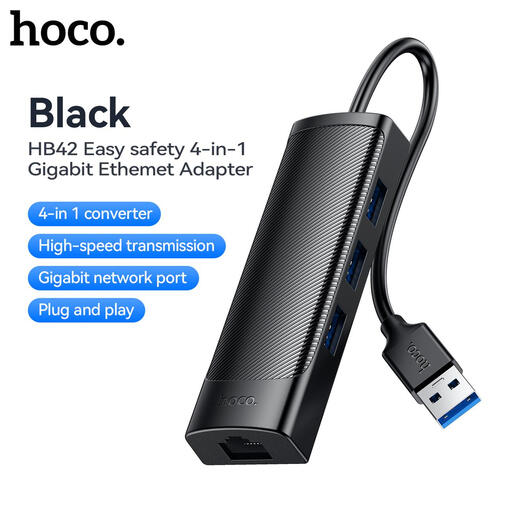 No image available
Consider this when you need more USB connections for a scanner and other desk accessories. The name specifies three USB 3.0 ports, RJ45 LAN and a 0.2 m cable; check the laptop connection and scanner plug before buying.
 No image available
Consider this for a USB-C laptop when the scanner will share a desk with other peripherals. Its named ports include one USB-A and one USB-C data connection rated at 10 Gbps each, two USB-A connections rated at 480 Mbps each, HDMI, RJ45, SD/TF and a USB-C PD connection. Check the scanner plug and laptop capabilities; video output requires a compatible DisplayPort Alt Mode connection.
 No image available
Consider this when you need two USB connections and may also use wired networking or a display. The name specifies two USB 3.0 ports, HDMI, VGA, Gigabit Ethernet and 100W Power Delivery. Check that the scanner plug fits and that your laptop meets the adapter’s USB-C Alt Mode requirement before relying on its additional functions.
 No image available
Consider this if the scanner is one of several USB devices you want to connect. The name specifies two USB-A 3.0 ports, one USB-C 3.0 port, SD/TF and HDMI 4K60Hz. Confirm the exact laptop connection described by the product and whether the scanner cable fits a data port.
 No image available
Consider this for a desk where several USB devices need connections alongside the scanner. The product name also lists RJ45, PD, SD/TF and audio connections. Check that the scanner cable fits a USB data port and that the laptop supports any display or charging functions you intend to use.
No, not if the scanner cable fits a spare, compatible laptop port. Try connecting it directly and switching it on first; Microsoft says this is usually enough to begin Windows scanner setup.
No. Kensington explains that USB-C describes the connector, while video, charging and speed depend on the laptop’s implementation. Check the laptop maker’s specifications for each function you plan to use.
Check that the scanner is switched on and connected through a compatible USB data port, then try adding it in Windows under Settings, Bluetooth & devices, Printers & scanners. Microsoft also notes that optional drivers are not installed automatically, so check available driver updates or the scanner maker’s installation instructions.
It can: Plugable says its USB 3.0 docking-station range requires the DisplayLink driver for display functionality. If monitor expansion is why you want that type of dock, check the exact model’s operating-system requirements before purchase.