What to check before choosing
Decide on the required screen arrangement first, then list the accessories and charging connection that should stay at the desk. Native USB-C video needs a suitable host port; Thunderbolt or USB4 still depends on laptop display limits, while DisplayLink is a software-assisted option when a compatible computer cannot natively run the required screens.
| Concern | What to check | Who this matters to |
|---|
| External displays |
Check the exact laptop port’s video capability and whether your intended screens extend or mirror at the required resolution and refresh rate. |
If I need two separate desktops, mirrored screens will not meet that need. Around 40% of consumers put their intended display arrangement first. |
| Peripheral connections |
List the required USB connector types, data ports, Ethernet and card readers; do not choose by total port count alone. |
When several accessories need to stay connected, I want the right sockets without repeatedly swapping adapters. Around 30% of consumers prioritise permanent access to their peripherals. |
| Laptop charging |
Compare power delivered to the laptop with its charging requirement, and check the required adapter and cable. |
If I want one connection to handle my desk setup, I need to know whether it can also charge my laptop. For around 30% of consumers, charging and cable management come first. |
Joybuy products for USB-C desk expansion
These USB-C docks and hubs offer different combinations of display and peripheral connections for a laptop with limited ports. Match each one to your host port and intended screens; a listed video socket or power-input rating alone does not establish the display or charging setup you will get.
 No image available
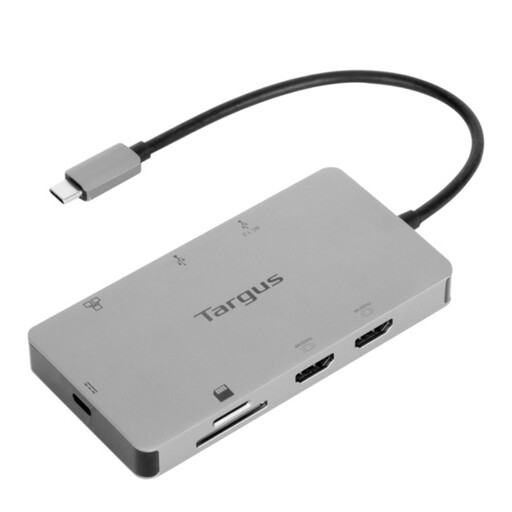
Targus USB-C Universal Dual HDMI 4K Docking Station, 100W PD pass-through
Consider this for a desk where two HDMI connections and USB-C power pass-through are priorities.
The named variant has dual HDMI 4K outputs and 100W PD pass-through. Check your laptop’s video support, the display arrangement it can run and the external power adapter required for charging.
Joybuy
 No image available
Baseus Metal Gleam Series II 10-in-1 USB hub, Cosmic Black
This port mix is relevant if your desk needs HDMI connections alongside USB data, wired networking and card access.
The title specifies HDMI outputs rated up to 4K at 120Hz and 4K at 60Hz respectively, a 10Gbps USB-A port, a 10Gbps USB-C port, two 480Mbps USB-A ports, RJ45, SD/TF and a USB-C PD connection. Check the achievable display arrangement and power delivered to your particular laptop; a PD input rating is not a host-charging figure.
Joybuy
 No image available
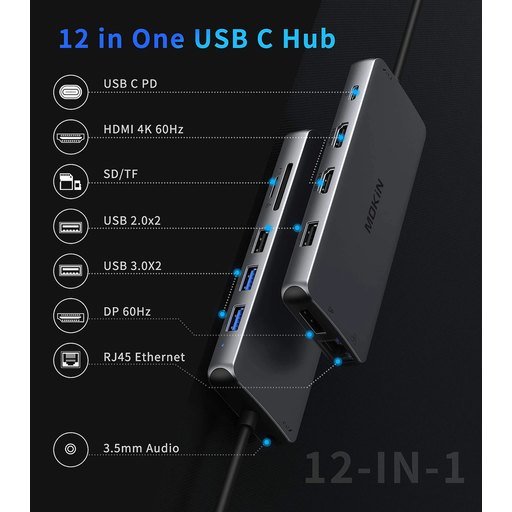
USB-C adapter with 2 HDMI, DisplayPort and USB ports
This is a connection mix to consider when a desk uses different monitor inputs as well as everyday peripherals.
The product name specifies two HDMI ports, DisplayPort, two USB 3.0 and two USB 2.0 ports, RJ45, PD, SD/TF and audio. Confirm which displays your exact laptop and operating system can run together, and check host-charging output if you need it.
Joybuy
 No image available
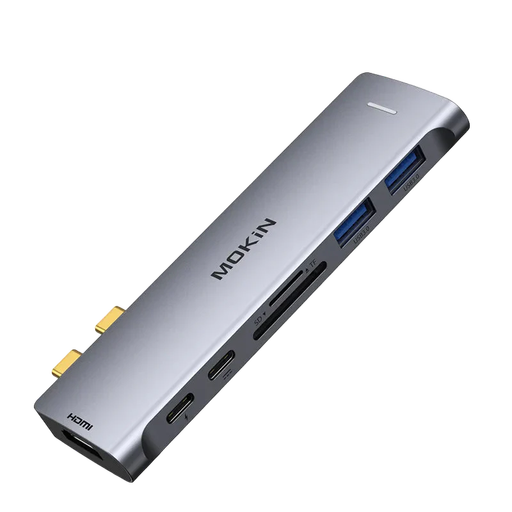
Mokin 2USBC to TB+ dock with HDMI 4K 60Hz
Consider the listed connections if you need an HDMI output, USB peripherals and card access from a compatible laptop.
The named variant includes two USB-A 3.0 ports, one USB-C 3.0 port and SD/TF readers. Check the required host connection and monitor compatibility; if charging or wired Ethernet matters to your desk, confirm those capabilities for this exact model.
Joybuy
 No image available
MOVESPEED DK5A1 USB-C 10-in-1 docking station
This hub may suit a desk that needs one HDMI connection, USB data ports, card readers and audio.
The named variant lists HDMI up to 4K at 60Hz, USB-C at 10Gbps, USB-A at 10Gbps and 5Gbps, SD/TF readers rated at 160MB/s and 3.5mm audio. Check video compatibility with your laptop and confirm laptop-charging capability separately.
Joybuy
Common questions
How can I tell whether my USB-C laptop supports an external monitor through a dock?
Check the specification for the exact laptop port for DisplayPort Alt Mode, Thunderbolt or USB4 video support. Microsoft Learn explains that DisplayPort Alt Mode carries video through USB; the connector shape alone does not confirm that capability.
Will a dual-monitor USB-C dock give my Mac two separate desktops?
Not in every combination of Mac and dock. UGREEN says its cited Revodok Pro 11-port model mirrors content across two external macOS displays, so check your Mac’s display limit and the exact dock’s extend-or-mirror behaviour. If you choose a DisplayLink model, account for its macOS application and permissions.
Does a 100W PD label mean my laptop receives 100W?
No: the label may describe power entering the dock rather than power delivered to the laptop. UGREEN specifies 100W input but up to 85W host charging for its cited 11-port model, with a suitable charger and cable required separately. Compare host output with your laptop’s charging requirement.
What should I do if a dock arrives faulty or does not match its description?
Contact the seller with your order details and evidence of the fault or discrepancy, and consult GOV.UK’s consumer-rights guidance for the applicable remedies. Treat a manufacturer warranty and a retailer’s change-of-mind returns policy separately from rights concerning faulty or misdescribed goods.
What can I do with an old docking station?
Check an electrical-waste collection route rather than putting it in general household rubbish. GOV.UK describes retailer take-back responsibilities in relevant circumstances; you can also check your retailer’s arrangements or your local authority’s electrical-waste service.


