What to check before buying
Identify the main obstacle first, then check the laptop and desk connections needed to address it. If the equipment is for work, Acas advises discussing equipment and technology needs with your employer.
| Concern |
Buying checks |
Who this matters to |
| Screen space |
Check the exact laptop model’s external-display support, then match its video connection to the monitor input. |
If documents and applications crowd a laptop screen, I need room to work without choosing a display I cannot connect. About 29% of consumers put screen space first. |
| Dock compatibility |
Match the host port, cable, intended display configuration and charging requirement to the dock’s specifications. |
When I move my laptop between desks, I want to reconnect my displays and peripherals without rebuilding the setup each time. Dock compatibility is the primary need for about 36% of consumers. |
| Video calls |
Check how a headset or webcam connects and whether it works with the device and calling software used for work. |
For frequent meetings, I need camera and audio equipment that fits my calling setup. About 21% of consumers put call equipment first. |
| Home connection |
Test the connection and check whether a practical Ethernet route exists before choosing a network accessory. |
If calls freeze on home Wi-Fi, I need to establish whether the local connection is the problem before adding more desk hardware. Connection reliability comes first for about 14% of consumers. |
Joybuy products for different desk needs
These products address separate home-desk needs: an external screen, a docking connection, call audio or wired networking. Choose the type of accessory that addresses your particular bottleneck.
 No image available
ASUS ProArt PA248CRV IPS WUXGA monitor
Consider this monitor if a laptop screen is limiting your desk workspace and the laptop supports the display connection you intend to use.
The product name specifies an IPS WUXGA display. Before relying on a USB-C display-and-charging arrangement, confirm the exact laptop’s video output and charging needs; check the configuration of any USB hub you plan to use.
Joybuy
 No image available
Targus USB-C Universal Dual HDMI 4K dock, 100W PD Pass-Thru
Consider a dock when you repeatedly reconnect desk equipment and need its connections in one place.
The product name specifies dual HDMI 4K and 100W Power Delivery pass-through. Confirm the laptop and operating system support the intended two-display setup, and check the required external power adapter and whether it is included.
Joybuy
 No image available
AOC Q32V4 31.5-inch 2K IPS monitor
Consider this screen if you want a 31.5-inch display at a fixed home desk and have space for it.
The product name identifies an IPS monitor with built-in speakers. Check the laptop’s video output and the connection cables needed for the intended setup.
Joybuy
 No image available
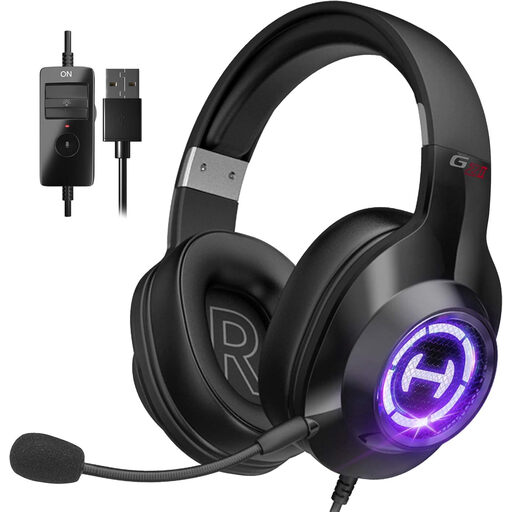
Edifier G2II wired USB headset for PC and PS4, black
This headset is a call-audio option if you need a wired microphone and its connection works with your work device.
The product name specifies a USB connection and microphone. Check compatibility with the laptop and calling platform before buying; a headset will not resolve an unreliable home connection.
Joybuy
 No image available
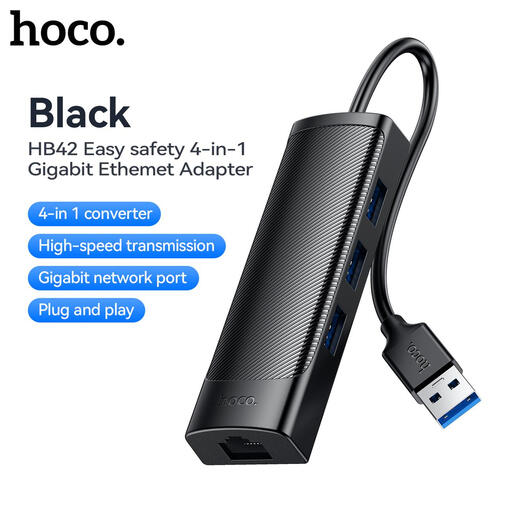
HOCO HB42 4-in-1 USB Gigabit Ethernet adapter, black
Consider a wired-network adapter if Wi-Fi is the suspected bottleneck and an Ethernet cable can reach the router.
The product name specifies three USB 3.0 ports, an RJ45 LAN connection and a 0.2 m cable. Confirm the host connection fits your laptop; Ethernet does not correct an inadequate broadband service.
Joybuy
Questions about home-working setups
Will my employer provide home-working equipment?
Discuss the specific equipment you need before buying it yourself. Acas advises employers and home-working staff to discuss what equipment and technology are needed, who will provide or pay for equipment and repairs, and what technical support is available.
Can any USB-C dock run two external monitors?
No: a USB-C connector alone does not establish two-display support. Check the exact laptop model, host port, intended resolution and refresh rate, and the dock’s documented display configuration. Apple Support says the number of displays a Mac can use depends on its model and the displays’ specifications.
When is a home-working display-screen assessment needed?
For employed home workers, the Health and Safety Executive says the display-screen equipment rules can apply to permanent or long-term home working. It says employers must assess workstations where staff use display-screen equipment daily as part of normal work for continuous periods of an hour or more; discuss how the assessment covers each place you routinely work.
Should I try Ethernet before buying a Wi-Fi extender for unreliable calls?
First test whether the difficulty lies with Wi-Fi coverage or the broadband service itself. Ofcom advises that a direct Ethernet connection to the router can provide a faster, more reliable local connection than Wi-Fi; an extender addresses a different issue and neither accessory improves an inadequate service at the address.
What should I check before using a closed laptop with an external monitor?
Check the laptop maker’s instructions for your exact model, including its supported external displays and the connections needed for the monitor and input devices. Apple Support notes that Mac display support varies by model, resolution and refresh rate, so do not assume the intended arrangement will work from the port shape alone.


