What to check before buying
Start with the monitor and peripherals you already own, then confirm the laptop’s video output, charging arrangement and Windows support before choosing a direct connection or dock.
| Priority |
What to check |
Your needs and relevant context |
| Portable desk replacement |
Check that the laptop has a documented monitor-output path and enough USB connectivity for your keyboard and mouse. Decide whether repeated cable reconnecting is acceptable or whether one desk connection is more practical. |
I want one computer for a fixed home workspace and for taking elsewhere. The Office for National Statistics reported that 28% of working adults in Great Britain hybrid worked between January and March 2025; this describes working arrangements, not laptop buying intent. |
| Monitor and peripheral compatibility |
Confirm HDMI output or USB-C support for DisplayPort Alt Mode or Thunderbolt. For a dock, check monitor count, resolution, refresh rate, USB ports, Ethernet needs and charging power against the exact laptop. |
My monitor, keyboard and mouse need to reconnect reliably without relying on a USB-C connector shape alone. A one-cable dock can be useful when I regularly move the laptop between desk and travel use. |
| Supported Windows use |
For a refurbished machine, verify the exact CPU against Microsoft’s approved list, plus UEFI/Secure Boot capability, TPM 2.0, RAM, storage, Windows edition and activation status. |
I want a refurbished laptop for office work, calls and browsing that has a supported operating-system path. Microsoft states that Windows 10 standard support ended on 14 October 2025. |
Joybuy product options
Joybuy accessories for building a compatible laptop desk setup with an external monitor, keyboard and mouse. Confirm your laptop’s video protocol and charging requirements before selecting an adapter or dock.
 No image available
V7 V7UC-U3CRJ45HDVG-BLK USB-C Adapter
For a compatible laptop needing one external monitor plus common desk peripherals.
Specified connections include 4K HDMI at 30Hz, VGA up to 1920×1200 at 60Hz, dual USB 3.0 ports, Gigabit Ethernet and 100W power-delivery pass-through.
It is specified for SST single-display use. Check the laptop’s USB-C Alt Mode support, monitor requirements and charging needs before purchase.
Joybuy
 No image available
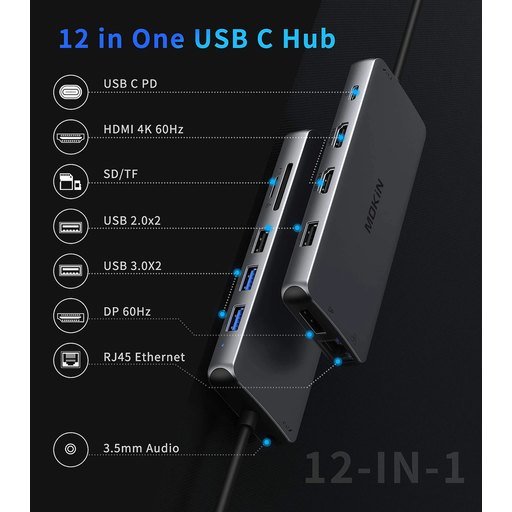
USB-C Multiport Adapter with 2 HDMI and DisplayPort
For a desk with several displays and a wider range of wired peripherals.
The listed ports include dual HDMI, DisplayPort, USB 3.0, USB 2.0, Gigabit Ethernet, SD/TF card readers, audio and power-delivery pass-through.
Check the laptop’s supported display configuration and the adapter’s charging wattage against the laptop charger requirement.
Joybuy
 No image available
MOVESPEED DK5A1 10-in-1 USB-C Docking Station
For a one-monitor home desk where keyboard, mouse and media connections need to travel through one hub.
Listed features include HDMI 2.0 at 4K 60Hz, USB-C and USB-A data ports up to 10Gbps, SD/TF readers and a 3.5mm audio connection.
The stated USB-C power output is 5V/3A, so confirm that it is suitable for the laptop. No Ethernet port is specified.
Joybuy
 No image available
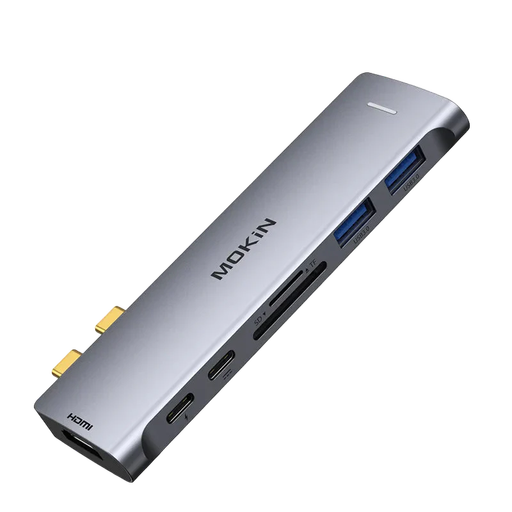
Mokin USB-C to Thunderbolt Hub with HDMI
For a compatible laptop using one HDMI monitor alongside a keyboard and mouse.
The listing specifies a Thunderbolt upstream connection, HDMI up to 4K at 60Hz, USB-A 3.0, USB-C 3.0 and SD/TF card readers.
Confirm the laptop’s host-port compatibility and charging arrangement before buying. No Ethernet connection is specified.
Joybuy
Frequently asked questions
Can any USB-C laptop port connect to my monitor through a USB-C dock?
No. Confirm that the particular laptop’s USB-C port supports DisplayPort Alt Mode or Thunderbolt. Lenovo’s UK dock documentation states that its USB-C and Thunderbolt docks require those protocols through the Type-C port, so also check the laptop-and-dock display information for the monitor count and resolution you need.
What should I check before choosing a dock for one monitor, keyboard and mouse?
Check the monitor input and cable, the laptop’s documented video output, the dock’s monitor ports, the USB ports needed for peripherals and whether dock power delivery meets the laptop’s charging requirement. A dock can carry video, data and charging through one connection, but the laptop can limit the display mode available.
How can I verify that a refurbished Windows laptop is still supported?
Ask for the exact model and CPU, then check Windows 11 eligibility against Microsoft’s requirements, including an approved CPU, at least 4 GB RAM, at least 64 GB storage, UEFI/Secure Boot capability and TPM 2.0. A Windows 10 installation is not proof of ongoing standard support, which Microsoft says ended on 14 October 2025.
Do I have protection if a refurbished laptop from a UK trader is faulty or not as described?
UK Trading Standards guidance says goods bought in a shop must be as described, fit for purpose and of satisfactory quality. Keep the listing and invoice, and check the seller identity, condition description, return process and warranty terms before you buy.
What should I do with the desktop I am replacing?
Do not put electrical equipment in ordinary household waste. GOV.UK explains that WEEE regulations are intended to reduce electrical and electronic equipment sent to landfill or incineration; use an appropriate retailer take-back route or local-authority recycling service.


