What matters when choosing?
Start with the software and account you will actually use. Then decide whether the laptop will spend most of its time at a desk or travel with you; that choice shapes how much attention to give its display, ports and weight.
| Concern |
What to check |
Who this matters to |
| Software compatibility |
Confirm the transcription service, Microsoft 365 account or tenant, operating system and recording formats before choosing a laptop. |
If my usual transcription feature will not work with my account or operating system, faster hardware will not fix the workflow. Around 31% of consumers would put compatibility first. |
| Long-session comfort |
Assess the screen, keyboard and external-display connections alongside your home workstation. |
When I spend hours reading and correcting text, I need a desk setup I can use comfortably throughout the session; around 31% of consumers would make that their primary concern. |
| Files and connections |
Check SSD capacity against your local recording library and match the available ports to your monitor, headset and transfer devices. |
If I retain recordings and working copies locally, running out of space or struggling to connect my equipment interrupts the job. Roughly 23% of consumers would prioritise file capacity and connectivity. |
| Portability |
Compare the exact model's weight, charger requirements and the conditions behind its stated battery life. |
When I take the laptop to interviews as well as using it at home, carrying and charging it matter more to me; portability would be the first concern for around 15% of consumers. |
Joybuy laptops for transcript editing
These laptops offer different screen sizes and storage capacities for editing transcripts at home. Check your transcription software and account first, then compare each model with the desk equipment and local recordings you plan to use.
 Image unavailable
ASUS Vivobook 14 X1407QA-LY003W Copilot+ PC, Snapdragon X, 16GB, 512GB, Quiet Blue
Consider this 14-inch option if you want a compact laptop for document editing at home and elsewhere. Its named configuration includes Snapdragon X, 16GB memory and a 512GB SSD. Confirm that your transcription software, account and recording formats work with this model before buying.
View on Joybuy
 Image unavailable
HP OmniBook X Flip 16-as0004na, 16-inch 2-in-1, Core Ultra 5 226V, 16GB, 512GB
The 16-inch touchscreen may appeal if you want a larger built-in display for working through transcripts at your desk. This 2-in-1 configuration names 16GB memory, a 512GB SSD and Windows 11 Home. Check its connections against your monitor and headset, as well as access to your transcription service.
View on Joybuy
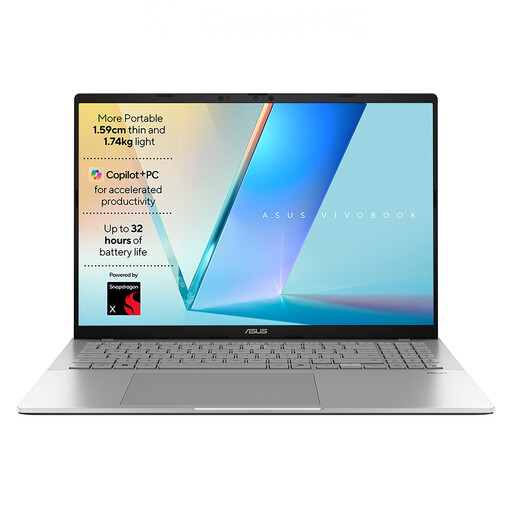 Image unavailable
ASUS Vivobook S3607QA-PL004W, Snapdragon X1-26-100, 16GB, 512GB, Silver
Consider its 16-inch WUXGA display if you prefer a larger laptop screen for reading and correcting text. The named configuration includes 16GB memory, a 512GB SSD and Windows 11 Home. Confirm the ports needed for your desk accessories and that your chosen transcription workflow is compatible.
View on Joybuy
 Image unavailable
Lenovo LOQ Essential 15ARP11, Ryzen 7 170, 16GB, 1TB, RTX 5050, 15.6-inch
Its 1TB SSD is worth considering if you plan to keep a substantial collection of recordings and working copies locally. This gaming model also names 16GB memory, a 15.6-inch 144Hz FHD display and GeForce RTX 5050 graphics; those gaming specifications do not, by themselves, establish a benefit for transcript editing. Check your software requirements and whether the laptop suits how often you carry it.
View on Joybuy
 Image unavailable
Microsoft Surface Laptop 7 15-inch Copilot+ PC, Snapdragon X Elite, 16GB, 256GB, Maya
The 15-inch PixelSense touchscreen may suit you if you want a larger built-in display for documents. This configuration names 16GB memory and a 256GB SSD, so compare its local capacity with the recordings and copies you intend to retain. Confirm your transcription software and account requirements before choosing it.
View on Joybuy
Frequently asked questions
Do I need a Windows laptop to edit interview transcripts?
Not for every transcription workflow. Choose around the software and account you actually use: Microsoft's guidance describes the cited Word for Microsoft 365 Transcribe feature as currently available on Windows in commercial tenants, while Word for the web has separate account and browser conditions. Confirm those conditions before ruling out a Mac.
Can Mac Dictation transcribe a recorded interview?
Do not treat Mac Dictation as a replacement for a recorded-interview transcription service. Apple describes Dictation as speaking to enter text where you can type; if you need to upload recordings or work with speaker-separated transcripts, confirm those functions in the separate service you plan to use.
What should I consider for long editing sessions at home?
Assess the complete desk setup, including screen position, keyboard, pointing device and headset, rather than choosing on laptop screen size alone. The Health and Safety Executive says the display screen equipment rules can apply to employees working at home daily for continuous periods of an hour or more, with an individual workstation assessment where applicable.
Can I upload work interviews to a cloud transcription service?
Check your organisation's data-handling requirements before uploading recordings containing personal information. The Information Commissioner's Office says organisations must determine and document an appropriate lawful basis before processing it; also review what participants have been told and the service's storage, retention and sharing terms.
Can I cancel an online laptop purchase in the UK?
A standard distance-sale cancellation period normally ends 14 days after you or a nominated person takes physical possession of the laptop, under the UK Consumer Contracts Regulations; exceptions and the circumstances of the purchase matter. Cancellation for a change of mind is distinct from remedies for faulty goods under the Consumer Rights Act, and a retailer's voluntary returns policy does not remove statutory rights.


