Who this setup suits

Routine laptop desk workers at home

People using a laptop for sustained screen-based work at a home desk who are deciding whether separate input devices, a laptop riser or an external display are worthwhile. The Health and Safety Executive identifies separate keyboard, mouse and display options for prolonged laptop use.

Hybrid workers with two workstations

People regularly moving between home and office who need both setups to work for their routine, rather than assuming an office arrangement also suits the home desk. Health and Safety Executive guidance covers long-term and hybrid home working.

Multi-device or multi-display users

People considering a USB-C or Thunderbolt dock for charging, displays and peripherals who need to check their exact laptop model’s video, power and operating-system capabilities before buying.

Buying priorities

Priority What to check Your needs
Screen and input position Check whether the screen can sit directly in front of you at roughly arm’s length, with the top around eye level. A raised laptop needs a separate keyboard and mouse for sustained typing. I need to position the screen separately from where I type and point, without making a small desk harder to use.
Monitor and dock compatibility Confirm the laptop’s video output, supported display count, resolution and refresh-rate limits. For a USB-C dock, check host protocol support, charging requirements and the dock’s stated operating-system conditions. I want one desk connection for displays and peripherals, but only if my laptop can actually support the intended setup.
Employer equipment process Check whether your role and home-working pattern fall within your employer’s DSE assessment process. Ask whether both home and office workstations are considered. I want to understand what equipment is appropriate for my work arrangement before paying for it personally.

Common buying pitfalls

  • Assuming every USB-C port can send monitor video

    A USB-C port may handle charging and data without supporting the alternate mode needed for display output. In that case, a dock’s USB ports may work while its monitor connection does not.

    Find the exact laptop model’s technical specification and confirm video output through the intended port, such as DisplayPort Alt Mode, USB4 or Thunderbolt, before comparing it with the dock’s host requirements.

  • Choosing a multi-display dock from its output count alone

    The laptop can have a lower external-display limit than the dock. Supported display count, resolution and refresh rate can vary by laptop model and configuration.

    Check the laptop manufacturer’s external-display specification first, then select a dock and monitor arrangement within that limit.

  • Raising the laptop but continuing to type on its built-in keyboard

    Raising the screen also raises the built-in keyboard. Health and Safety Executive guidance pairs an elevated laptop with separate input devices for prolonged use.

    Choose a stand together with a separate keyboard and mouse, or use a separate monitor where that better fits the desk and work pattern.

  • Buying equipment before checking the employer’s DSE process

    For home workers covered by DSE requirements, the Health and Safety Executive says workers cannot be charged where an assessment indicates action is needed. This depends on the work arrangement and assessment.

    Ask whether your role is covered, whether home and office setups are assessed, and what equipment or reimbursement process applies before purchasing.

    This can avoid personal spending on equipment that may be identified through an employer assessment.

Relevant brand references

Lenovo

A relevant option for Windows-focused USB-C docking, including universal dock models intended for mixed-PC and home-office environments.

  • Lenovo states that its ThinkPad Universal USB-C Dock supports more than 11 ports, up to 100W charging and multiple display outputs.
  • Check the laptop rather than the connector shape alone: Lenovo lists USB-C Alt Mode, DisplayLink or Thunderbolt support as relevant dock protocols.

Dell

A relevant option for a fixed USB-C desk dock where charging and multi-display capability are required and laptop compatibility has been confirmed.

  • Dell’s UK WD25 page lists up to 100W power delivery for Dell systems and 96W for non-Dell systems, with listed multi-display modes.
  • The laptop’s own video and charging limits still apply, so dock specifications are not a guarantee for every host device.

CalDigit

A relevant option for users with a compatible Thunderbolt, USB4 or USB-C host who need a high-port-count fixed-desk dock.

  • CalDigit lists Thunderbolt 4, Thunderbolt 3, USB4 and USB-C host categories, 18 ports and up to 98W host charging for its TS4 dock.
  • Check the manufacturer’s minimum operating-system requirements as well as the host interface before purchase.

Logitech

A relevant option for separate keyboard and mouse choices, including compact and ergonomic-oriented input-device lines for fixed or smaller desks.

  • Logitech positions its Ergo range around workspace comfort and describes its trackball approach as requiring less arm movement.
  • Manufacturer positioning does not replace an individual DSE assessment or establish that a particular device shape will suit every user.

Joybuy product options

These Joybuy product options cover separate keyboard and mouse sets, an external monitor and USB-C hubs or docks for a regular laptop desk.

HP 680 CFT dual-mode keyboard and mouse combo

HP 680 CFT Dual-Mode Keyboard/Mouse Combo

A separate keyboard and mouse can be positioned independently when the laptop screen is raised. The listing states Bluetooth and receiver connectivity for up to three devices, quiet keys, a wrist rest, negative tilt and programmable controls; check the physical keyboard layout if you need a UK arrangement.

Joybuy
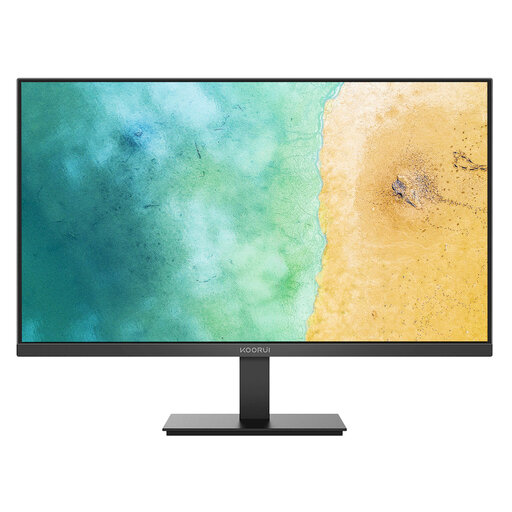
KOORUI MB27V29FS2 27-inch IPS monitor

KOORUI MB27V29FS2 27-inch IPS Monitor

A separate display gives more options for screen placement at a fixed desk. This model is listed with a 27-inch Full HD IPS panel, HDMI 1.4 and VGA inputs, tilt adjustment and VESA 100 × 100 mm mounting; confirm the exact model, included accessories and laptop video connection before buying.

Joybuy

Baseus Metal Gleam Series II 10-in-1 USB-C hub

Baseus Metal Gleam Series II 10-in-1 USB-C Hub

For a fixed desk, this hub lists two HDMI outputs, Gigabit Ethernet, USB ports, SD/TF readers and 100W PD input. Monitor output requires a laptop USB-C port with DisplayPort Alt Mode, and the laptop’s own display and charging limits remain decisive.

Joybuy

Targus USB-C universal dual HDMI 4K docking station

Targus USB-C Universal Dual HDMI 4K Docking Station

This dock lists dual HDMI 2.0 outputs at 4K@60Hz, USB-C Alt Mode host connection, Gigabit Ethernet, USB ports and 100W PD pass-through. Check the laptop’s external-display limit, operating-system requirements and whether a suitable power adapter is included.

Joybuy

Philips 3000 Series wireless keyboard and mouse combo

Philips 3000 Series Wireless Keyboard and Mouse Combo

This UK English full-size set uses a 2.4GHz wireless connection with a USB-A nano receiver and includes an optical mouse. It suits a laptop desk needing separate input devices, provided the computer has USB-A access or an appropriate adapter.

Joybuy

Questions about laptop workstations

Does a UK employer have to provide my home-working monitor, dock or keyboard?

Not automatically for every home worker. The Health and Safety Executive says DSE rules can apply to permanent, long-term and hybrid home working where display-screen equipment is used daily for continuous periods of an hour or more; where a workstation assessment indicates action is needed, workers cannot be charged for it.

Do I need a laptop stand if I buy an external keyboard and mouse?

A stand is useful when the laptop remains your main display and you need to raise it. For prolonged laptop use, the Health and Safety Executive identifies a separate keyboard and mouse as the arrangement that allows the laptop screen to be elevated; a separate display can be another route where desk space allows.

Will every USB-C dock connect my laptop to an external monitor?

No. USB-C is a connector, while external video depends on capabilities such as DisplayPort or DockPort alternate mode. Check the exact laptop specification and the dock’s host-protocol requirements before buying; Lenovo lists USB-C Alt Mode, DisplayLink or Thunderbolt as relevant protocols for its docks.

Can a dock add more screens than my laptop normally supports?

Do not assume so. Apple states that simultaneous external-display support depends on the Mac model and the resolution and refresh rate of each display, and that a supported hub or daisy chain does not increase the maximum display count. Check the equivalent manufacturer specification for any Windows laptop.

Must a dock or charger sold for use in Great Britain have UKCA marking only?

No. Department for Business and Trade guidance says Great Britain continues to recognise CE marking for many product requirements alongside or instead of UKCA marking. Electrical equipment supplied in Great Britain remains subject to the Electrical Equipment (Safety) Regulations 2016, so retain product, power-supply and safety documentation.