What to check before buying
Start with the working position you need, then confirm laptop compatibility before choosing ports, displays or peripherals.
| Priority |
What to check |
Your needs |
| Screen and input position |
Check whether the screen can be positioned separately from the keyboard and mouse. If raising the laptop, plan for a separate keyboard and mouse; alternatively, consider a separate display. |
I want the screen at a practical height without forcing the typing surface too high during longer desk sessions. |
| Laptop port capability |
Check the exact laptop model for video output, supported external displays and charging input. USB-C describes the connector shape, not guaranteed video, bandwidth or power delivery. |
I need a dock that can provide the display and charging arrangement I actually plan to use, not simply one that fits the port. |
| Managed-device access |
Confirm whether drivers, USB Ethernet, wireless peripherals and new accessories are permitted. Check whether an Apple-silicon Mac needs accessory approval and whether Windows device controls apply. |
I need accessories that can be used with my work laptop without relying on software or permissions I cannot obtain. |
| Home-to-office portability |
Compare the port mix, display connections and weight against how often you move. Decide whether a compact hub or multi-device keyboard and mouse is sufficient instead of a permanent docked desk. |
I want useful desk connections at home while keeping the setup manageable to carry or pack away. |
Joybuy product options
Joybuy options for creating a more practical hybrid-work desk, including docking hubs, separate input devices and external displays.
 No image available
Targus USB-C Dual HDMI 4K Dock with 100W Pass-Through
Consider this for a fixed desk needing two display connections, wired networking and peripheral ports through one hub.
Stated features include two HDMI outputs, Gigabit Ethernet, USB 3.2 ports, card readers and 100W power-delivery pass-through.
Check that the laptop supports USB-C Alt Mode, the intended two-display setup and the required charging input. Confirm whether a suitable external 100W+ power adapter is included or already available.
Joybuy
 No image available
Baseus Metal Gleam Series II 10-in-1 USB-C Hub
This hub suits a home desk requiring display connections, wired networking and USB peripherals in a compact format.
Its stated connections include HDMI at 4K 120Hz and 4K 60Hz, 10Gbps USB-A and USB-C ports, RJ45, SD/TF card reading and USB-C PD input.
Video output requires a USB-C device with DisplayPort Alt Mode. Check the laptop's supported display modes, charging capability and workplace peripheral policy.
Joybuy
 No image available
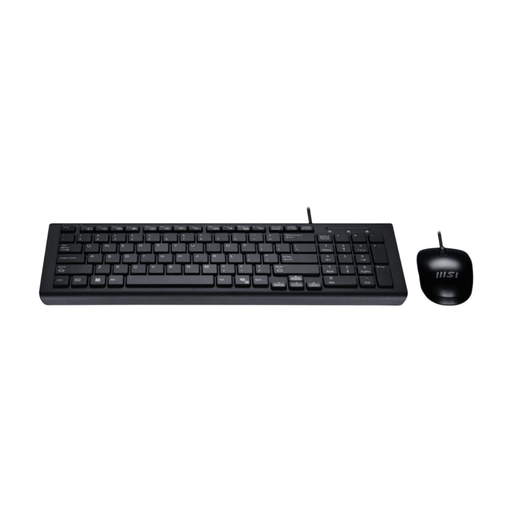
MSI GK-701 Office Keyboard and Mouse Set, UK Layout
A separate keyboard and mouse can complete a raised-laptop or external-display setup for sustained desk work.
The set includes a full-size UK-layout keyboard, optical mouse, low-profile keys and a wired USB connection.
The Copilot key is stated for Windows 11, while macOS and ChromeOS have basic functionality only. Route cables away from walkways.
Joybuy
 No image available
ASUS ZenScreen MB166C 15.6-inch Full HD USB-C Monitor
Consider this portable second screen when you move between home and office but want more visual workspace.
It has a stated 15.6-inch Full HD IPS display, USB-C-only connection, anti-glare surface, flicker-free backlight, blue-light filter and 780g weight.
Check that the laptop's USB-C port can provide the required video connection. The monitor has no stated built-in speakers, so confirm whether separate audio output is needed.
Joybuy
 No image available
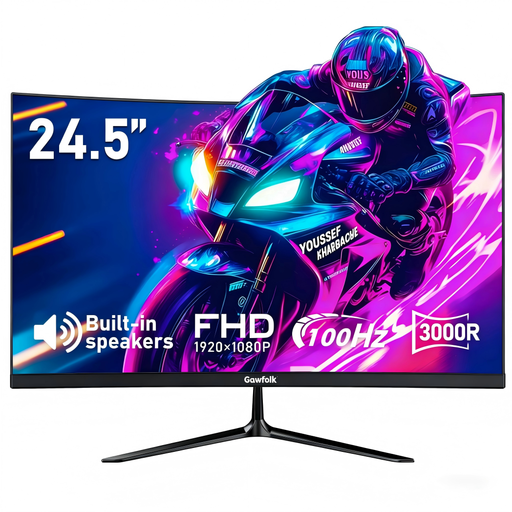
Gawfolk 24.5-inch Full HD Curved Monitor
This is an option for a more permanent home desk where a separate visual workspace is the priority.
Stated features include a 24.5-inch Full HD display, HDMI and VGA inputs, tilt adjustment, VESA 75 × 75mm support and built-in speakers.
Check that the laptop has a suitable HDMI or VGA output, or that the required adapter is compatible. A VESA wall mount is supported but not included.
Joybuy
Frequently asked questions
Is a laptop stand enough for regular home working?
Not on its own for prolonged laptop use. The Health and Safety Executive identifies a separate keyboard and mouse so the screen can be elevated on a riser or similar, or a separate display; choose a stand as part of an input-and-screen combination.
Does a USB-C port guarantee that a dock can run monitors and charge my laptop?
No. Kensington states that USB-C describes the connector, while speed, video and power-delivery capability depend on the manufacturer's implementation. Check the laptop manual or support page for video output, charging and supported display configuration.
Can a work-managed Mac prevent a new dock or monitor from working?
It can require approval. Apple states that Apple-silicon Mac laptops may ask you to allow new USB, Thunderbolt or other accessories, and administrators can control this setting on supervised Macs. Confirm the required display, keyboard and mouse connections before relying on a docked setup.
Can an employer-managed Windows laptop restrict a dock or connected accessories?
Potentially. Microsoft documents device-control capabilities that can allow or prevent certain peripheral devices and configure exceptions. Ask IT before buying when the setup depends on drivers, storage, networking or unusual peripherals.
Do UK display screen equipment rules mean every hybrid worker needs the same equipment?
No. The Health and Safety Executive says the regulations can apply to permanent, long-term and hybrid home working, while an assessment determines whether additional equipment is needed. A comfortable, sustainable posture may not require the same furniture or equipment used in an office.


