For exhibition-catalogue layout and image work, start with an operating system that fits the shared office, 16GB of memory and enough internal SSD space for active files; Adobe recommends 16GB for current InDesign and Photoshop. A compact general-purpose laptop can suit layout and collaboration, while routine colour-sensitive review, large multilayer files or GPU-assisted work may justify a creator-oriented configuration. Check the exact screen, monitor and dock arrangement, fonts, plug-ins and print workflow before choosing.
Who this is for
Layout-first catalogue makers
You assemble pages, revise copy and place supplied images in InDesign or comparable software. Application compatibility, working space for files and a usable monitor setup matter more than choosing graphics hardware for work you do not routinely do.
Colour-conscious image reviewers
You select, retouch or approve catalogue artwork before it enters a print workflow. Check the exact display specification and agree a proofing process with the print provider rather than relying on a display claim alone.
Shared-office workstation users
You move between a desk and meeting spaces, then reconnect to shared monitors, docks and storage. The required display arrangement, ports and office operating system should shape the laptop choice.
What matters when choosing
Confirm the office software and peripherals before settling on an operating system. Then match memory, storage and display requirements to the catalogue work you actually do.
| Concern |
What to check |
Who this matters to |
| Layout and image-editing capacity |
Check for 16GB or more memory and an internal SSD with room for applications, active assets and working files. Adobe recommends 16GB for current InDesign and Photoshop. |
If I am building pages while editing images, I want room to work beyond the applications' minimum requirements. Around 33% of consumers put creative-app capacity first. |
| Image and layout review |
Confirm the purchased configuration's panel and stated colour coverage, then agree proofs and colour profiles with the print provider. |
When I approve artwork on screen, I need to understand both what the display shows and how print will be checked. Colour-aware review comes first for roughly 25% of consumers. |
| Shared-desk connections |
Match the required monitor count and resolutions to the exact laptop, dock and cables; check connections for shared storage and other peripherals. |
Returning to a shared desk should not mean rebuilding my display and peripheral setup each time. About 25% of consumers prioritise desk integration. |
| Portability and workflow fit |
Check the office's application versions, fonts, plug-ins and print tools before choosing macOS or Windows; consider how often the laptop moves between spaces. |
I carry the laptop between work areas but still need the catalogue files and office tools to work together. Portability and operating-system fit are the primary concern for around 17% of consumers. |
Common buying mistakes
-
Choosing 8GB because it meets the application minimum
Adobe lists 8GB as the minimum for current InDesign and Photoshop, but recommends 16GB. Meeting an installation minimum is different from allowing headroom for catalogue files and other open applications.
Use 16GB as a starting point for this work, and check the selected laptop's SSD capacity against the space your active projects need.
-
Assuming any USB-C port will run the shared monitors
Display support depends on the laptop and its connection to the particular monitors or dock. A matching connector shape does not establish that the whole desk arrangement will work.
Write down the monitor count and resolutions, dock model and cable types, then check the laptop-and-dock documentation before ordering.
An incompatible arrangement may require a different dock, cable or adapter.
-
Treating display colour claims as a print proof
A wide-gamut screen can be relevant to on-screen image review, but it does not establish how the finished catalogue will reproduce colour.
Check the exact panel and ask the print provider which proofs, profiles and PDF-export settings its process requires.
-
Choosing an operating system before checking the office workflow
Adobe provides requirements for both macOS and Windows, but base application support does not settle compatibility for the office's fonts, plug-ins, printers or shared tools.
Confirm the versions and peripherals the team uses before committing to either platform.
Changing platforms can also mean migrating fonts, plug-ins or peripheral workflows.
Brands to consider for this work
Apple
MacBook Air is a compact macOS option when the catalogue applications and shared-office equipment are confirmed to work with it.
- Apple UK lists 16GB starting unified memory, two Thunderbolt 4 ports and support for up to two external displays for the cited M5 MacBook Air.
- Check the office dock, fonts, plug-ins and print tools; the stated ports may require a suitable dock or adapters for existing peripherals.
Dell
Dell Pro 14 configurations offer a Windows business-laptop route for layout-led work in a shared office.
- Dell UK lists a cited configuration with Windows 11 Pro, 16GB DDR5 memory and a 512GB SSD.
- Memory, screen and port choices vary; check the exact configuration rather than assuming every Pro 14 has the cited specification.
Lenovo
ThinkPad P-series configurations are worth considering when larger local assets or a particular business-support arrangement shape the choice.
- Lenovo UK lists a cited ThinkPad P14s Gen 6 configuration with 64GB DDR5 memory, a 2TB SSD and a 100% sRGB anti-glare display.
- Those details belong to that configuration, not every ThinkPad; match the capacity to the actual project files.
ASUS
ProArt laptops are a creator-oriented route when image review or demanding creative work is central to catalogue preparation.
- ASUS describes the ProArt range as offering wide-gamut displays and creator-oriented hardware; panel and graphics options vary by model.
- Confirm the precise display, memory, graphics and warranty configuration. A display specification does not replace the print provider's proofing process.
Joybuy laptop choices
These Windows laptops offer different approaches to catalogue work: portable layout and review setups, dual-screen working space, and higher-capacity configurations for more demanding files. Check each model against your office software, displays and print workflow.
 No image available
ASUS Zenbook DUO UX8406CA-QL135W, 16GB, 1TB
The dual-screen format may suit catalogue layout and revisions if it fits the way you work at the shared desk.
Two 14-inch OLED touchscreens; Intel Core Ultra 7 255H; 16GB LPDDR5X memory; 1TB SSD. Confirm the exact panel resolution and compatibility with the office monitors and dock.
View on Joybuy
 No image available
HP OmniBook Ultra Flip 14-fh0006na, 16GB, 1TB
This 2-in-1 may suit catalogue teams that want a portable laptop for moving between desks and reviewing work on screen.
16GB memory; 1TB SSD; Windows 11 Home. Check the required monitor and dock arrangement, and agree any colour-critical proofing with the print provider.
View on Joybuy
 No image available
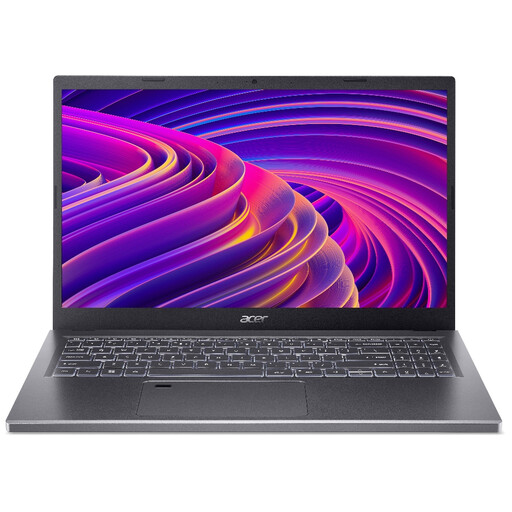
Acer Aspire 5 A515-48M, Ryzen 5 7530U, 16GB, 512GB
Consider this configuration for layout-led Windows work where the office can separately confirm its display and peripheral requirements.
15.6-inch Full HD (1920 × 1080) screen; 16GB memory; 512GB SSD. Check the exact panel's colour coverage before using it for colour-critical approval.
View on Joybuy
 No image available
ASUS ProArt P16 H7606WW-SE006W, RTX 5080, 64GB, 2TB
The higher-memory configuration is an option to assess for large creative files or GPU-assisted catalogue work, rather than an automatic requirement for layout.
16-inch 4K OLED touchscreen; AMD Ryzen AI 9 HX 370; NVIDIA GeForce RTX 5080 16GB; Windows 11 Home. Confirm the exact panel's colour coverage, office dock compatibility and print-proofing process.
View on Joybuy
 No image available
Lenovo Legion Pro 7 16IAX10H 83F5000UUK, RTX 5090, 64GB, 2TB
This higher-capacity Windows configuration is worth assessing only if the catalogue workflow calls for substantial local storage, memory or graphics hardware.
16-inch screen; Intel Core Ultra 9; NVIDIA GeForce RTX 5090; Windows 11 Home. Check display colour coverage, carrying weight and the office monitor setup before choosing it for shared-desk work.
View on Joybuy
Frequently asked questions
Is 16GB of memory enough for an exhibition catalogue?
For current InDesign and Photoshop, 16GB meets Adobe's recommended memory level and is a sensible starting point for catalogue layout and image work. Consider more memory if your actual files are unusually large or you regularly keep several demanding applications open.
Do I need a dedicated graphics card?
Not for every InDesign and Photoshop catalogue workflow. Adobe's requirements include graphics specifications, and Photoshop recommends more GPU memory for displays at 4K or above; match the graphics configuration to your applications, displays and workload rather than assuming that all layout work needs a dedicated GPU.
Can one laptop run a shared dual-monitor desk?
Yes, if the exact laptop and connection arrangement support those monitors. Apple UK states that the cited M5 MacBook Air supports up to two external displays; for any laptop, check the required resolutions, dock and cables against its model-specific documentation.
Should a shared catalogue office choose Windows or macOS?
Either can be suitable for current Adobe applications, which publish requirements for both platforms. Choose after checking the office's application versions, fonts, plug-ins, printers, asset-management tools and shared peripherals.


