For library transcription, choose a laptop you can carry and type on comfortably, with a screen, headphone connection and file storage that suit your sessions. If your workflow depends on Microsoft Word Transcribe, check its Windows, Microsoft 365 commercial-tenant and OneDrive requirements before choosing an operating system. A compact MacBook Air is an option for compatible macOS tools, but its published battery figure does not describe transcription runtime.
Who needs which setup?
Shared-space field-note transcribers
If you carry a laptop to the library and replay recordings while typing, consider its size, keyboard comfort and connection for private listening together. A thin design alone tells you nothing definite about keyboard or fan noise.
Microsoft 365 transcription users
If your organisation uses Word Transcribe, establish which account, licence, operating system and cloud-storage arrangements apply before buying around that feature. Microsoft Support describes its current availability for Word for Microsoft 365 on Windows in commercial tenants.
Long-session archive builders
If you keep recordings, drafts and references locally, check the exact memory and SSD configuration alongside screen readability, charging arrangements and your approved backup workflow.
What should you check before buying?
Start with the application and account you will actually use, then assess how the laptop will work at a library desk. Treat the concerns below as different primary needs among consumers choosing a laptop for this task, not as a ranking of laptop features.
| Concern |
What to check |
Who this matters to |
| Portable, discreet library use |
Try the keyboard and check the weight, headphone connection and ports needed for your recorder or card reader. Test noise where possible. |
I need to carry my notes between locations and listen without disturbing people nearby; around 42% of consumers put portable, discreet library use first. |
| Transcription software and account |
Confirm the application’s operating-system, licence, tenant and approved storage requirements before choosing a laptop. |
If my organisation relies on Word Transcribe, I need access through the right account and permission to use its cloud workflow. Software and account compatibility comes first for around 33% of consumers. |
| Long sessions and local files |
Check the exact memory and SSD capacity, screen finish and charging arrangements for the sessions you plan to work. |
I want room for recordings and references while keeping documents readable through a long session; roughly 25% of consumers prioritise that workspace and file capacity. |
Common buying mistakes
-
Choosing the operating system before the transcription service
A laptop running Windows does not by itself provide access to Word Transcribe. Microsoft Support describes current availability in Word for Microsoft 365 on Windows in commercial tenants, with recordings stored in OneDrive.
Confirm the app, account, tenant and permitted recording-storage location. If you type while replaying audio instead, choose around the tools you actually use.
Changing an unsuitable account or storage workflow after purchase can take time and may require a different subscription.
-
Reading a series name as a full specification
ASUS lists different memory, SSD and screen options within the Zenbook S 14 UX5406 line. Lenovo’s cited ThinkPad X1 Carbon Gen 13 details describe a particular UK configuration, not every ThinkPad.
Match the seller’s complete model or part number to the memory, storage, screen finish, keyboard layout and charger you intend to buy.
-
Equating a battery claim with transcription runtime
Apple UK quotes up to 15 hours of wireless web use for the MacBook Air M5; that is not a measurement of audio playback, document editing and syncing together.
Plan how you will charge during a long session, and assess battery life with your own workflow when you can.
-
Overlooking accessory connections
The MacBook Air M5 has two Thunderbolt 4 data ports using USB-C connectors. Your existing recorder cable, card reader or display may need a different connection.
List the accessories you will bring to the library and check how each connects before buying.
A compatible hub, card reader or display adapter may be needed for existing accessories.
Relevant brands and product lines
These examples illustrate different configurations to check; the details of one model should not be assumed to apply across a brand.
Apple
The 13-inch MacBook Air M5 is a compact macOS option for manual transcription, document work and wired-headphone listening when your chosen software is compatible.
- Apple UK lists a 13.6-inch display, headphone jack and up to 15 hours of wireless web use; the quoted battery figure is not transcription runtime.
- Its two Thunderbolt 4 data ports use USB-C connectors. Check accessories and do not assume Word Transcribe has the same availability on macOS as on Windows.
Lenovo
The ThinkPad X1 Carbon Gen 13 Aura Edition illustrates a Windows setup for buyers who want an English (UK) keyboard and an anti-glare display.
- Lenovo UK lists a specific configuration with 16GB memory, a 512GB SSD, a 14-inch anti-glare display and an English (UK) backlit keyboard.
- Check the part number: that configuration does not establish the keyboard, screen or storage fitted to every ThinkPad listing.
ASUS
The Zenbook S 14 UX5406 line offers a 14-inch Windows workspace worth considering if you read notes and reference material side by side.
- ASUS UK lists UX5406 options with 16GB or 32GB memory, 512GB or 1TB SSD storage and OLED screen variants that include anti-glare or low-reflection treatments.
- Screen treatment, processor, memory and storage vary by variant. Confirm the complete model code rather than relying on the series name.
Joybuy laptops for this workflow
These laptops cover compact Windows and macOS choices, a dual-screen Windows setup and a larger-screen Windows option. Compare each configuration with your transcription software, desk space and accessory needs rather than treating every design as interchangeable.
 No image available
ASUS Vivobook 14 X1407QA-LY003W, Snapdragon X, 16GB, 512GB SSD, Quiet Blue
Consider this 14-inch Windows option if you want a portable typing setup; confirm the keyboard layout and connections needed for your recordings and headphones.
The named configuration has a Snapdragon X processor, 16GB memory and a 512GB SSD. Word Transcribe still depends on the relevant Microsoft 365 account and approved OneDrive workflow.
Joybuy
 No image available
ASUS Zenbook DUO UX8406CA-QL135W, dual 14-inch OLED touchscreens, 16GB, 1TB SSD
The dual-screen design may suit work with a transcript and reference material at once, provided its setup and detachable keyboard work comfortably at your library desk.
The product name specifies an Intel Core Ultra 7 255H, 16GB memory and a 1TB SSD. Confirm the exact screen resolution and keyboard layout before buying.
Joybuy
 No image available
Apple 13-inch MacBook Air M5, 24GB, 1TB SSD, Midnight
Consider this compact macOS configuration for typing and listening if your transcription software runs on macOS. Apple UK lists a headphone jack on the MacBook Air M5.
This variant’s name specifies 24GB unified memory and a 1TB SSD. Check the keyboard layout and whether your accessories need adapters for its USB-C/Thunderbolt data ports; do not use a published battery figure as a promise of transcription runtime.
Joybuy
 No image available
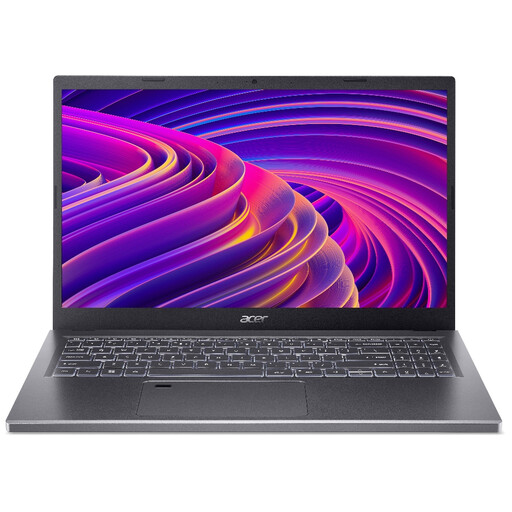
Acer Aspire 5 A515-48M, 15.6-inch Full HD, Ryzen 5 7530U, 16GB, 512GB SSD
The 15.6-inch screen offers a different desk-space trade-off from the smaller laptops here. Check that its size suits the table and bag you use for library visits.
The named configuration has a 1920 × 1080 display, AMD Ryzen 5 7530U processor, 16GB memory and a 512GB SSD. Confirm the keyboard layout and charging arrangements for long sessions.
Joybuy
 No image available
HP OmniBook Ultra Flip 14-fh0006na, 2-in-1, 16GB, 1TB SSD
This Windows convertible is worth considering if its 2-in-1 arrangement also serves your document work; for transcription, check typing comfort before giving the folding design priority.
The named variant has 16GB memory, a 1TB SSD and Windows 11 Home. Confirm its keyboard layout and whether it has the connection you need for wired headphones.
Joybuy
Frequently asked questions
Can I choose a MacBook if I need Word Transcribe?
Check your organisation’s exact access requirements before choosing a MacBook for that feature. Microsoft Support describes Word Transcribe as currently available in Word for Microsoft 365 on Windows in commercial tenants; confirm your tenant, subscription and permitted storage workflow rather than assuming equivalent macOS access.
Will Word Transcribe keep field recordings only on my laptop?
No: Microsoft Support says recordings in this workflow are stored in the Transcribed Files folder on OneDrive. Check whether your organisation permits field observations to be uploaded and whether the account has suitable storage access.
Is Word dictation practical in a quiet library?
Speaking into a microphone is unlikely to suit a designated quiet area. Microsoft Support says Word dictation needs a microphone and a reliable internet connection; check local library rules, and consider typing while listening through headphones instead.
Can I return an online laptop purchase in the UK if I change my mind?
For an eligible online change-of-mind purchase, GOV.UK says to notify the seller within 14 days of receiving the item and return it within a further 14 days. Conditions and deductions may apply to handling or damage. Remedies for a faulty or misdescribed laptop are a separate matter from change-of-mind cancellation.


