For ordinary Python lessons, choose a laptop that runs your course’s required software and has a screen and keyboard you will be comfortable using regularly. Python and the VS Code Python extension work across Windows, macOS and Linux; Windows is worth considering if you need Windows applications alongside Linux command-line tools through WSL, while macOS is an option if your course tools support it. Check the exact memory, storage and ports of the configuration you buy rather than choosing by processor name alone.
Who is this for?
First-time Python learners
You want to follow tutorials, work in VS Code and keep files for small practice projects, rather than choose a machine for a specialist workload. The Python Software Foundation provides downloads for major desktop operating systems, and Microsoft documents the VS Code Python extension across those systems.
Windows learners who may need Linux tools
Your lessons may introduce Bash, Git or Linux-style commands, but you still need Windows applications. Microsoft Learn documents Windows Subsystem for Linux, or WSL, for running a Linux distribution and command-line tools on supported Windows installations.
People studying in different places
You expect to write code between classes, in a library or while travelling. Alongside software compatibility, you need to assess the screen, keyboard, carrying weight and connections of the particular laptop you choose.
What matters when choosing?
Intel or AMD Windows laptop
Consider it when: Your course uses Windows software, or you want the option of Linux command-line work through WSL.
Allow for: Installing a Python interpreter separately and setting up WSL if you need it; Microsoft Learn specifies Windows 10 version 2004, build 19041 or later, or Windows 11 for its standard WSL installation route.
MacBook Air
Consider it when: You prefer macOS and your course’s required tools support it.
Allow for: Installing Python for your VS Code workflow rather than relying on the macOS system Python, and checking whether your peripherals need adapters for the ports on your chosen model.
Snapdragon Windows laptop
Consider it when: A lightweight Windows configuration appeals to you and you can check your course tools against Windows on ARM.
Allow for: Checking each required package and tool before purchase; ASUS lists different memory and storage configurations for its Zenbook 14 UX3480 Snapdragon.
| Concern | What to check | Who this matters to |
|---|
| Getting started |
Check the required operating system and whether you can install Python, VS Code and course software. |
I want tutorials and small projects to run without avoidable setup obstacles. Around 33% of consumers put a straightforward Python setup first. |
| Studying on the move |
Compare screen size, keyboard layout, stated weight and the ports needed for your accessories. |
When I move between study locations, carrying the laptop and working comfortably matter most; roughly 25% of consumers make portable, comfortable study their primary concern. |
| Windows and Linux tools |
If you need WSL, check for Windows 11 or the Windows 10 version required by Microsoft Learn, plus permission to install it. |
I need Windows applications now but expect Linux-style exercises later. About 25% of consumers prioritise that combination. |
| Room for projects |
Compare the exact RAM and SSD configuration and check whether either can be upgraded. |
I expect to keep more course files and work on larger projects over time; around 17% of consumers place capacity for growing projects first. |
Buying pitfalls
-
Assuming VS Code includes Python
The editor extension and Python interpreter are separate. Without an interpreter selected, running code or setting up an environment can be confusing.
Install Python through the appropriate route, add the VS Code Python extension and select your interpreter. The Python Software Foundation recommends a separate virtual environment for each project.
-
Relying on WSL without checking the Windows setup
Microsoft Learn specifies Windows 10 version 2004, build 19041 or later, or Windows 11 for its standard WSL installation command. A school- or employer-managed device may also restrict installation.
Before choosing WSL for coursework, check the Windows version and whether your account can install WSL and a Linux distribution.
-
Treating every version of a laptop line alike
ASUS lists different memory and storage options for the Zenbook 14 UX3480 Snapdragon, while Lenovo describes the ThinkPad E14 Gen 6 as a configurable line. A feature listed for one configuration need not apply to another.
Read the exact processor platform, RAM, SSD, operating system, display and keyboard layout on the version you intend to order.
-
Checking weight but overlooking connections
Apple lists two Thunderbolt 4/USB-C ports for the cited MacBook Air models. Existing USB-A accessories or an HDMI display may therefore need an adapter.
List the devices you already use and compare their connectors with the exact laptop’s ports before choosing accessories.
Connecting existing equipment may require a suitable hub or display adapter.
Relevant laptop lines for reference
Apple
MacBook Air is a macOS option for learners whose course tools support that platform.
- Apple’s UK specifications list M5 MacBook Air configurations with 16GB unified memory, a 512GB SSD and two Thunderbolt 4/USB-C ports.
- Check the exact configuration and whether your existing accessories need adapters; manufacturer specifications are not Python-performance measurements.
Lenovo
ThinkPad E14 Gen 6 is a Windows laptop line to consider if memory and storage configuration matter to your longer-term plans.
- Lenovo describes memory and storage in the E14 Gen 6 line as upgradeable.
- Check the installed components and upgrade conditions of the particular version you intend to buy.
ASUS
Zenbook 14 includes a Snapdragon Windows-on-ARM option for learners considering a compact laptop.
- ASUS lists the Zenbook 14 UX3480 Snapdragon at 1.10 kg, with 8GB/256GB and 16GB/512GB memory-and-storage options.
- Its listed memory is on-board. Check the exact configuration and compatibility of any packages or course tools you must use.
Our top recommendations on Joybuy
These laptop choices cover Windows configurations for Python lessons and a MacBook Air for learners choosing macOS. Compare the exact version against your course requirements, carrying needs and peripherals.
 No image available
MSI Summit 16 AI Evo, Core Ultra 7 255H, 32GB, 1TB SSD
Consider this Windows route if you want a 16-inch screen for working beside lesson material. Its title specifies a QHD+ 165Hz display, Intel Core Ultra 7 255H, 32GB LPDDR5 memory and a 1TB SSD.
Check the keyboard layout and ports against your typing preferences and accessories before ordering.
View on Joybuy
 No image available
ASUS Vivobook 15 X1504VA, Core 5 120U, 24GB, 1TB SSD
This Windows-route laptop is worth comparing if you want a 15.6-inch screen and space for local course files. Its title specifies an Intel Core 5 120U, 24GB memory and a 1TB SSD.
Confirm that the keyboard layout suits you before ordering.
View on Joybuy
 No image available
Lenovo LOQ Essential 15ARP11, Ryzen 7 170, 16GB, 1TB SSD
Consider this Windows-route model if the specified configuration also meets needs beyond introductory Python work. Its title lists an AMD Ryzen 7 170, 16GB memory, a 1TB SSD, a GeForce RTX 5050 and a 15.6-inch 144Hz Full HD display.
Check the carrying weight if you will take it to class regularly; the graphics specification alone does not establish a benefit for beginner Python lessons.
View on Joybuy
 No image available
Apple 13-inch MacBook Air M5, 24GB, 1TB SSD, Midnight
Choose this macOS route only after confirming that your course tools support it. This variant’s title specifies an M5 chip with a 10-core CPU and 10-core GPU, 24GB memory and a 1TB SSD.
For the VS Code Python workflow, install Python separately rather than relying on the macOS system Python. Check the keyboard layout, included power adapter and any adapters needed for your peripherals.
View on Joybuy
 No image available
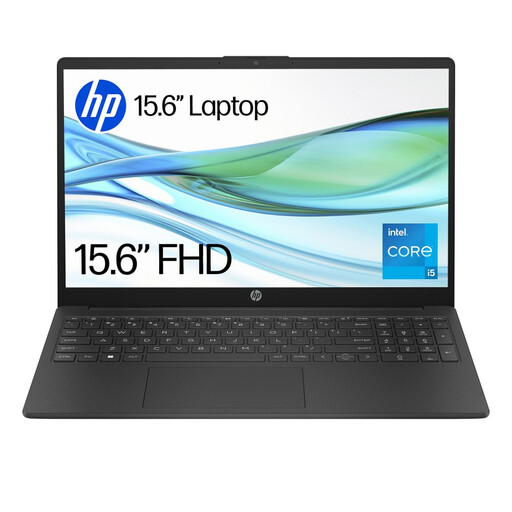
HP 15-fd0064na, Core i5-1334U, 8GB, 256GB SSD
This is a Windows 11 Home option to assess for first lessons and small projects. Its title specifies a 15.6-inch display, Intel Core i5-1334U, 8GB memory and a 256GB SSD.
Check whether that memory and storage will accommodate your intended projects and other applications, and confirm the keyboard layout and ports you need.
View on Joybuy
Frequently asked questions
Do I need a Linux laptop to learn Python?
No. The Python Software Foundation provides Python downloads for Windows, Linux/Unix and macOS, and Microsoft documents the VS Code Python extension across desktop operating systems. Choose a Linux installation if your course requires it or you prefer that environment.
Can I use Linux command-line tools on a Windows laptop?
Yes, WSL provides that route on supported Windows installations. Microsoft Learn specifies Windows 10 version 2004, build 19041 or later, or Windows 11 for its standard installation command; also check whether a managed device permits installation.
Does VS Code install Python for me?
No. Install a Python interpreter separately, then select it in VS Code. For projects, the Python Software Foundation recommends separate virtual environments so their packages can be managed independently.
Can I use the Python already on macOS with VS Code?
For the workflow in Microsoft’s VS Code Python tutorial, do not rely on the macOS system Python; install a separate interpreter through the recommended route. Check your course’s installation instructions before setting up projects.


