Start with the games you plan to play: for The Sims 4, Electronic Arts recommends 8 GB RAM and 50 GB of free space, plus 1 GB for custom content and saves, so compare an integrated-graphics laptop’s exact configuration with the game’s requirements before choosing it. A dedicated-GPU laptop is another one-device route when your game library may grow; a desktop plus an everyday laptop makes more sense if gaming stays at a desk and you are willing to use two computers.
Who is each setup for?
The useful distinction is whether one portable computer must also handle every game, or whether gaming can stay at a desk.
One-device Sims and everyday users
If you want one Windows laptop for browsing, documents and The Sims 4, compare its exact hardware with Electronic Arts’ recommended requirements. Leave room on the drive for saves, custom content and your other files.
Players considering other PC games
If your game library may extend beyond The Sims 4, a laptop with a named dedicated GPU gives you a different hardware route to compare against each game’s requirements. Check the particular model’s memory, storage and carrying requirements rather than relying on its gaming label.
At-home players who still need a laptop
If most gaming happens at one desk, a desktop and a separate everyday laptop may suit you. Box.co.uk identifies cooling and easier upgrades as reasons to consider a desktop; you would still need to manage two computers.
What should you check before choosing?
Integrated-graphics laptop
Consider it when: Your named games match the exact laptop’s hardware and you are comfortable adjusting settings if needed.
Trade-off: Electronic Arts says Laptop Mode may help when a computer is near The Sims 4’s minimum requirements or when playing on a laptop; it does not establish how another game will run.
Dedicated-GPU laptop
Consider it when: You want one computer for daily tasks and a graphics configuration you can check against a wider game library.
Trade-off: The laptop and its charger both matter if you carry them regularly; a GPU model name alone does not establish game-specific performance.
Desktop plus everyday laptop
Consider it when: Gaming stays at a desk and you also need a separate computer away from home.
Trade-off: You need space for the desktop and must look after two devices rather than one.
| Priority | What to check | Your needs |
|---|
| Named games |
Compare the exact CPU, graphics and RAM with each publisher’s recommended requirements. Electronic Arts recommends 8 GB RAM for The Sims 4; check requirements for other games separately. |
I want the games I actually play to guide the laptop choice, rather than buying to a minimum launch threshold. |
| Graphics route |
Identify integrated or dedicated graphics in the exact model. Compare its stated graphics hardware with each game’s requirements, and decide whether adjusting settings is acceptable. |
If I may add other PC games, I want to assess a dedicated-GPU option as well as an everyday laptop. |
| Storage |
Check free space after the operating system and your other files. Electronic Arts recommends 50 GB free for The Sims 4, plus 1 GB for custom content and saves. |
My games, saves and everyday files all need space on the same drive. |
| Portability |
Check laptop weight and the charger you would carry. If gaming is desk-bound, compare that arrangement with a desktop and a separate portable laptop. |
I need to decide whether carrying one gaming-capable laptop is more practical for me than using two computers. |
What can catch buyers out?
-
Buying to a game’s minimum requirements
For The Sims 4, Electronic Arts distinguishes minimum from recommended requirements and recommends 8 GB RAM and 50 GB free space, plus 1 GB for custom content and saves.
Use the recommended specification as your starting point for a new purchase, then check every other game you intend to install.
-
Assuming every laptop in a range has the same parts
Acer describes some Nitro V 15 AI hardware as available in configurations of up to a stated specification. That wording does not identify the components in every Nitro V 15 AI.
Check the exact model number, GPU, installed RAM, storage and screen on the configuration you are considering.
-
Counting the laptop but forgetting the charger
A laptop used for gaming still has to work for your routine travel. The charger adds another item to carry and needs a compatible place to plug in.
Check the dimensions and weight of both items if the computer will regularly leave your desk.
-
Choosing a replacement charger by connector alone
In a September 2026 product-safety report, the UK Office for Product Safety and Standards identified a specific laptop charger with a high fire and electric-shock risk because its plug pins did not meet dimensional requirements.
Use the supplied charger or confirm a replacement’s compatibility with the exact laptop model and UK plug requirements through the manufacturer.
Which laptop ranges are relevant?
These ranges illustrate different configurations to check; a range name does not tell you which components are in a particular laptop.
ASUS
The ASUS TUF Gaming A15 FA507NU-LP101W is a dedicated-graphics example for a one-laptop setup.
- This configuration is listed with an RTX 4050, 16 GB RAM and a 512 GB NVMe SSD.
- Check the full model number when comparing TUF listings; those specifications belong to FA507NU-LP101W.
HP
The HP Victus 15-fb3011na is another named dedicated-graphics configuration to compare with your games.
- HP Store UK lists 16 GB RAM, a 1 TB SSD and an RTX 4050 with 6 GB VRAM for this model.
- Those components do not establish the settings or frame rate you will get in a particular game.
Lenovo
Lenovo has both Legion gaming laptops and IdeaPad everyday laptops, so the exact product matters when comparing graphics routes.
- Lenovo UK lists the Legion 5 83M0004UUK with 32 GB RAM, a 1 TB SSD and an RTX 5060.
- Lenovo describes the IdeaPad Slim 5 Gen 10 with integrated graphics; check its exact configuration against each intended game rather than treating the two ranges as equivalent.
Acer
The Nitro V 15 AI is an Acer gaming-laptop range worth checking by exact configuration.
- Acer’s UK range page describes configurations with up to a Ryzen 7 8845HS processor and RTX 4050 graphics.
- The “up to” specifications do not apply to every model; confirm the GPU, memory, storage and display of the one you select.
Joybuy dedicated-graphics laptops
These laptops represent the one-device, dedicated-graphics route for everyday use and PC gaming. Compare each exact configuration with your games and with how often you will carry it; this selection does not cover the integrated-graphics or desktop routes.
 No image available
ASUS ROG Zephyrus G14 GA403WR-QS088W, RTX 5070 Ti, German Grey
A 14-inch Windows laptop to consider if you want dedicated graphics in the same computer you use day to day.
The named configuration has a Ryzen AI 9 HX 370, 32 GB RAM, a 2 TB SSD and a WQXGA+ display. Check your games’ requirements and confirm the colour variant before ordering.
View on Joybuy
 No image available
Lenovo Legion Pro 7 16IAX10H 83F5000UUK, RTX 5090
This dedicated-graphics Windows laptop is an option to assess if you expect to use one computer for routine tasks and a wider game library.
Its named configuration includes a 16-inch display, Core Ultra 9, 64 GB RAM and a 2 TB SSD. Check game-specific requirements and the laptop-and-charger carrying burden.
View on Joybuy
 No image available
Lenovo LOQ Essential 15ARP11, RTX 5050, 16 GB RAM
Consider this one-device route if you want a named dedicated GPU alongside space for everyday files and games.
The product name specifies a Ryzen 7 170, 1 TB SSD and 15.6-inch 144 Hz FHD display. Check each game’s requirements and whether the complete setup suits regular carrying.
View on Joybuy
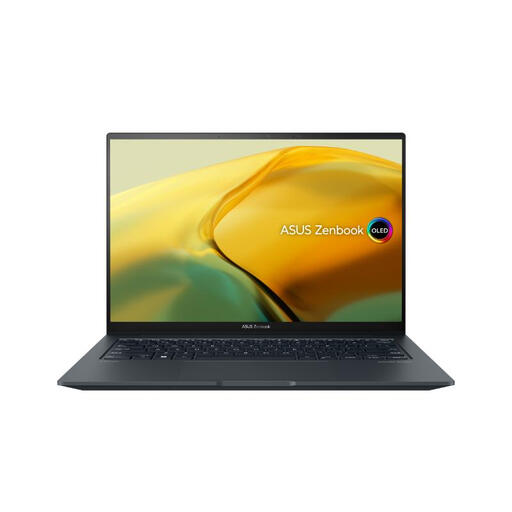 No image available
ASUS ZenBook UX3404VC-M3130W, RTX 3050, 16 GB RAM
This Windows laptop offers a dedicated-graphics configuration to compare if everyday use and PC games must share one device.
The product name specifies a Core i9, 1 TB SSD and 14.5-inch OLED touchscreen. Confirm the exact RTX 3050 graphics-memory configuration against your games’ requirements.
View on Joybuy
 No image available
MSI Pulse 16 AI, RTX 4060, 16 GB DDR5 RAM
This dedicated-graphics laptop is another configuration to check for everyday computing alongside PC gaming.
The product name specifies a Core Ultra 7 155H, 1 TB SSD and 16-inch QHD+ 240 Hz display. Confirm the delivered configuration and consider the charger as well as the laptop if you travel with it.
View on Joybuy
Common questions
Should I use The Sims 4’s minimum or recommended requirements when buying a laptop?
Start with Electronic Arts’ recommended requirements for a new purchase, rather than treating the minimum as your target. EA recommends 8 GB RAM and 50 GB free space, plus 1 GB for custom content and saves; check the publisher’s separate requirements for any other games you plan to play.
Can an integrated-graphics laptop be an option for The Sims 4?
Yes, it is an option to investigate if the exact laptop meets the game’s requirements and you are willing to adjust settings where needed. Electronic Arts says Laptop Mode may help on a laptop or a computer near the minimum requirements; that advice does not establish performance for a particular configuration or for other games.
When does a desktop plus an everyday laptop make sense?
Consider two computers if gaming will stay at a desk and you still need a portable device for daily tasks. Box.co.uk points to desktop cooling and easier upgrades as reasons to compare that route, but it also means finding room for the setup and managing two devices.
Can I use any replacement charger with a UK laptop?
No: confirm a replacement’s compatibility with the exact laptop and its UK plug requirements through the manufacturer. A September 2026 report from the UK Office for Product Safety and Standards identified a specific 45 W laptop charger with a high fire and electric-shock risk caused by non-compliant plug-pin dimensions.


