What matters when choosing?
For one primary laptop used on campus and at home, establish what your course requires before deciding which size, configuration and support arrangements suit you.
Windows laptop
Consider it when: Your course requires Windows applications, or its specialist software requirements are still unclear. UWE Bristol describes Windows as compatible with most university and specialist software.
Check before buying: The exact applications, required Windows version and any assessment software; the operating-system name alone cannot confirm that a particular laptop will run them.
Mac laptop
Consider it when: Your institution confirms that every required application and assessment tool works on macOS.
Check before buying: UWE Bristol warns that some specialist applications are unavailable on macOS and that Windows cannot be installed on Apple-silicon Macs.
Chromebook
Consider it when: Your course confirms that its required applications and every assessment format support the specific Chromebook setup.
Check before buying: Inspera says Chrome OS does not support Safe Exam Browser; its Chromebook Kiosk alternative requires institution-managed devices and licences.
| Concern |
What to check |
Who this matters to |
| Course software and assessments |
Ask your programme for named applications, supported operating systems and any exam-browser requirements. |
If my coursework or exams need installed software, I cannot choose by browsing capability alone. Around 27% of consumers put confirmed course compatibility first. |
| Carrying and charging |
Compare the laptop’s weight and charging arrangements; check its webcam and microphone against your teaching requirements. |
When I move between lectures, study spaces and home, I need a laptop I can carry and use throughout my day. Daily portability is the primary concern for around 33% of consumers. |
| Configuration and support |
Check storage, operating-system support and, for refurbished units, the stated condition, charger and warranty terms. |
If one laptop must serve me throughout my course, I want a usable configuration and a clear route for dealing with faults. Around 20% of consumers prioritise that longer-term value. |
| Study setup and accessibility |
Confirm the ports and compatibility needed for your display, input devices or assistive technology. |
I need my laptop to work with the equipment and arrangements I rely on, not just on its own. For around 20% of consumers, that usable setup is the main consideration. |
Joybuy Windows laptop choices
These Windows laptops offer different screen sizes, memory and storage configurations for campus and home study. Check each model against your course’s applications and assessment tools, particularly where Windows mode or Snapdragon-based software compatibility affects your choice.
 No image available
Acer Aspire Lite AL15-36P-C29Z, 15.6-inch
Consider this configuration if a 15.6-inch screen suits your study setup and your course software works with its supplied version of Windows.
Intel N150, 8GB DDR4 RAM, 128GB SSD and Full HD display. The title identifies Windows 11 Home, while other listing information identifies S Mode; confirm the supplied mode before buying. Check whether 128GB accommodates your local files and applications.
Joybuy
 No image available
ASUS Vivobook 14 X1407QA-LY003W Copilot+ PC
Consider the 14-inch format if you carry your laptop regularly, but confirm that your required applications and assessment tools work on this Snapdragon-based Windows model.
Snapdragon X, 16GB RAM and 512GB SSD. Check expected time between charges against your daily routine rather than judging runtime from the configuration.
Joybuy
 No image available
Lenovo IdeaPad 1, 15-inch
This is a 15-inch Windows option if its supplied operating-system mode accommodates the applications your course requires.
AMD Ryzen 3 7320U, 8GB RAM, 128GB SSD, Full HD display and Windows 11 Home in S Mode. Confirm software and assessment compatibility and whether the storage meets your needs.
Joybuy
 No image available
Lenovo IdeaPad Slim 3 83K7009MUK, 15.3-inch
The 24GB memory and 512GB storage are worth comparing with your programme’s requirements if you expect to keep multiple applications or local files on one laptop.
AMD Ryzen 5 7535HS, 24GB DDR5 RAM, 512GB PCIe SSD, WUXGA display and Windows 11 Home. Check course compatibility, charging needs and the connections required for your study setup.
Joybuy
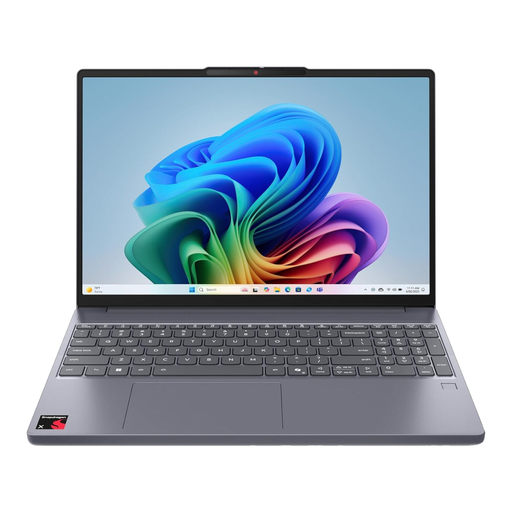 No image available
Lenovo IdeaPad Slim 3 15Q8X10, 83N30029UK
Consider this 15.3-inch option only after checking your named course applications and assessments against its Snapdragon-based Windows setup.
Qualcomm Snapdragon processor, 16GB RAM and 256GB SSD. Check whether the storage suits your files and how the laptop’s size fits your daily journey.
Joybuy
Common questions
Do I need a Windows laptop for university?
Not for every course: the deciding factor is whether your programme’s software and assessment tools support your chosen operating system. UWE Bristol describes Windows as compatible with most university and specialist software, but advises choosing equipment around your course’s actual requirements.
Can a Chromebook be my only study laptop?
Yes, if your university confirms that the specific Chromebook setup supports every required application and assessment. The University of Cambridge cautions that Chromebooks may not suit all assessments; Inspera says its Safe Exam Browser does not support Chrome OS, while its Chromebook Kiosk alternative requires institution-managed devices and licences.
What should I check on a refurbished laptop?
Check the exact processor, memory, storage, operating-system support, stated battery condition, charger and seller’s warranty terms, then match the configuration to your course requirements. Dell Outlet advertises certified refurbished systems and a same-as-new warranty, but you should read the terms for the particular unit.
How do I account for accessibility needs?
List the software, input devices and display arrangements you rely on, then confirm that they work with the laptop’s operating system and connections. If you need arrangements for teaching or assessments, discuss them with your university’s disability or assistive-technology service before purchasing.
What if a UK retailer sells me a faulty laptop?
The Consumer Rights Act 2015 provides statutory remedies for faulty goods; where repair or replacement is the applicable remedy, section 23 requires the trader to provide it within a reasonable time, without significant inconvenience and while bearing necessary costs. GOV.UK also makes clear that buying an extended warranty does not replace your statutory rights.


