What to consider before buying
Write down your games, intended resolution and acceptable settings first; then compare graphics routes and the full laptop configuration against those requirements.
| Concern |
What to check when buying |
Who this matters to |
| Fit for your games |
Check each game’s current operating-system, processor, graphics, memory and free-space requirements against the exact laptop configuration. Decide on your intended resolution and settings. |
If I have particular games in mind, I want to know whether the exact laptop can meet my requirements before choosing a graphics route. Around 36% of consumers put game fit first. |
| Complete configuration |
Compare the exact processor, GPU, RAM, SSD and display together; check the specific model rather than relying on its product-family name. |
If I am comparing laptops, I want the whole configuration assessed rather than making a decision from one component label. Around 29% of consumers prioritise the complete setup. |
| Portability |
Check the listed weight and display size of the exact model against how often and where you will carry it. |
When I regularly move between places, carrying the laptop matters alongside whether it can run my games. Around 21% of consumers put portability first. |
| Storage and continued use |
Check available SSD space for your games and planned additions, the operating-system support path, and the condition and included components of any refurbished unit. |
If I expect to keep games installed and use the laptop over time, I want to consider storage, support and condition as well as immediate game fit. Around 14% of consumers prioritise continued usability. |
Laptop options on Joybuy
These Joybuy choices include everyday laptops and models with dedicated graphics. Check each exact model and its compatibility with your named PC games before choosing.
 No image available
Lenovo LOQ Essential 15ARP11
Consider this dedicated-graphics model if your named games and preferred settings call for that route; check performance for the exact configuration.
AMD Ryzen 7 170; GeForce RTX 5050; 16 GB DDR5 RAM; 1 TB SSD; 15.6-inch FHD 144 Hz display; Windows 11 Home.
Joybuy
 No image available
Lenovo IdeaPad Slim 3 15.3-inch WUXGA, 83K7009MUK
This everyday-use laptop may suit buyers who prioritise carrying their computer; verify its exact graphics configuration against your games before purchase.
AMD Ryzen 5 7535HS; 24 GB RAM; 512 GB SSD; 15.3-inch WUXGA display; listed weight 1.59 kg.
Joybuy
 No image available
ASUS ROG Zephyrus G14 GA403WR-QS088W
Compare this dedicated-graphics laptop if your games and target settings call for a stronger graphics route; check game-specific performance for this configuration.
AMD Ryzen AI 9 HX 370; GeForce RTX 5070 Ti Laptop GPU; 32 GB LPDDR5x RAM; 2 TB SSD; 14-inch WQXGA+ display; Windows 11 Home.
Joybuy
 No image available
Apple MacBook Air 13.6-inch, M5, Starlight
This configuration is listed for everyday productivity; check compatibility for each PC game you intend to play rather than assuming it will run as it would on a Windows laptop.
M5 chip with 10-core GPU; 24 GB unified memory; 1 TB SSD; 13.6-inch display.
Joybuy
 No image available
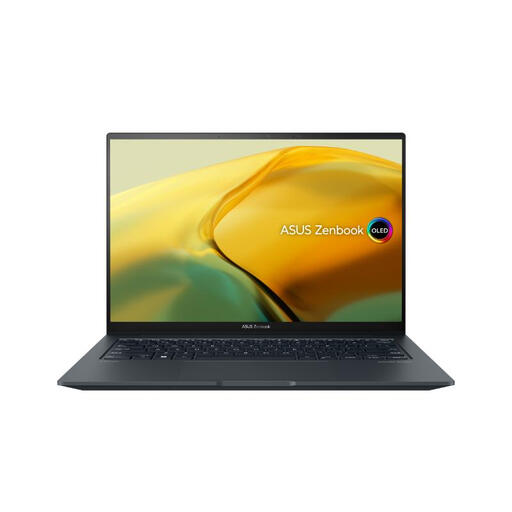
ASUS ZenBook 14.5-inch OLED, UX3404VC-M3130W
Compare this dedicated-graphics configuration if your named games call for that type of GPU, and verify performance for the exact game and settings.
Intel Core i9; GeForce RTX 3050; 16 GB RAM; 1 TB SSD; 14.5-inch 2.8K OLED touchscreen; Windows 11 Home; listed weight approximately 1.6 kg.
Joybuy
Common questions
What should I note about my games before choosing a laptop?
Write down the exact game titles and versions, planned additions, current minimum and recommended requirements, intended resolution and settings, and how long you expect to keep the computer. EA’s The Sims 4 requirements distinguish minimum from recommended specifications, and Steam Support notes that meeting system requirements alone does not guarantee high frame rates.
Does The Sims 4 automatically require a dedicated graphics card?
No: EA’s published minimum graphics list includes some integrated graphics. Compare the exact GPU with the game’s current requirements and your intended settings; the minimum list does not promise a particular frame rate or equivalent performance with added content.
What should I check on an older or refurbished laptop?
Confirm the exact GPU and RAM, usable SSD space, device condition, included charger and operating-system support path before installing games. Microsoft states that ordinary Windows 10 support ended on 14 October 2025, and UK product-safety guidance advises care when buying second-hand electrical goods.
Will a Windows-on-Arm laptop necessarily run my PC games?
No; a general laptop specification does not guarantee that a particular game will work. Microsoft explains that Windows 11 on Arm can run many x86 and x64 apps through emulation, while compatibility checks and driver limitations still matter. Verify each game and its dependencies before treating an Arm model as interchangeable with an x86 laptop.
What UK rights apply if an online laptop order is unsuitable or faulty?
For an applicable online purchase from a trader, GOV.UK says consumers can notify the seller that they wish to cancel within 14 days of receiving the goods and then have a further 14 days to return them. Faulty, misdescribed or unfit goods involve separate remedies. Check that the transaction and seller fall within the relevant rules; a warranty does not replace statutory rights.


