Editors using specified software
If your help-centre work depends on a particular content system, desktop application, browser extension or Office-file workflow, establish its operating-system and account requirements before choosing a device.


Confirm the help-centre platform, file workflow and any required desktop applications before choosing a laptop’s operating system. Windows is the route to check when Windows-only tools are required; macOS can work when those tools support it, while ChromeOS needs particular care with cloud accounts, extensions and offline work. For long formatting sessions, compare the exact screen, keyboard, memory and connections you will use at your desk.
If your help-centre work depends on a particular content system, desktop application, browser extension or Office-file workflow, establish its operating-system and account requirements before choosing a device.
If you regularly read, format and check articles, tables and links from your room, assess the screen and keyboard alongside charging, video-call needs and connections for a possible external display.
If writing, research, documents and calls make up most of your workload, compare the exact memory and storage configuration with the applications and local files you expect to use. A product-family name alone does not identify the configuration.
Choose an operating-system route around the required workflow, then compare the workspace and exact configuration you will use.
Consider it when: Your help-centre system or related work requires Windows applications or plug-ins.
Keep in mind: Windows compatibility does not establish that a particular laptop’s configuration will suit your workload; check the exact tools and device together.
Consider it when: Your required content system, files and collaboration tools support macOS.
Keep in mind: For a MacBook Air desk setup, check whether its USB-C and Thunderbolt connections require adapters for your existing accessories.
Consider it when: The help-centre work runs in a supported browser or cloud workflow, or your organisation explicitly supports ChromeOS.
Keep in mind: Google says its Chromebook route for editing Microsoft 365 files requires OneDrive; check account access, extensions and offline requirements before relying on it.
| Concern | What to check | Who it matters to |
|---|---|---|
| Software and file compatibility | Confirm the content platform, required apps or extensions, account access and offline workflow. | If I cannot use the required editor or share files in the expected format, the laptop will not serve the task. Around 42% of consumers put workflow compatibility first. |
| Room-based workspace | Compare the exact screen and keyboard; check display-output and accessory connections if using a monitor. | Long sessions checking layouts, tables and links call for a desk setup I can work with comfortably. For around 33% of consumers, that workspace is the primary concern. |
| Value for routine work | Check the unit’s installed memory and SSD capacity against your applications and local files. | When writing, research and administrative tasks dominate, I want a configuration that fits those jobs without choosing specialist capability I will not use. Roughly 25% of consumers prioritise that fit. |
A laptop can meet an application’s basic hardware requirements yet still be unsuitable for a required content system, plug-in or offline process. Google says OneDrive is required for its Chromebook Microsoft 365 editing route.
Ask whoever administers the help centre which operating systems, browsers, applications, extensions, accounts and file formats the work requires before ordering.
Microsoft lists 4 GB RAM as a minimum for Windows 11 and for Microsoft 365, but a minimum requirement does not establish how a particular laptop will handle your mix of browser tabs, calls and files.
Use minimum requirements to check eligibility, then assess the exact configuration against the applications you expect to run together.
Memory, storage and other features can vary within a range. An ASUS Vivobook 15 family specification expressed as “up to” does not describe every configuration.
Check the full model identifier and the particular unit’s memory, SSD, screen, ports and included charger before buying.
Battery figures depend on test conditions and use. Acer notes that actual battery life varies with configuration, applications, settings and operating conditions.
If you expect to work away from a socket, compare the stated test conditions with your use and check how the laptop charges.
These model lines illustrate different configurations to examine; check the precise unit and your required software rather than treating a brand name as a compatibility guarantee.
MacBook Air is a macOS option when the required help-centre tools support that operating system.
The Vivobook 15 X1504 range is a Windows option to examine if a larger laptop screen suits your room setup.
The IdeaPad Slim 3i Gen 9 16-inch line is worth examining if a larger Windows workspace and webcam privacy feature matter to you.
The Aspire 5 line offers specific Windows configurations to compare for document work and a room-based desk.
These Windows laptop choices cover different screen sizes and configurations for help-centre work at a student-room desk. Before choosing among them, confirm that your required applications, accounts and file workflow run on the exact device.
 Image unavailable
Consider this 15.6-inch model if you plan to do most formatting at a desk; confirm that its configuration supports your required software and accessories.
The product name specifies an Intel Core 5 120U processor, 24 GB memory, a 1 TB SSD and the Cool Silver variant.
 Image unavailable
Consider the 14-inch size if you will move the laptop between your room and other workspaces. Before buying, confirm that every required application and plug-in supports this Snapdragon X configuration.
The product name specifies 16 GB memory, a 512 GB SSD and the Quiet Blue variant.
 Image unavailable
The 15-inch touchscreen may suit a room-based editing setup. Check support for your applications and plug-ins on this Snapdragon X Elite model, and assess whether 256 GB accommodates the files you will keep locally.
The product name specifies 16 GB memory, a PixelSense touchscreen and the Maya colour variant.
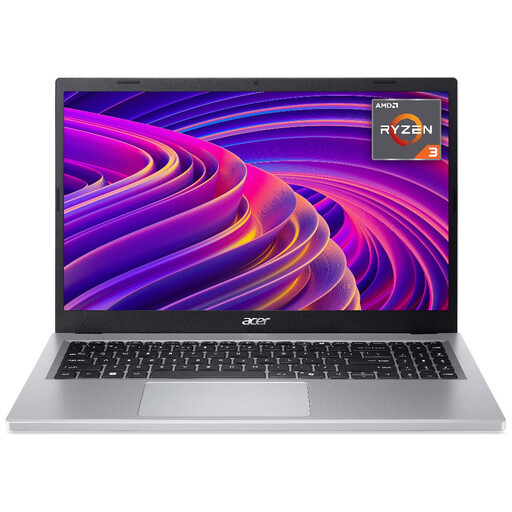 Image unavailable
This model has a 15.6-inch display for desk-based work. Check whether its memory and local storage suit the browser tabs, applications and files your help-centre workflow requires.
The product name specifies a Full HD 1920 × 1080 display, an AMD Ryzen 3 7320U processor and the Silver variant.
 Image unavailable
The 16-inch touchscreen may appeal if you want a larger editing area in your room. Check its weight and monitor connections if you also plan to carry it or add a display.
The product name identifies a 2-in-1 model with an Intel Core Ultra 5 226V processor and Windows 11 Home.
Only if your required platform or related tools need Windows. Microsoft provides Microsoft 365 requirements for Windows and macOS, while Google describes a Chromebook workflow for editing Microsoft 365 files; neither establishes compatibility with your particular help-centre system. Confirm its applications, extensions, accounts and offline requirements before choosing.
It meets a stated minimum, not a demonstrated target for your full workload. Microsoft lists 4 GB RAM in the minimum requirements for Windows 11 and Microsoft 365; compare the exact laptop with the browser tabs, calls, files and other applications you expect to use together.
Yes, Google says Chromebooks can open, edit, download and save Microsoft 365 files through the Microsoft 365 app. Google says OneDrive is required for editing through that route, so check your account access, the features your files need and any offline requirements before choosing ChromeOS.
Check an appropriate electrical-equipment collection or recycling option rather than assuming ordinary household rubbish is the right route. GOV.UK explains that waste electrical and electronic equipment is regulated to encourage recovery, reuse and recycling; ask your local authority or retailer which collection option applies where you live.