Buying priorities
Choose the work platform first, then check whether the exact configuration, connections and support arrangements fit the way you work between home and office.
| Priority |
What to check |
Your needs |
| Performance and storage |
Match the processor, RAM and SSD capacity to your heaviest routine task, simultaneous applications and local files. Compare SSD storage with your working files; Which? notes that otherwise-identical SSD laptops are faster than HDD versions. |
I want documents, downloads and everyday office tasks to stay responsive, rather than choosing a replacement only because my current laptop is old. |
| Work-system compatibility |
Confirm the operating system and supported version, required applications, VPN, browser, endpoint security and device management. For Windows, check the exact edition and Windows 11 hardware support; for ChromeOS, confirm app and administrator access. |
My work laptop needs to run the tools and security setup my employer actually uses, not merely a similar consumer version. |
| Home-to-office practicality |
Check screen size and weight alongside USB-C or Thunderbolt, HDMI, USB-A, wireless connectivity, webcam and external-display requirements. Compare the exact port set with the equipment already on each desk. |
I need a machine that is comfortable at home but still manageable to carry and connect when I work elsewhere. |
| Support and condition |
Check operating-system support dates, the exact configuration, battery condition, charger, disclosed faults and seller terms. For refurbished devices, distinguish voluntary warranty cover from consumer rights. |
I want a laptop with a clear route for support if it develops a fault, especially when buying a used business model. |
Joybuy laptop options
Joybuy product options for Windows and macOS home or hybrid work routes. Confirm employer software, security, VPN, management and peripheral compatibility for the exact model before purchase.
 No image available
ASUS Vivobook 15 X1504VA, Core 5 120U, 24GB RAM, 1TB SSD
A Windows option for routine office work with substantial local files and several existing peripherals.
15.6-inch anti-glare Full HD IPS display, Intel Core 5 120U, 24GB RAM, 1TB SSD, HDMI, USB-A, USB-C, Wi-Fi 6 and HD webcam.
Check that employer tools support Windows 11 Home and confirm work-use battery expectations; the listing states up to 8 hours of standby time.
Joybuy
 No image available
Lenovo IdeaPad Slim 3 15.3-inch, Ryzen 5 7535HS, 24GB RAM, 512GB SSD
A Windows option for hybrid travel, regular video meetings and routine multi-application work.
15.3-inch WUXGA anti-glare display, AMD Ryzen 5 7535HS, 24GB DDR5 RAM, 512GB PCIe SSD, Windows 11 Home, Wi-Fi 6, HD webcam privacy shutter and numeric keypad; stated weight is 1.59kg.
Confirm employer compatibility, work-use battery expectations and any required HDMI or Ethernet connection before buying.
Joybuy
 No image available
ASUS ProArt P16 H7606WW-SE006W, Ryzen AI 9 HX 370, 64GB RAM, 2TB SSD
A Windows option for demanding local creative or technical workloads that genuinely need a high-capacity configuration.
16-inch 3840 × 2400 OLED touchscreen, AMD Ryzen AI 9 HX 370, NVIDIA GeForce RTX 5080 16GB, 64GB RAM, 2TB SSD, HDMI 2.1, USB4, USB-C, two USB-A ports and Wi-Fi 7; stated weight is 1.95kg.
Its larger, heavier format may be less convenient for frequent carrying, and employer acceptance of Windows 11 Home should be confirmed.
Joybuy
 No image available
HP OmniBook X Flip 16-as0004na, Core Ultra 5 226V, 16GB RAM, 512GB SSD
A Windows 2-in-1 option where touch or tablet-style working is useful alongside desk work and video meetings.
16-inch 2K 16:10 touchscreen, 360-degree hinge, Intel Core Ultra 5 226V, 16GB RAM, 512GB SSD, Wi-Fi 7 and 5MP IR camera with privacy shutter.
Confirm workplace support for Windows 11 Home, as well as the weight, port selection, battery capacity and current rotation-driver behaviour if convertible modes matter.
Joybuy
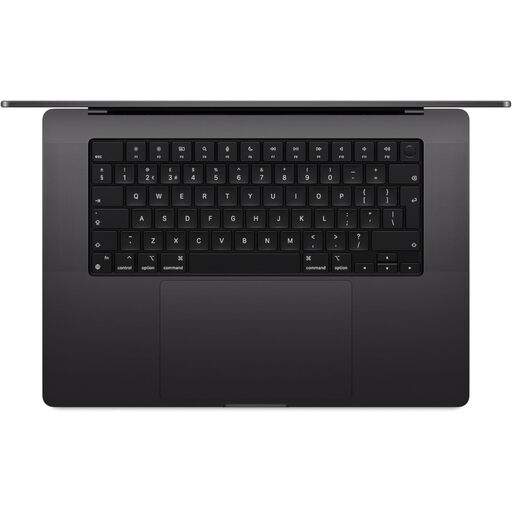 No image available
Apple MacBook Pro 16.2-inch, M5 Max, 36GB Unified Memory, 2TB SSD
A macOS option for large local projects where the employer has confirmed support for the required Mac workflow.
16.2-inch Liquid Retina XDR display, M5 Max chip, 36GB unified memory, 2TB SSD, 12MP camera, three Thunderbolt 5 ports, HDMI, SDXC, Wi-Fi 7 and Bluetooth 6.
Confirm macOS, VPN, security and peripheral compatibility. The listing states that a power adapter is not included and requires a USB-C/USB-PD charger of at least 94W.
Joybuy
Frequently asked questions
Should I buy my own laptop before asking my employer?
Not necessarily. The Health and Safety Executive says DSE rules can apply to workers who use display screen equipment for long-term home or hybrid work, and employers should assess the individual situation. Where an assessment indicates that equipment should be provided, the worker cannot be charged for it.
Can I use a Chromebook for work?
Only after checking the exact work setup. Google says that Android-app availability varies between Chromebooks and apps, and administrators may restrict Play Store access, networks, apps, extensions and authorised users. Confirm your work applications, meetings, VPN and file workflow with your employer or IT team first.
Will Microsoft 365 work on Windows and macOS?
It can, provided the device and version meet your organisation’s requirements. Microsoft lists Windows 11 for Windows and one of the three most recent macOS versions for Microsoft 365 business applications. Confirm the exact apps, licence, deployment method, Teams, VPN and endpoint-security requirements.
What should I check before buying a refurbished business laptop?
Check the exact model and configuration, Windows support, battery condition, charger, ports, keyboard layout, cosmetic grade, known faults, seller identity and return or warranty terms. Citizens Advice says secondhand goods still have consumer rights if they are not of satisfactory quality, fit for purpose or as described, while known faults and normal wear affect the position.
Does UK law require a particular laptop specification for home working?
The Health and Safety Executive’s home-working DSE guidance does not prescribe a laptop brand, operating system, RAM amount or screen size. Where DSE duties apply, suitable equipment depends on the individual assessment and the work carried out at home and, for hybrid workers, in the office.


