What matters when choosing?
Decide which applications and input method your journey requires, then check offline access, the complete carried kit and battery performance against your usual trip.
Compact laptop
Choose it when: You regularly need desktop applications, long typing sessions or several files and windows open at once.
Accept that: A fixed keyboard is ready to use, but a conventional laptop may be less convenient for handwritten notes.
Keyboard tablet or detachable
Choose it when: Reading, annotation and touch input matter more than a permanently attached keyboard.
Accept that: A compatible keyboard may be separate, and the assembled setup may be less convenient for extended typing on your lap.
For consumers choosing a portable computer for repeated rail journeys, these concerns describe different primary needs. Ofcom’s June 2026 research found poor mobile performance across measured rail segments in England, Scotland and Wales, making offline preparation particularly relevant.
| Concern | What to check | Who this matters to |
|---|
| Offline files |
Check capacity for required files and applications, and whether essential cloud files are saved on the device. |
I need to open work or study material when the train loses its connection; around 33% of consumers put reliable offline access first. |
| Carrying and typing |
Compare the packed device, keyboard and other accessories; consider whether the setup works on your lap. |
When I carry my computer every day, I want a manageable bag without giving up the input method I use most; roughly 27% of consumers prioritise that balance. |
| Battery without a socket |
Look for battery tests with a stated workload and settings, allowing for your longest usual journey. |
I want to finish a long trip even if my seat has no usable socket. For about 20% of consumers, working from the device battery is the main concern. |
| Privacy in shared carriages |
Check the exact device’s locking and authentication options, and how easily you can put it away. |
If I handle sensitive documents near other passengers, I need to control access and keep my screen and device manageable; around 20% of consumers place that need first. |
Joybuy products for commuting
These laptops and a convertible model offer different approaches to keyboard-based work and keeping files on the device during train journeys. Check your required software and a relevant battery test before choosing between them.
 Image unavailable
Acer Chromebook Plus 514 CB514-5H, 14-inch, 8GB/256GB
Consider this Chromebook for keyboard-based document work if the applications you need are compatible with it.
14-inch WUXGA display (1920 × 1200), Intel Core i3-1315U, 8GB RAM and 256GB SSD. Check battery testing for your workload and save essential files locally before travel.
View on Joybuy
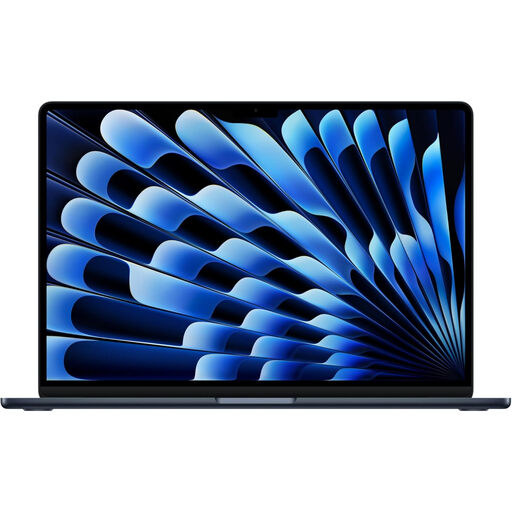 Image unavailable
Apple 13-inch MacBook Air (2026), M5, 24GB/1TB, Midnight
This integrated laptop is worth considering for typing and locally stored work if your applications suit macOS.
M5 chip with 10-core CPU and 10-core GPU, 24GB memory and 1TB SSD. Compare battery results for your own workload rather than treating a video-playback claim as working time.
View on Joybuy
 Image unavailable
HP OmniBook Ultra Flip 14-fh0006na, 2-in-1, 16GB/1TB
Consider this convertible if you want a built-in laptop keyboard alongside a different screen arrangement for reading or notes.
16GB RAM, 1TB SSD and Windows 11 Home. Check whether its folded setup works in your usual seat and compare battery tests relevant to your journey.
View on Joybuy
 Image unavailable
ASUS Vivobook 14 X1407QA-LY003W, Snapdragon X, 16GB/512GB
This 14-inch laptop is an option for keyboard-based work with files stored on the device; confirm that your required applications suit its configuration.
Snapdragon X, 16GB RAM and 512GB SSD. Check a battery test with a comparable workload rather than relying on battery capacity alone.
View on Joybuy
 Image unavailable
Lenovo IdeaPad 1, 15-inch, Ryzen 3 7320U, 8GB/128GB
Consider this laptop if you prefer a larger screen and built-in keyboard and can accommodate them in your daily carry.
Full HD display, 128GB SSD and Windows 11 Home in S Mode. Check both the space needed for offline material and compatibility with your required applications; compare battery tests for commute-like use.
View on Joybuy
Frequently asked questions
Which battery figure helps me plan for offline work?
A test describing its workload and settings is more useful than an advertised maximum on its own. Compare document work, screen brightness and other relevant conditions with your likely use; Microsoft Support notes that battery life varies significantly with settings and activity.
Can I rely on connectivity while working on a train?
Plan to work without it. Ofcom’s June 2026 research across measured rail segments in England, Scotland and Wales found poor mobile performance in 58% to 83% of tests, depending on network, and reported that onboard Wi-Fi performed well only 1% of the time. Save necessary files before boarding and check that they open offline.
Will my train seat have a plug socket?
Check the particular service, train and seat rather than assuming it will. LNER describes plugs at tables in Azuma Standard, while Great Western Railway says its 165/166 Turbo trains lack plug and USB sockets in First Class. Charge your device for the journey even when a socket is expected.
When does a keyboard tablet make more sense than a laptop?
A keyboard tablet or detachable may suit reading, annotation and shorter writing sessions when touch input matters to you. For frequent desktop-application use or prolonged typing, consider a conventional laptop instead; compare the tablet with its compatible keyboard and any other equipment you would actually carry.


