For browser-first landing-page design away from a socket, choose around the apps you need, the laptop’s charging options and the conditions behind its battery rating; Figma says its browser workflow has low graphics requirements. If you also edit images in Photoshop, compare the exact configuration with Adobe’s recommendations of at least 16GB RAM, a display of 1920 × 1080 or higher, and 100GB of available space on a fast internal SSD. A larger screen gives you more room to review layouts on the laptop, but makes for a less compact setup.
Who this is for
Browser-first designers working away from sockets
You create landing pages mainly in Figma, a browser and collaboration tools. Unplugged working time, carrying weight and a workable charging arrangement matter more to you than a dedicated GPU. Figma says its browser workflow has low graphics requirements, although dedicated-GPU use can increase battery consumption.
Designers who also edit images in Photoshop
You work in the browser but also prepare substantial image assets. Adobe recommends at least 16GB RAM, a display of 1920 × 1080 or higher, and 100GB of available space on a fast internal SSD for Photoshop, so check more than the laptop’s battery rating.
Designers tied to Windows tools
Your workplace apps, fonts, plug-ins or browser-testing tools make Windows part of the decision. Check each essential application and peripheral for the exact laptop, particularly if it uses Windows on Arm, before weighing portability against screen size.
What to check before buying
Rule out laptops that cannot run your essential tools, then balance working time away from a socket against the screen and resources your design work needs.
| Concern |
What to check when buying |
Who this matters to |
| Unplugged work and charging |
Compare battery ratings under the same stated test activity. Check charger inclusion, USB-C Power Delivery support and the wattage required by the exact laptop. |
If I work where outlets are scarce, I need a charging plan I can use without assuming a web-browsing battery figure covers design work; around 40% of consumers would put unplugged use and charging first. |
| Design workspace and image editing |
For Photoshop, compare the configuration with Adobe’s recommendations of at least 16GB RAM, a 1920 × 1080 display and 100GB available on a fast internal SSD. |
When I prepare larger image assets as well as page layouts, I need room to work on screen and enough resources for my editing tools; for around 30% of consumers, design workspace and image editing come first. |
| App and device compatibility |
Confirm your required browser, desktop apps, fonts, plug-ins and peripherals against the operating system and processor architecture. |
If my workplace tools will not run on a laptop, its portability cannot make up for that; compatibility would be the primary concern for around 30% of consumers. |
Buying pitfalls
-
Treating a battery rating as a design-session promise
A manufacturer’s figure for video streaming or wireless web use does not tell you how long a session with design files, many tabs, calls or an external display will last.
Check what activity the rating measures, compare like with like and test your own workflow promptly after purchase.
-
Assuming a thin laptop comes with a charger
Dell UK says the charger is not included with its listed XPS 13 configuration and specifies a 27–65W charging range. That changes what you need to arrange before working away from a socket.
For the exact configuration, confirm what comes in the box and check the required plug, USB-C Power Delivery support and wattage.
You may need to obtain a compatible charger separately.
-
Using overloaded leads or unsuitable chargers to gain outlets
London Fire Brigade warns about overloaded extension leads and counterfeit chargers. More sockets do not remove the need to manage the electrical load safely.
Follow the laptop and accessory manufacturers’ instructions, avoid overloading or daisy-chaining leads, and check official product recalls.
-
Assuming every design tool works on every laptop
Browser-based Figma work and locally installed design software have different requirements. Operating system and processor architecture can affect the apps and peripherals you need.
List your essential browser, desktop apps, fonts, plug-ins and external devices, then check compatibility for the exact machine before choosing macOS or Windows, including Windows on Arm.
Laptop lines to consider
Apple
The MacBook Air M5 line is relevant if your browser-first workflow can run on macOS and you want to compare charging options for work away from a socket.
- Apple lists USB-C Power Delivery charging, MagSafe 3 and two Thunderbolt 4 ports. Its 13-inch M5 specifications quote up to 15 hours of wireless web use.
- That web-use figure is not a design-work runtime. Check your apps and plug-ins, and whether the selected screen size fits your layout-review work.
Dell
The current XPS 13 line is a compact Windows route for designers whose workplace tools require Windows.
- Dell UK lists a 27–65W charging range for its XPS 13 product page, giving you a wattage range to check against a proposed charging setup.
- Dell says the charger is not included on that listing. Confirm the selected configuration’s memory, display, ports and charger arrangement rather than applying one listing to every XPS 13.
Lenovo
The Yoga Slim 7x Gen 11 provides a 14-inch Windows-on-Arm route to compare if on-laptop design review matters alongside portability.
- Lenovo’s listed UK configuration has a 1920 × 1200 OLED display, 16GB memory, a 512GB SSD and a 65W USB-C power supply.
- Check every essential desktop app, plug-in and peripheral for Windows on Arm. Lenovo marked that particular UK configuration unavailable when it was listed in the research.
Joybuy product choices
These laptops offer different ways to approach landing-page work: compact Mac and Windows options for carrying between workspaces, alongside larger-screen models to consider if on-laptop layout review matters more. Check charging and real-workload battery needs for the exact model you choose.
 No image available
Apple 13-inch MacBook Air (2026) M5, 16GB, 1TB, Sky Blue
Consider this compact macOS option if browser-first design and your required apps fit your workflow.
The listed variant has a 10-core CPU and 10-core GPU. Apple specifies USB-C Power Delivery and MagSafe 3 charging for the 13-inch M5 line; its up-to-15-hour wireless-web rating is not a design-session guarantee.
Joybuy
 No image available
Lenovo LOQ Essential 15ARP11, Ryzen 7 170, RTX 5050, 16GB, 1TB
Consider this Windows model if a larger built-in display is more important to your image-asset workflow than carrying a smaller laptop.
Its name specifies a 15.6-inch, 144Hz FHD display. Check battery duration under your design workload and the charging equipment you would use away from a socket.
Joybuy
 No image available
ASUS Vivobook 14 X1407QA-LY003W Copilot+ PC, 16GB, 512GB, Quiet Blue
This 14-inch Windows option is worth comparing if you want a smaller laptop for browser-based design.
It has a Snapdragon X processor. Before choosing it, confirm that your essential desktop apps, plug-ins and peripherals work on its Windows-on-Arm configuration, and check battery duration for your workload.
Joybuy
 No image available
Apple 15-inch MacBook Air (2026) M5, 16GB, 1TB, Silver
Consider the larger screen if you review landing-page layouts on the laptop and your required tools support macOS.
Confirm the exact CPU configuration before purchase, as the variant descriptions differ, and check charging requirements and battery duration for your design workload.
Joybuy
 No image available
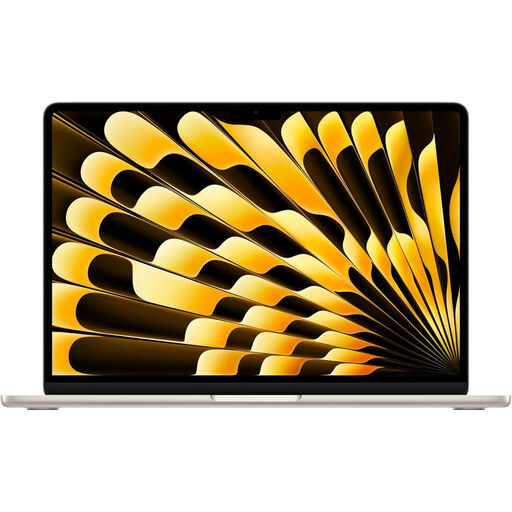
Apple 15-inch MacBook Air (2026) M5, 16GB, 512GB, Starlight
This larger-screen macOS variant may suit on-laptop layout review if its storage capacity fits your files and apps.
The name specifies a 10-core CPU and 10-core GPU. Confirm the screen resolution and charging requirements that matter to your setup, and assess battery duration against your own design workload.
Joybuy
Questions and answers
Do I need a dedicated GPU for landing-page design in Figma?
Not necessarily for browser-based Figma work: Figma describes its graphics requirements as low. It says a dedicated GPU can improve performance but increase battery consumption, so weigh that trade-off against your actual files and other graphics-intensive work when sockets are scarce.
What should I check if I also edit images in Photoshop?
Compare the exact laptop with Adobe’s recommended Photoshop requirements: at least 16GB RAM, a display of 1920 × 1080 or higher, and 100GB of available space on a fast internal SSD. Advertised SSD capacity is not the same as free space after installation.
Can an extension lead solve a shortage of plug sockets?
An extension lead can add outlets, but it does not replace a suitable charging plan or make an overloaded setup safe. London Fire Brigade advises against overloading extension leads and using counterfeit chargers; follow the equipment manufacturers’ instructions when arranging your workspace.


