Silence-first web designers
If you work in a shared or quiet study, audible distraction may matter more to you than extra graphics hardware. You still need to check that your browser-based design tools work with the operating system you choose.


For browser-based landing-page design, check that your tools and browser will work on the laptop before choosing by graphics hardware alone. If quiet operation decides the purchase, Apple explicitly describes the current MacBook Air as fanless; if Windows compatibility, glare control or particular connections matter more, compare the exact laptop configuration and check its acoustic behaviour separately.
If you work in a shared or quiet study, audible distraction may matter more to you than extra graphics hardware. You still need to check that your browser-based design tools work with the operating system you choose.
If your work depends on Windows, compare the exact screen, connections and support arrangement you would buy. Those details can differ between configurations in the same laptop family.
If you prepare visual assets or review colour-sensitive page elements, inspect the exact panel’s colour-gamut specification, resolution and finish rather than relying on the laptop’s model family.
For landing-page work in a quiet study, decide which of three needs would settle your choice: low audible distraction, a suitable display, or compatibility with your software and connections. Then check the exact configuration against that need.
Consider it when: Silence comes first and your design and collaboration tools work on macOS; Apple describes the current MacBook Air as fanless.
Check before choosing: The cited 13-inch specification has two Thunderbolt 4/USB-C ports, so check your peripherals and external-display setup.
Consider it when: You need Windows 11 Pro and want the anti-glare IPS display and support arrangement listed for Lenovo configuration 21NSCTO1WWGB2.
Check before choosing: Those details are configuration-specific; confirm acoustic behaviour separately if study-room noise would decide the purchase.
Consider it when: You want Windows and the OLED and colour-gamut specifications ASUS lists for this model fit your visual-work requirements.
Check before choosing: The cited configuration lists onboard memory with a 16GB maximum; confirm that capacity and the model’s acoustic behaviour before ordering.
| Concern | What to check | Who this matters to |
|---|---|---|
| Quiet operation | Look for an explicit fanless statement or dependable acoustic information for the exact model. Check your design tool’s browser and operating-system requirements. | If I work beside other people in a quiet study, I want to avoid choosing a laptop by appearance and discovering that its fan distracts me. Around 40% of consumers put quiet operation first. |
| Display and glare | Compare the exact panel’s resolution, finish and colour-gamut claim. Decide whether reflections or colour-sensitive asset review is your main display concern. | When I spend hours arranging text and visual assets, I need a screen suited to my room lighting and the work I review on it. For around 30% of consumers, the display is the primary concern. |
| Workflow and connections | Check your operating system, local tools, monitor and peripheral connections, and whether the chosen memory configuration meets your needs. | If my landing-page workflow uses particular local tools or wired devices, I need them to fit the laptop I actually order. Compatibility and connections come first for around 30% of consumers. |
Thickness and screen size do not establish how a laptop sounds in use. Apple describes the current MacBook Air as fanless, but that statement does not extend to the Windows models discussed here.
If noise is decisive, check for a fanless statement or dependable acoustic information covering the exact configuration before buying.
Panel finish, colour specification, memory arrangement and ports affect how a laptop fits a particular design setup. For example, Lenovo’s cited ThinkPad configuration specifies an anti-glare IPS display, while ASUS lists an OLED display and onboard memory for the cited Zenbook configuration.
Keep the full model or part number to hand and compare its panel, memory and connections with your workspace and accessories.
Figma describes itself as predominantly browser-based and says its graphical requirements are low. It also says selecting a dedicated GPU on a dual-GPU computer can improve performance while increasing battery consumption.
Check browser and operating-system compatibility first. Give extra graphics hardware priority only if your files or other software call for it.
The current MacBook Air is a macOS route for a quiet study: Apple describes its 13-inch and 15-inch models as having a silent, fanless design.
The ThinkPad X1 Carbon Gen 13 Aura Edition configuration considered here is a Windows 11 Pro route with an anti-glare work display.
The Zenbook 14 UX3480 is a Windows route to consider if its documented OLED display and connections fit your design setup.
These laptops offer Windows or ChromeOS choices for landing-page work. Match each one to your tools and display needs, and check the exact model’s acoustic behaviour if quiet operation is essential.
 Image unavailable
Consider this Windows laptop if your landing-page workflow also calls for the graphics hardware named in its configuration; ordinary browser-based Figma work does not require a dedicated GPU by default.
The product name specifies a 15.6-inch 144Hz FHD display, 16GB RAM, a 1TB SSD and GeForce RTX 5050 graphics. Check its acoustic behaviour before choosing it for a quiet study.
 Image unavailable
Consider this Windows model if a larger touchscreen and a two-in-one format suit the way you arrange and review page layouts.
The product name specifies a 16-inch touchscreen, 16GB RAM, a 512GB SSD and Windows 11 Home. Check the exact panel finish and colour specification if glare or colour review matters, as well as its acoustic behaviour for study use.
 Image unavailable
Consider this Windows laptop for a compact browser-based setup, provided any local design and development tools you need work on its Snapdragon configuration.
The product name specifies 16GB RAM and a 512GB SSD. Check the screen against your colour requirements and confirm acoustic behaviour before choosing it for a quiet study.
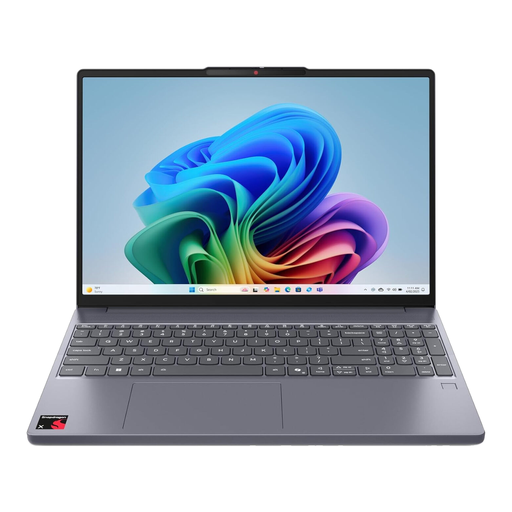 Image unavailable
Consider this larger-screen Windows model if its Snapdragon configuration supports your browser and any local landing-page tools.
The product name specifies a 15.3-inch display, 16GB RAM and a 256GB SSD. Check the panel’s colour and glare characteristics against your work, and confirm acoustic behaviour for study use.
 Image unavailable
Consider this ChromeOS model if your landing-page work fits a browser-centred workflow and does not depend on incompatible local tools.
The product name specifies a 14-inch display, 8GB RAM and 256GB eMMC storage. Check that memory and storage suit your work, and confirm acoustic behaviour if you need a quiet study laptop.
Not by default for ordinary browser-based Figma work. Figma describes its graphical requirements as low; check its browser, operating-system and WebGL requirements, then consider extra graphics capability if your files or additional software call for it.
Look for a fanless statement or dependable acoustic information for the exact laptop you intend to buy. Apple describes the current MacBook Air as fanless; do not assume a different laptop is equally quiet because it is thin or portable.
A change-of-mind return depends on where and how you buy, so check the applicable rules and the seller’s terms before ordering. Keep this separate from a faulty or misdescribed laptop: Citizens Advice explains that those problems may give rise to remedies in England.
A faulty or misdescribed laptop may qualify for a remedy such as a refund, repair or replacement, as Citizens Advice explains in its England guidance. Keep the order confirmation and the advertised model and configuration details so you can describe the problem clearly to the seller.