Choose a laptop for the databases, containers and development tools you need to run at the same time, then check that its operating system and processor architecture support your toolchain. At a standing desk, plan for an elevated screen or external display with a separate keyboard and mouse; the laptop alone is only part of the workstation.
Who this setup suits
Developers running several local services
If a database, containers, an IDE and browser tools are open together, assess memory and storage against that combined workload. PostgreSQL’s resource documentation and Docker’s virtual-machine requirements are useful starting points for checking what your setup needs.
Developers with a required toolchain
If your work depends on Windows applications, Linux tooling or macOS, check the required database software and container images before settling on a laptop. Docker’s setup requirements differ by platform.
People working for long periods at a standing desk
If the laptop will stay on your desk for extended sessions, plan where the screen, keyboard and mouse will sit. The Health and Safety Executive advises using a separate keyboard and mouse so a laptop screen can be raised.
What to check before buying
Start with the software and simultaneous workload you must support, then check how the chosen laptop will connect to your standing-desk equipment and fit any travel or support needs.
| Concern | Buying checks | Who this matters to |
|---|
| Local workload capacity |
List the services and applications you will run together; check installed memory and SSD space for databases, container data and project files. |
I need my database, containers and development tools open together without choosing a laptop solely by an installer minimum. Around 36% of consumers put simultaneous-workload capacity first. |
| Platform compatibility |
Confirm the required host OS, container-image architecture and virtualisation setup. For Windows, check the intended Docker backend and Windows requirements. |
If a required tool or image cannot run on my chosen platform, extra capacity will not fix the mismatch; roughly 29% of consumers prioritise toolchain compatibility. |
| Standing-desk setup |
Check the intended display connection and make room for an elevated screen or monitor, separate keyboard and mouse. |
I work at this desk for long sessions and need the screen and input devices positioned separately. For about 21% of consumers, the desk arrangement is the primary concern. |
| Mobility and support |
Compare the exact configuration’s weight, charger and support terms; check software subscription terms for organisational use. |
I move between work locations or need a configuration my organisation can support, while still meeting my database requirements; around 14% of consumers put mobility or support first. |
Buying pitfalls
-
Buying to a database installer’s minimum
A database that starts successfully may still compete with containers, an IDE and other active tools for memory and storage. PostgreSQL’s resource documentation notes that settings above its minimum are usually needed for good performance; Docker also specifies memory requirements for its virtual-machine environment.
Size the laptop for the services and applications you will use together, including local data, rather than checking each installer separately.
-
Raising the laptop without changing the typing position
An elevated laptop screen also raises its built-in keyboard. For prolonged use, the Health and Safety Executive advises a separate keyboard and mouse so the screen can be raised.
Measure the space for the screen, keyboard and mouse, and check the connection needed for any external display.
The desk arrangement may also call for a riser, external display or dock.
-
Assuming every container works on every platform
Docker’s Windows backends and Mac installation paths differ. Docker also documents slow amd64 emulation on its Docker VMM path and potential file-sharing problems for some databases.
Check your required database images, extensions and development tools against the intended OS, processor architecture and container setup before buying.
-
Assuming local development settles Docker Desktop licensing
Running software on your own laptop does not, by itself, determine which Docker Desktop terms apply to work for an organisation.
Check the current Docker terms against your organisation and intended use before deployment.
Relevant brands to consider
These product lines illustrate different platform and configuration routes; check the exact model rather than applying a line-wide specification to every laptop.
Apple
MacBook Pro is a macOS option when the required development tools and container images suit Apple silicon.
- Apple UK lists three Thunderbolt ports and an HDMI port on MacBook Pro models, relevant when planning desk connections.
- Port availability does not establish toolchain compatibility; check the exact model and required container-image architecture.
Lenovo
The ThinkPad P16 Gen 3 is a workstation line to examine when a larger laptop and a specified memory and storage configuration suit the workload.
- Lenovo UK lists a ThinkPad P16 Gen 3 configuration with 32 GB DDR5 memory and a 1 TB SSD.
- That configuration does not describe every ThinkPad; check the selected model’s specifications and desk connections.
Dell
The Dell Pro Precision 5 14 line is worth checking if you want to order a professional laptop with a Linux operating-system option.
- Dell UK lists Ubuntu Linux 24.04 LTS as an option for the Pro Precision 5 14.
- Confirm the CPU, memory, storage and ports on the configuration you select.
Joybuy laptop choices
These laptops offer Windows and Apple-silicon macOS options for considering local database work. Compare each configuration with your actual software requirements and standing-desk connections; a product’s listed capacity alone does not establish workload performance.
 Image unavailable
Stormforce Exobook 16 QHD+, Ultra 9, 32 GB, 4 TB, 5080
Consider this configuration if your local files and concurrent applications call for the listed 32 GB memory and 4 TB storage. Check your intended Windows and container setup, desk connections and the supplied power adapter before ordering.
Joybuy
 Image unavailable
Lenovo Legion Pro 7 16IAX10H, 83F5000UUK, 64 GB, 2 TB
The listed 64 GB DDR5 memory and 2 TB SSD make this a configuration to assess for a memory-heavy local workload. It has Windows 11 Home and an NVIDIA GeForce RTX 5090; confirm Windows and container requirements, plus the display connections needed at your desk.
Joybuy
 Image unavailable
MSI Stealth 18 AI Studio A1VGG-001UK, 32 GB, 2 TB
This 18-inch configuration lists 32 GB memory and a 2 TB SSD for assessing a local database and development workload. Check the Windows setup your tools require and whether an 18-inch laptop fits the space and movement planned for your desk.
Joybuy
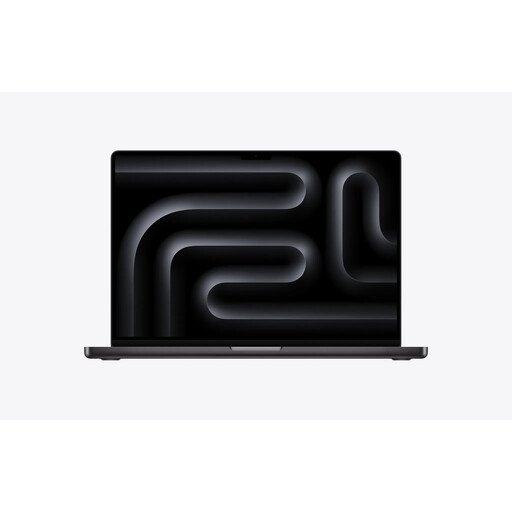 Image unavailable
Apple MacBook Pro 16.2-inch M5 Max, 48 GB, 2 TB, Space Black
Consider this macOS configuration if your database tools and container images support the Apple-silicon architecture you need. It lists an 18-core CPU, 40-core GPU, 48 GB unified memory and a 2 TB SSD; check your exact external-display arrangement before ordering.
Joybuy
 Image unavailable
MSI Summit 16 AI Evo, Core Ultra 7 255H, 32 GB, 1 TB
This 16-inch configuration is worth assessing if you move between desks while running a local workload that fits its listed 32 GB memory and 1 TB SSD. Confirm the ports, display support and Windows container requirements for the setup you intend to use.
Joybuy
Common questions
Do I need a separate monitor, keyboard and mouse at a standing desk?
A separate monitor is not essential to the arrangement described by the Health and Safety Executive, but for prolonged laptop use it advises a separate keyboard and mouse so the laptop screen can be elevated. An external monitor is another option if its position and connections suit your desk.
Can a Windows laptop run Linux containers?
Yes, if the Windows configuration meets the requirements for your chosen container setup. Docker documents WSL 2, Hyper-V and Docker VMM backends for Docker Desktop on Windows; check the applicable Windows requirements and the containers you need before buying.
Does using Docker Desktop for local work make it free?
Local use alone does not determine eligibility. Docker lists free-use categories including personal use, education, non-commercial open-source work and qualifying small businesses; check its current terms against your organisation and intended use.


