Choose the platform around the database images and developer tools you need, then compare memory, storage and noise for the exact configuration. An Apple-silicon laptop is worth considering if your tools support ARM64; a Windows/x86 laptop suits a Windows and WSL 2 workflow. Neither route guarantees quiet operation during sustained database work, so look for model-specific load-noise testing.
Who needs what from the laptop?
Quiet-study local developer
If you run one or a few local database services for coding, coursework or personal projects, check that your tools work on the chosen architecture and that the installed memory and SSD fit your workload. For a noise-sensitive study, seek sustained-load testing of the exact laptop rather than relying on its processor name.
Windows and x86 container user
If your work depends on Windows applications or linux/amd64 images, confirm the required image architecture and Windows setup before choosing a laptop. Docker identifies WSL 2 as its default Windows backend; its requirements and the resources available to your other applications still matter.
Growing local-stack builder
If you expect several databases, containers or larger local datasets, compare installed memory, SSD capacity and expansion options on the exact configuration. Check ports if you plan to attach a dock, wired network or external storage, and assess noise under the kind of sustained work you expect.
What should you check before buying?
For local databases in a quiet study, establish any non-negotiable software compatibility first. Then weigh capacity against study-room noise on the configurations you can actually buy.
| Concern |
What to check |
Who this matters to |
| Memory and storage |
Check installed RAM, SSD capacity and the exact model’s expansion options against your concurrent services and local data. |
If I run databases and containers alongside an editor, I need enough memory for them to coexist and space for their files. Around 42% of consumers put capacity first. |
| Study-room noise |
Look for noise testing of the exact or near-identical configuration at idle and under sustained load; check the seller’s return terms. |
Long imports or builds could disrupt the room where I study, so I need to know how the laptop sounds under load. Roughly 33% of consumers make quiet operation their primary concern. |
| Tool compatibility |
Check required container-image architectures and developer tools; for Windows, confirm Docker Desktop and WSL 2 requirements. |
My existing images or Windows tools must work in the development environment I choose. Around 25% of consumers put compatibility ahead of the other concerns. |
Buying pitfalls
-
Choosing by processor name alone
A processor label does not resolve an incompatible container image or tell you whether memory and storage will accommodate the rest of your local stack. Docker distinguishes ARM64 from amd64 images, while PostgreSQL documents the memory demands of database buffering.
List your database engine, image tags, concurrent services and expected local data before comparing exact laptop configurations.
-
Assuming a slim laptop stays quiet under load
Imports and container builds can keep a laptop busy for longer than light everyday tasks. Its appearance or a product-family description does not establish how the configuration will sound in your study.
Seek an independent sustained-load test of the exact or near-identical configuration, and review the seller’s return terms before ordering.
-
Applying family specifications to the laptop in your basket
Memory and other options can vary within a product line. Lenovo’s ThinkPad T14 Gen 6 Intel documentation and Dell’s UK configurator describe configuration-dependent choices, not specifications shared by every retail model.
Confirm the manufacturer part number, installed RAM, SSD, operating system, ports and warranty terms for the exact SKU you intend to buy.
Relevant brands to consider
Apple
MacBook Air is an Apple-silicon option to assess when your local database tools and container images can run on ARM64.
- Apple’s UK MacBook Air specifications list 16GB unified memory as standard, with configurations up to 32GB.
- Docker says a linux/amd64 container cannot run on an arm64 host without emulation. Check every required image and seek noise testing for the exact MacBook Air configuration.
Lenovo
ThinkPad T14 Gen 6 Intel is an x86 business-laptop line to examine if your local stack may need more memory or wired connections.
- Lenovo lists U- and H-series configurations with support for up to 64GB DDR5-6400 memory.
- Installed memory, expansion options and ports must be checked for the exact configuration; the platform maximum does not describe every laptop sold under the name.
Dell
Dell Pro 14 configurations are worth examining for a Windows development setup where the chosen memory configuration matters.
- Dell’s UK configurator lists a 32GB dual-channel memory option on the referenced configuration.
- A configurable memory option does not establish whether memory can be upgraded after purchase or how the laptop sounds under database load.
Joybuy laptop choices
These laptops cover two approaches to the same study setup: Intel-based options for an x86 workflow and a MacBook Air for an Apple-silicon workflow. Check your software requirements and the noise of the exact configuration before deciding.
 No image available
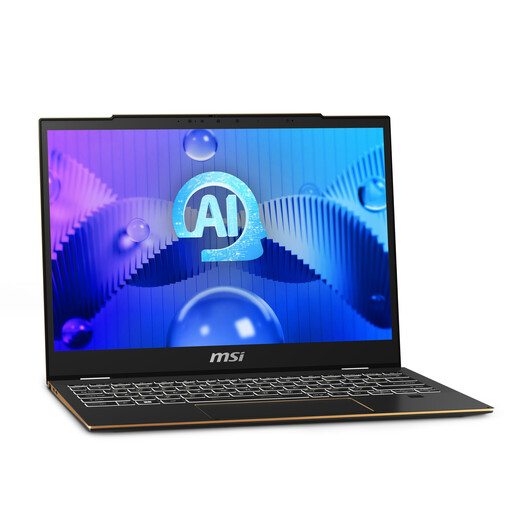
MSI Summit E13 AI Evo, Core Ultra 7 155H, 32GB, 1TB
Consider this Intel-based model if your local stack needs the stated memory and storage in a 13-inch laptop.
The product name specifies a 13-inch FHD+ 60Hz touch display, Intel Core Ultra 7 155H, 32GB LPDDR5 RAM and a 1TB SSD.
Check the installed operating system, memory expansion options and sustained-load noise for this exact configuration.
View on Joybuy
 No image available
MSI Summit 16 AI Evo, Core Ultra 7 255H, 32GB, 1TB
Consider this Intel-based model if you want a 16-inch display alongside the stated memory and SSD capacity for local work.
The product name specifies a 16-inch QHD+ 165Hz display, Intel Core Ultra 7 255H, 32GB LPDDR5 RAM and a 1TB SSD.
Confirm the installed operating system, expansion options and sustained-load noise before relying on it for a quiet study.
View on Joybuy
 No image available
Apple 13-inch MacBook Air (2026), M5, 16GB, 1TB, Sky Blue
Consider this Apple-silicon configuration if your database images, extensions and developer tools support ARM64 or you can use an acceptable emulation workflow.
The product name specifies an M5 chip with a 10-core CPU and 10-core GPU, 16GB memory and a 1TB SSD.
Check compatibility image by image and seek noise testing for this configuration under sustained work.
View on Joybuy
Frequently asked questions
Can an Apple-silicon laptop run my local Docker databases?
Yes, if your required images and dependencies support ARM64, or an emulation workflow is acceptable for your project. Docker says a linux/amd64 container cannot run on an arm64 host without emulation, so check each database image and extension before choosing an Apple-silicon laptop.
What should I check for Docker Desktop on Windows?
Check that the laptop’s Windows installation and hardware meet Docker Desktop’s current requirements, including those for WSL 2 if that is your intended backend. Docker identifies WSL 2 as its default Windows backend; leave enough memory for Windows and the other applications you run alongside your containers.
Can changing my workload help keep the study quieter?
Stopping containers you are not using and moving lengthy builds or imports outside quiet-study time can reduce periods of sustained work, but neither step guarantees a quiet laptop. If noise is central to your choice, look for testing under a workload close to yours.
What should I do if a laptop bought in the UK is faulty?
Contact the seller with your order details and a description of the fault. GOV.UK explains that the Consumer Rights Act 2015 covers what happens when goods are faulty; a seller’s change-of-mind policy is a separate matter from remedies for faulty goods.


