Choose the laptop around the mapping applications you must run: Esri says ArcGIS Pro is a Windows-only desktop application, while an M-series Mac needs a virtual environment to run it. For 2D layouts, compare a mainstream laptop with your actual software requirements; for substantial spatial analysis, imagery or 3D work, assess a suitably configured Windows mobile workstation. Whichever route you take, check the shared desk’s display, dock and charging setup before buying.
Who needs which setup?
GIS analysts handling large or 3D projects
If your work involves ArcGIS Pro, substantial spatial datasets, imagery or 3D views, compare the planned workload with the recommended or optimal requirements for your software, not just its minimum requirements. Esri distinguishes these tiers in its ArcGIS Pro system requirements.
2D map designers and report producers
If you mainly prepare map layouts, labels, exports and accompanying documents, start with the applications you will keep open together and the complexity of your files. Adobe describes 8 GB of memory as a baseline for Illustrator, particularly when several applications run at once; that is not a complete specification for GIS work.
Shared-office and hybrid workers
If you move between desks, check how the laptop connects to the available display, dock and peripherals as well as how you will carry it. The UK Health and Safety Executive includes hot-deskers among the workers covered by its display screen equipment guidance where that guidance applies.
What matters when choosing?
Mainstream Windows laptop
Consider it when: Your work centres on 2D mapping, layouts and documents, and the exact configuration meets your applications’ requirements.
Trade-off: Check memory, graphics and ports against larger projects and the shared desk rather than assuming any Windows laptop will suffice.
Windows mobile workstation
Consider it when: Substantial imagery, spatial analysis or 3D work calls for a configuration matched to the relevant software requirements.
Trade-off: A workstation-family name does not establish the graphics, memory or software certification of the particular model you buy.
MacBook for a compatible workflow
Consider it when: Your team’s required map-design applications support macOS and native ArcGIS Pro is not required.
Trade-off: Esri says ArcGIS Pro requires a virtual environment on an M-series Mac; confirm the organisation’s setup and support arrangements before relying on that route.
| Concern |
What to check |
Who this matters to |
| Software compatibility |
List the required GIS and design applications and versions; confirm their supported operating systems and any employer rules on virtual machines. |
If ArcGIS Pro is essential to my map task, I need an approved way to run it before comparing hardware. Around 40% of consumers put application compatibility first. |
| Mapping workload |
Match the expected datasets, imagery, analysis and 2D or 3D work to the software publisher’s requirements and the exact laptop configuration. |
When I work with substantial imagery or analysis, I need to know whether the machine suits those projects, not just whether the application opens. Roughly 30% of consumers prioritise workload capacity. |
| Shared-desk setup |
Check the actual dock, display connections, charging and peripherals, alongside the employer’s workstation arrangements. |
Moving between desks means I need a setup I can connect and use for map layouts without relying on the laptop screen alone. For about 30% of consumers, shared-office usability is the primary concern. |
Buying pitfalls
-
Choosing an operating system before checking the GIS application
Esri says ArcGIS Pro runs on Windows only. On an M-series Mac it requires a virtual environment, rather than a native installation.
Ask the task owner or IT team for the required applications and versions. If ArcGIS Pro is essential, confirm an approved Windows setup or have the proposed virtualised setup assessed before buying a Mac.
A virtualised setup can also add Windows installation and IT-support work.
-
Assuming a workstation badge or dedicated GPU settles the choice
Esri sets different minimum, recommended and optimal requirements for ArcGIS Pro, and GPU processing depends on the particular tool. A product-family label cannot establish whether one configuration suits your projects.
Check the GIS tools, dataset size and 2D or 3D workload first. Then compare the exact processor, memory and graphics configuration with the software publisher’s requirements.
-
Checking portability but not the shared desk
A laptop that is convenient to carry may still need compatible connections and peripherals at the desk. Where the UK Health and Safety Executive’s display screen equipment guidance applies, the employer’s workstation assessment remains relevant to hot-desking.
Confirm the dock model, display inputs, charging, network and peripheral arrangements, and use the employer’s assessment process where applicable.
A compatible dock, adapter, charger or separate keyboard and mouse may be needed for the planned setup.
Relevant brands to consider
Lenovo
Lenovo positions its ThinkPad P Series as mobile workstations for professional applications.
- Lenovo describes the series as offering independent software vendor certification for major applications.
- Check certification, graphics, memory and ports for the specific ThinkPad P configuration and your required software.
Dell
Dell’s Precision mobile-workstation range is aimed at demanding professional applications.
- Dell describes application testing and certification within the Precision range.
- A range-level claim does not confirm that a particular configuration suits your GIS software or shared-office dock.
HP
HP positions different ZBook models for workloads ranging from 2D work to more advanced visualisation and modelling.
- The range gives buyers distinct workload tiers to compare.
- Memory and graphics options differ by model; choose the configuration against your actual mapping applications.
Apple
MacBook Pro is a macOS option when the organisation’s required map-design applications support that platform.
- Apple lists multiple memory and SSD configurations for MacBook Pro.
- Esri says ArcGIS Pro runs on Windows only and requires a virtual environment on an M-series Mac; confirm that route with IT if the application is required.
Joybuy products for map-design work
These laptops offer different display, memory and graphics configurations to assess for map-design work. Compare each one with your required applications and the equipment at your shared desk.
 No image available
ASUS ProArt P16 H7606WW-SE006W, 64GB RAM, 2TB SSD
Consider this Windows configuration for map projects that call for substantial memory and graphics hardware, subject to your applications’ requirements.
The product name specifies Windows 11 Home, an AMD Ryzen AI 9 HX 370, NVIDIA GeForce RTX 5080 16GB graphics and a 16-inch 4K OLED touchscreen. Confirm compatibility with your required software and the shared-office dock and displays.
Joybuy
 No image available
MSI Summit 16 AI Evo, Core Ultra 7 255H, 32GB RAM
Consider it for 2D map layouts and work across several applications once you have confirmed the required software and operating-system configuration.
The product name specifies a 16-inch QHD+ 165Hz display, Intel Arc graphics and a 1TB SSD. If your planned Spatial Analyst tools need the NVIDIA GPU processing path described by Esri, check graphics compatibility before choosing this model.
Joybuy
 No image available
Lenovo Legion Pro 7 16IAX10H 83F5000UUK, 64GB RAM, 2TB SSD
Assess this Windows laptop against more demanding map projects if its exact configuration meets the GIS applications and tools you plan to use.
The product name specifies Windows 11 Home, an Intel Core Ultra 9 processor and NVIDIA GeForce RTX 5090 graphics. Confirm its carrying requirements and compatibility with the shared-office dock and displays.
Joybuy
 No image available
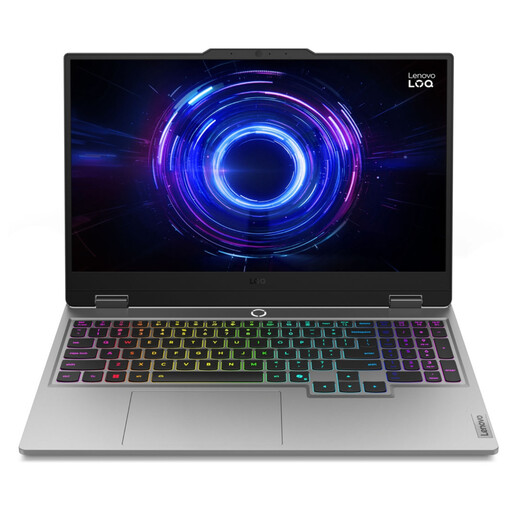
LOQ 15IRX10 i5-13450HX, 24GB RAM, 1TB SSD, W11H
Consider this configuration when comparing laptops for mapping across several applications, after checking the precise GIS workload it must handle.
The product name identifies the processor, memory, storage and W11H variant. Confirm the graphics and port configuration against your software and shared-desk equipment.
Joybuy
 No image available
ASUS Vivobook 15 X1504VA, Core 5 120U, 24GB RAM, 1TB SSD
Assess it for ordinary 2D map layouts and document work if its software configuration matches the applications you need.
The product name specifies a 15.6-inch display and the Cool Silver variant. Check graphics requirements for any planned GIS analysis, along with connections to the shared-office dock and display.
Joybuy
Common questions
Do I need a Windows laptop to design geography maps?
You need a Windows route if your required workflow includes a native ArcGIS Pro installation: Esri describes it as a Windows-only desktop application. For other map-design workflows, check the operating-system requirements of every application your team uses.
Can I use ArcGIS Pro on a MacBook Pro?
Not as a native macOS application. Esri says ArcGIS Pro requires a virtual environment on an M-series Mac, so confirm the organisation’s virtualisation, Windows licensing and support arrangements before buying a MacBook for that task.
Does map design require a dedicated GPU?
Not for every map-design task. Esri identifies GPU processing for particular Spatial Analyst operations; check whether your planned tools use that path, then compare their requirements with the laptop’s exact graphics configuration.
How much RAM should I consider for Illustrator-based map layouts?
Adobe describes 8 GB as a baseline for Illustrator, particularly when several applications run together. Treat that as an Illustrator starting point, then check the requirements of your GIS software and the size and complexity of your map files.
What should I check before using a laptop at a shared desk?
Check the actual dock, display connections, charging and peripherals before choosing the laptop. Where the UK Health and Safety Executive’s display screen equipment guidance applies, the employer should assess the workstation and address identified risks; a laptop purchase alone does not determine the desk setup.


