Choose a laptop around where you enter membership records: a larger screen and a suitable keyboard can help with frequent desk-based entry, while a more compact model is easier to take between locations. If the records contain personal information, confirm that your software works on the exact device and plan for secure access, storage encryption where appropriate, updates and recovery; a business-laptop label alone does not provide those safeguards.
Who is this for?
Membership secretaries handling personal records
If you maintain names, contact details or subscription records, consider how the laptop will control access and how you will recover the information after a loss or failure. The Information Commissioner's Office advises enabling storage encryption on laptops that store personal information.
Desk-based spreadsheet record keepers
If you spend long sessions entering and checking records, compare the working area and the exact keyboard layout. A numeric keypad may be useful for frequent numerical entry, but its presence depends on the configuration.
Mobile volunteer administrators
If you work at meetings, at home and at other venues, consider what you can comfortably carry and how you will access records securely away from the main desk. The Information Commissioner's Office also advises organisations to assess the risks when personal devices are used for their work.
What matters when choosing?
Start with your membership software and record-storage arrangements, then decide whether desk-based entry or travel has the greater influence on screen and keyboard size.
| Concern | What to check | Who this matters to |
|---|
| Personal-data security and recovery |
Confirm a supported operating system and suitable storage encryption; plan secure sign-in and backups for the way records are held. |
If I keep identifiable member records on the laptop, I need to limit unauthorised access and be able to restore them after a problem. Around 42% of consumers put secure handling and recovery first. |
| Efficient record entry |
Compare screen size and the exact keyboard layout, including whether a numeric keypad is fitted. |
When I regularly reconcile subscriptions or update long spreadsheets, I want room to see the records and enter numbers comfortably. Efficient entry is the primary need for around 33% of consumers. |
| Work across locations |
Check the device's weight, charging and connections, as well as how it will receive updates and access records remotely. |
Moving between meetings and home makes carrying the laptop manageable more important to me, provided I can still access records securely. Portability and remote use come first for around 25% of consumers. |
Buying pitfalls
-
Assuming a security feature makes the records secure
A fingerprint reader or business-laptop label cannot replace access management, updates or a way to restore records. The Information Commissioner's Office calls for security measures appropriate to the risks of handling personal data.
Choose a device that can be securely configured, then put suitable encryption, authentication and backup arrangements in place for your records.
-
Buying an older Windows laptop without checking support
Microsoft states that Windows 10 support ended on 14 October 2025. A device intended for membership records needs an operating system that can continue receiving security updates.
Check the exact laptop's operating system, update status and compatibility with your membership software before buying.
-
Choosing a compact laptop without considering regular data entry
A smaller screen gives you less room to view records, and the keyboard may not have the layout you want for repeated numerical entry.
Compare the actual keyboard and display. If you prefer a compact laptop for travel, consider whether an external monitor or keyboard will make desk sessions more practical.
-
Sharing a personal laptop that opens membership records
The Information Commissioner's Office identifies shared access, weak protection and movement of organisation data into personal storage as risks when personally owned devices are used for work.
Use an organisation-managed device where practical. If a volunteer uses their own laptop, assess the arrangement, separate organisation data and secure access before allowing it to open records.
Relevant brands to consider
These business-laptop families offer configurations worth comparing; features must be checked on the particular model rather than assumed from its brand.
Lenovo
ThinkPad business laptops are a route to consider if your organisation wants a Windows device that can be selected and managed around its security requirements.
- Lenovo describes selected ThinkPad Secured-core PCs as offering ThinkShield and Microsoft security options, including firmware protections and authentication choices.
- Those claims concern eligible configurations, not every ThinkPad. Check the exact model, operating system and available management features.
Dell
Latitude is a commercial Windows-laptop family to compare for work at a desk and across locations.
- Dell describes productivity-oriented Latitude configurations and identifies a numeric keypad on a cited larger-screen business-laptop configuration.
- Screen, keyboard and security features vary. Confirm the particular configuration and keyboard layout before choosing it for record entry.
HP
ProBook offers commercial Windows-laptop configurations to compare if you need a choice of working areas for membership administration.
- HP describes ProBook screen-size and business-security options across the range.
- Memory, storage, included accessories and security features depend on the exact configuration; do not assume that a feature described for one ProBook applies to another.
Joybuy laptops for membership-record work
These laptops offer different screen sizes and configurations for desk-based records work or carrying between locations. Before choosing one, check that your membership software runs on its exact configuration and that your arrangements for personal data are suitable.
 No image available
ASUS Vivobook 14 X1407QA-LY003W, Quiet Blue
Consider this 14-inch model if carrying your records-work laptop between locations is a priority; check that your intended software works with this Snapdragon X configuration.
Snapdragon X processor, 16 GB RAM and 512 GB SSD. Confirm the security configuration and your backup arrangements before storing member data locally.
View on Joybuy
 No image available
HP OmniBook X Flip 16-as0004na, 16-inch 2-in-1
Consider the larger touchscreen if you want room to view records at a desk and a convertible design for other working positions.
Intel Core Ultra 5 226V, 16 GB RAM, 512 GB SSD and Windows 11 Home. Check the keyboard layout if you enter numbers frequently, and confirm your encryption and backup arrangements for locally held records.
View on Joybuy
 No image available
ASUS Vivobook 15 X1504VA, 24 GB/1 TB, Cool Silver
This 15.6-inch configuration is worth considering if you work mainly at a desk and need to assess space for local working files.
Intel Core 5 120U, 24 GB RAM and a 1 TB SSD. Check its keyboard layout, software compatibility and the security and recovery arrangements for any locally stored member records.
View on Joybuy
 No image available
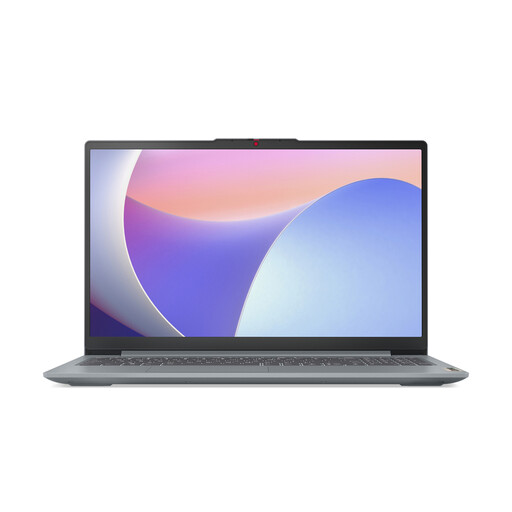
Lenovo IdeaPad Slim 3 15IAH8, 83ER00G4UK
Consider its 15.6-inch screen for desk-based document and record viewing, while checking the keyboard against your entry workload.
Intel Core i5, 8 GB RAM and 512 GB SSD. Check battery runtime for your intended use before relying on it away from a desk, and arrange suitable protection and recovery for locally stored records.
View on Joybuy
 No image available
Acer Aspire Lite AL15-36P-C29Z, Silver
Its 15.6-inch screen is a desk-work option, but establish your software and local-file requirements before choosing this configuration.
Intel N150, 8 GB DDR4 RAM and 128 GB SSD. Confirm whether Windows 11 Home is running in S Mode and whether your membership software will work with it; also plan encryption where appropriate and a way to recover records.
View on Joybuy
Frequently asked questions
Should I encrypt a laptop used for membership records?
Yes, if it stores personal information: the Information Commissioner's Office advises enabling storage encryption on laptops that store such information. Encryption helps protect data if the device is lost, but you also need appropriate access controls, updates and recovery arrangements.
Should I buy a Windows 10-only laptop for membership administration?
Choose a device that can run an operating system still receiving security updates instead. Microsoft states that Windows 10 support ended on 14 October 2025; check the exact laptop's supported operating system and your membership software's requirements.
Can a volunteer use their own laptop to access membership records?
They can only do so safely if the organisation assesses and manages the risks of that arrangement. The Information Commissioner's Office says organisation-issued devices are generally the more secure option and highlights shared access, unpatched software and personal storage as concerns with privately owned devices; separate organisation data and secure remote access where a personal laptop is used.
What should I do if a new laptop is faulty?
Contact the seller and explain the fault, keeping your order confirmation and the exact model details. The UK Consumer Rights Act 2015 covers remedies for faulty goods sold to consumers; the remedy available depends on the circumstances and timing, and is distinct from a manufacturer's voluntary warranty.


