What matters when choosing
For a bright-window writing desk, settle the display and software questions first. Then decide how much built-in workspace and travel convenience you need from the same laptop.
| Concern | What to check | Who this matters to |
|---|
| Window-side readability |
Check brightness in nits and anti-glare or anti-reflection wording for the exact display configuration. A brightness figure alone does not guarantee readability in direct sunlight. |
If reflections interrupt my edits beside the window, I want to settle the screen choice before other upgrades. Around 36% of consumers would put window-side readability first. |
| Writing workspace |
Compare display size and shape, and decide whether an external monitor or separate keyboard fits your regular editing setup. |
Keeping a manuscript and reference notes visible together matters more to me than carrying the smallest laptop. Around 29% of consumers would make writing workspace their primary concern. |
| Travel and charging |
Check the selected model’s weight, ports, box contents and compatible charging requirements. |
When I move between writing locations, the laptop and everything needed to power it must be manageable to carry. For around 21% of consumers, travel practicality would come first. |
| Software and file capacity |
Confirm that essential writing and photo tools run on the chosen operating system, then select the memory and storage configuration for your files. |
I need my established apps and locally kept photographs to fit the way I work. Software workflow and capacity would lead the choice for around 14% of consumers. |
Joybuy product choices
These laptops offer different ways to balance manuscript space, portability and software workflow. For each one, check the precise display and charging configuration against your window-side setup before ordering.
 No image available
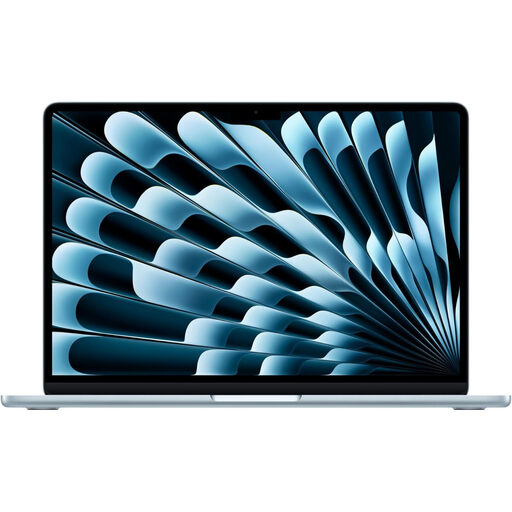
Apple MacBook Air 15-inch M5, 10-core CPU and GPU, 16GB/1TB, Sky Blue
Consider this macOS model if built-in space for a manuscript and notes is a priority. Apple documents a 500-nit display for the M5 MacBook Air, but check how reflections look in your intended position rather than relying on brightness alone.
This variant is identified with 16GB memory and a 1TB SSD. Check the charging equipment you will need when travelling.
View on Joybuy
 No image available
ASUS Vivobook 15 X1504VA, 15.6-inch, Core 5 120U, 24GB/1TB, Cool Silver
Consider this Windows laptop if you want a 15.6-inch screen for editing chapters alongside reference material. Check the exact panel’s brightness and reflection treatment for your window-side desk.
This variant is identified with an Intel Core 5 120U processor, 24GB memory and a 1TB SSD. Assess its weight and charging setup if you will carry it regularly.
View on Joybuy
 No image available
Lenovo IdeaPad 3 15IAU7, 82RK0177UK, 15.6-inch, 16GB/512GB, Blue
The 15.6-inch format may suit manuscript review when you want a Windows laptop with more built-in screen area. Confirm the exact display brightness and reflection treatment before choosing it for a bright window.
This variant is identified with 16GB memory and a 512GB SSD. Check the precise processor and graphics configuration when ordering.
View on Joybuy
 No image available
Acer Chromebook Plus 514 CB514-5H, 14-inch WUXGA, Core i3-1315U, 8GB/256GB, Iron
Consider this Chromebook if a 14-inch format appeals for travel and your essential writing, research and photo tools work on ChromeOS. Check screen brightness and reflections in the lighting where you expect to edit.
The named configuration has a WUXGA 1920 × 1200 display, Intel Core i3-1315U processor, 8GB memory and a 256GB SSD.
View on Joybuy
 No image available
HP OmniBook Ultra Flip 14-fh0006na, 2-in-1, 16GB/1TB
Consider this Windows 2-in-1 if a convertible form suits the way you work while travelling. For editing beside a bright window, check the exact panel’s ordinary brightness and reflection treatment.
The named configuration has 16GB memory, a 1TB SSD and Windows 11 Home. Do not treat an HDR display label as a substitute for checking brightness in your intended conditions.
View on Joybuy
Common questions
What display should I look for beside a bright window?
Look for brightness and reflection treatment specified for the exact laptop configuration. Lenovo lists 500 nits plus anti-glare and anti-reflection treatment for ThinkPad part number 21NS0171UK; Apple lists 500 nits for the M5 MacBook Air. Neither brightness figure guarantees comfortable viewing in direct sunlight.
Is a larger screen always better for editing a memoir?
No: more built-in document space is useful when you view chapters beside notes, but the size must still suit your travel routine and lighting. Apple lists a 15.3-inch M5 MacBook Air display, while Microsoft offers Surface Laptop sizes from 13 to 15 inches with taller 3:2 options; check reflection treatment separately.
Will a laptop come with a charger?
Check the selected product rather than assuming it will. Apple says its UK MacBook Air does not include a power adapter, and Dell says a charger is not included with the XPS 13 DX13260; confirm box contents and compatible charging requirements before ordering.
What should I do with an old laptop in the UK?
Use an appropriate electrical-equipment collection or recycling route rather than putting it in general household waste. UK government guidance on waste electrical and electronic equipment addresses recovery, reuse and recycling; erase your personal data before handing the laptop over.
Do workplace display-screen rules apply to personal writing at home?
Employer display-screen duties are not a general rule for personal memoir writing. The Health and Safety Executive’s workstation guidance can still help you arrange the screen and keyboard and plan breaks for lengthy editing sessions.


