Joybuy product choices for laptop work and calls
These choices cover external screens, USB-C hubs and docks, separate keyboard and mouse inputs, and webcams for recurring laptop-based work.
 No image available
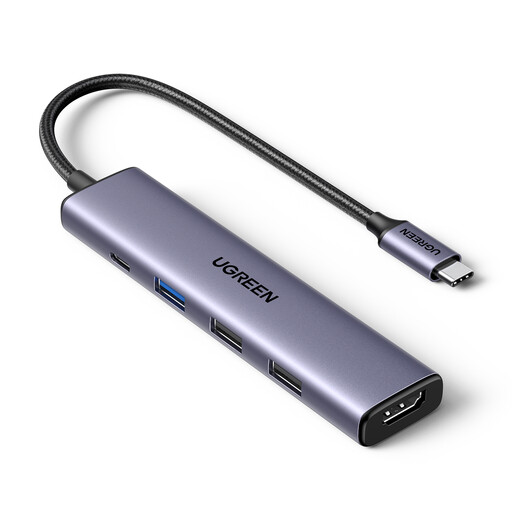
UGREEN Revodok 5-in-1 USB-C Hub
For a laptop workspace that needs one external screen and a few additional connections.
USB-C hub with 4K HDMI, three USB-A data ports and 100W PD listed. Check your laptop’s video support and the power delivered to it before relying on this setup.
Joybuy
 No image available
HP 680 CFT Dual-Mode Keyboard/Mouse Combo
For a laptop setup where separate keyboard and mouse inputs are part of the working arrangement.
Check the connection type and operating-system compatibility against your laptop and workspace before choosing a keyboard and mouse set.
Joybuy
 No image available
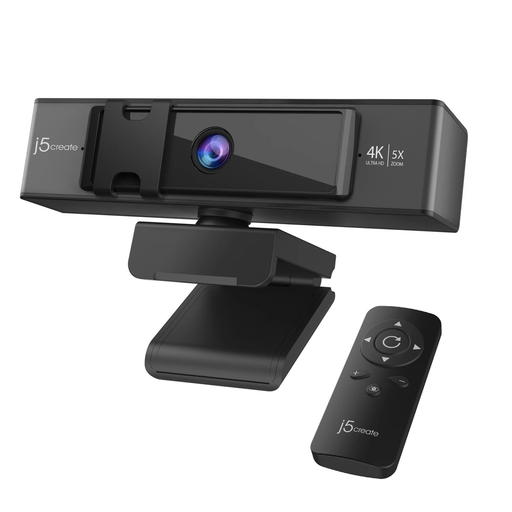
j5create JVCU435 4K Ultra HD Webcam
For calls where a separate camera is the need, rather than more screen space or laptop connections.
The product name specifies 4K Ultra HD, 5× digital zoom and a remote control. Check that its connection and features suit your setup.
Joybuy
 No image available
ASUS ProArt PA278CV IPS WQHD
For sustained laptop work when adding an external screen is the main requirement.
IPS WQHD monitor. Check the laptop’s video output, the monitor’s compatible connection and the display position that suits your desk.
Joybuy
 No image available
Targus USB-C Universal Dual HDMI 4K Docking Station
For a desk setup that regularly reconnects displays and peripherals through a dock.
The product name specifies dual HDMI 4K and 100W power-delivery pass-through. Check that the laptop supports USB-C Alt Mode and that the stated external power-adapter requirement suits your setup.
Joybuy
Frequently asked questions
Does a USB-C port mean my laptop can use a one-cable monitor or dock?
No. USB-C identifies a connector, while video alternate modes and enhanced USB Power Delivery are separate capabilities. Check the exact laptop port, proposed device and cable; for a direct HDMI or DisplayPort connection, check the laptop’s video output and the monitor input. The USB Implementers Forum describes USB Type-C capabilities separately from the connector itself.
Will a dock give every MacBook several separate external screens?
Do not assume so; check the exact Mac model’s external-display support and the dock’s connection method. BenQ notes that its DisplayPort MST daisy-chain approach is not a universal Mac multi-display route. DisplayLink-based alternatives can require software installation and macOS Screen Recording permission.
How should I set up a laptop for prolonged screen work?
HSE guidance describes positioning a screen around eye level and an arm’s length away, with separate keyboard and mouse inputs so a laptop screen can be elevated. A separate display is another option; adjust the setup to your workstation rather than assuming every laptop user needs to buy a monitor.
Does UK display-screen guidance require a home or hybrid worker to buy a monitor or dock?
It does not establish a blanket requirement for every worker to buy either item. HSE says display-screen equipment rules can apply to permanent or long-term home workers and routine hybrid workers who use display-screen equipment daily for continuous periods of an hour or more. Where an applicable workstation assessment finds equipment is needed, HSE says the worker cannot be charged for it; discuss the assessment and provision with the employer.
What return rights matter when buying a monitor or dock online in the UK?
For distance sales, GOV.UK says customers generally have 14 days after receiving an item to notify the seller that they want to cancel, followed by another 14 days to return it. Faulty or misdescribed goods have separate rights. Check the seller’s process, and do not treat a manufacturer’s warranty as a substitute for statutory rights.


