What should you check before buying?
Start with the connection your laptop can use, then narrow the screen choice by desk space, positioning and the accessories you actually need.
| Concern |
What to check |
Who this matters to |
| Video and charging compatibility |
Confirm the laptop’s USB-C display-output capability or a matching HDMI or DisplayPort output. For one-cable charging, compare the monitor’s stated power delivery with the laptop’s requirement. |
I want to plug in once and start work without finding that the screen or charging does not function as expected. About 40% of consumers put connection and charging certainty first. |
| Workspace and desk fit |
Measure free desk width and depth, then compare screen size, native resolution and stand footprint. |
With spreadsheets and documents open together, I need more usable room on screen without crowding my desk. For about 30% of consumers, workspace within the available footprint is the main concern. |
| Screen position |
Check the supplied stand’s height and angle adjustments. For an arm, confirm mount compatibility, supported weight and desk-clamp fit. |
If I work at this desk for long stretches, I need to place the display where I can use it comfortably. Positioning is the primary need for about 20% of consumers. |
| Calls and peripherals |
List the accessories you need to connect, then check the exact monitor’s ports and hub functions. |
When I move between laptop-only work and a desk with call equipment and accessories, I want connections that suit both arrangements. Roughly 10% of consumers put that desk convenience first. |
Joybuy monitors for laptop desks
These additional displays offer different screen sizes and connection choices for laptop work. Match the exact model to your laptop’s outputs, charging needs and available desk space.
 Image unavailable
BenQ MA320UP 32-inch 4K USB-C monitor
Consider this larger display if you have room for it on your laptop desk. The title specifies a Nano Glossy IPS panel and a height-adjustable stand; confirm your laptop’s USB-C video output and charging requirement before planning a one-cable setup.
View on Joybuy
 Image unavailable
ASUS ProArt PA24ACRV QHD IPS monitor
A QHD option for a laptop desk where document or creative work calls for a separate screen. Confirm the exact regional variant’s USB-C video, charging and hub functions, along with your laptop’s display output, before relying on one cable.
View on Joybuy
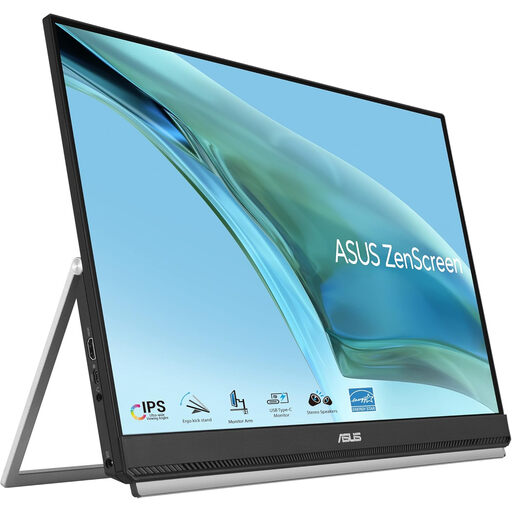 Image unavailable
ASUS ZenScreen MB249C IPS USB-C monitor
Consider this model for a workspace where the screen’s placement may change. Check which mounting accessories come with the variant, and confirm laptop video and charging compatibility; if you expect to move or mount it regularly, verify the supplied variant’s weight.
View on Joybuy
 Image unavailable
ASUS ProArt PA278CFRV QHD IPS 100Hz monitor
A QHD display to assess if you want another screen for documents or creative work. Its title specifies a 100Hz IPS variant; confirm the exact regional model’s USB-C functions before planning monitor-based charging or peripheral connections.
View on Joybuy
 Image unavailable
LG 27UP650K 27-inch 4K IPS monitor
Consider this model if a separate display connection and laptop charger suit your desk. The title specifies a 60Hz display with HDMI and DisplayPort; check for a matching laptop output or suitable adaptor, and measure the space available for a 27-inch screen.
View on Joybuy
Common questions
Will any USB-C laptop work with a USB-C monitor through one cable?
No. Confirm that the laptop supports video output through that USB-C port, such as DisplayPort Alt Mode or a documented Thunderbolt or USB4 display function. If you also want charging, compare the monitor’s stated power delivery with the laptop’s requirement and check the cable you will use.
When does HDMI or DisplayPort make more sense than USB-C?
Use a matching HDMI or DisplayPort output if you are content to charge the laptop separately, particularly when USB-C display output has not been confirmed. For an adaptor connected to USB-C, check that the laptop can send video through that port and that the adaptor supports your intended display connection.
Does a home-working monitor need an adjustable stand?
Choose the adjustment your desk arrangement needs rather than treating any single stand design as essential. Check whether the supplied stand lets you position the screen appropriately; an arm is another option if the monitor mount, arm capacity and desk attachment are compatible.
Should a UK employer assess a home-working screen setup?
Where display screen equipment regulations apply, the UK Health and Safety Executive says employers should carry out an assessment for individual home workers. If you work at home and in an office, raise both setups through your employer’s assessment process; the action needed depends on the individual workstation.


