What to decide before buying
Choose the screen arrangement around the desk you actually use, then check that the keyboard, pointing device and connections work with it. A monitor arm or desk lamp is a further choice: mounting must suit the desk and display, while lighting should not create screen glare.
External monitor and separate input devices
Consider it when: You work at a permanent desk and need more screen area for documents or multiple applications.
Trade-off: The display takes desk space, and its inputs, cable and supported output must match your laptop. A monitor does not replace planning a separate typing and pointing position.
Raised laptop and separate input devices
Consider it when: You use a compact or shared surface and do not need a second display.
Trade-off: The riser must support your laptop and still leave room for the keyboard and pointing device; it does not add screen area.
| Concern |
What to check |
Who this matters to |
| Screen and input position |
Check that screen height can be set independently of the keyboard and that there is space for a pointing device. |
If I raise my laptop for repeated work, I still need to type and point without using its elevated keyboard and trackpad. Around 36% of consumers put this arrangement first. |
| Desk footprint |
Measure the usable surface and check the riser’s laptop size and weight limits, or an arm’s mounting requirements. |
On a shared table, I need to clear away my work setup without giving up separate input devices. Roughly 29% of consumers make space and storage their primary concern. |
| Device compatibility |
Match the laptop’s video output to the monitor and cable; check Bluetooth and operating-system support for wireless input devices. |
When I change laptops, I need the screen or accessories to connect to the device I will actually use. Around 21% of consumers prioritise compatibility. |
| Employer assessment |
If you are an employee, ask whether a display screen equipment assessment applies and how any identified equipment is supplied. |
Before buying work equipment myself, I need to know whether my employer should assess the workstation and arrange what it requires. Approximately 14% of consumers put that question first. |
Joybuy products for this setup
These keyboards, mice and external displays address parts of a regular laptop-work setup. Choose an input arrangement that fits your desk, then consider whether a portable or permanent-desk display meets your need for more screen area.
 Image unavailable
HP 680 CFT Dual-Mode Keyboard and Mouse
A separate keyboard-and-mouse arrangement to consider when raising a laptop screen. Check that the keyboard fits beside your laptop and that its shortcuts work as needed with your device.
View on Joybuy
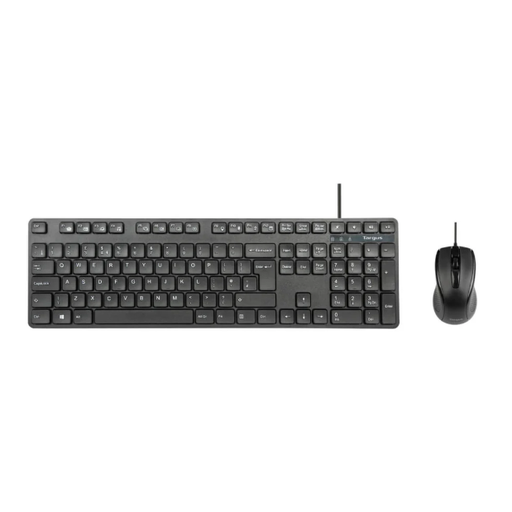 Image unavailable
Targus Full-Size USB Wired Keyboard and Optical Mouse
A wired keyboard-and-mouse set for a desk with room for full-size input devices. Check the available surface and your laptop’s USB connections before choosing it.
View on Joybuy
 Image unavailable
ASUS ZenScreen MB166CR FHD
An external FHD display to consider when a laptop workspace needs another screen. Confirm that your laptop’s video output and the proposed connection suit the MB166CR.
View on Joybuy
 Image unavailable
ASUS ProArt PA278CV IPS WQHD
A WQHD external monitor to consider for a permanent laptop desk. Allow space for the screen and check the laptop output, monitor input and cable before buying.
View on Joybuy
 Image unavailable
Dahua 32-inch 4K 165Hz Curved OLED Gaming Monitor
A large external display to consider where a permanent desk has sufficient space. Its title specifies 4K resolution and a 165 Hz refresh rate; check which settings your laptop and chosen connection can support.
View on Joybuy
Questions about home laptop setups
Do I need a separate keyboard and mouse with a laptop riser?
For prolonged laptop use, the Health and Safety Executive advises separating the keyboard and mouse from the laptop so its screen can be raised. A riser alone also raises the built-in keyboard and trackpad, so plan space for the complete arrangement.
Will any USB-C monitor work with my USB-C laptop?
No: check the exact laptop’s video output, the monitor input and the cable or adapter before buying. Apple Support says external-display support depends on the Mac model, while Google Chromebook Help advises checking the Chromebook’s connections and suitable adapter.
Does my employer need to assess my home workstation?
In Great Britain, the Health and Safety Executive says employers must assess the workstation when an employee normally uses display screen equipment daily for continuous periods of an hour or more; this can include home and hybrid work. Northern Ireland has separate rules, and the Health and Safety Executive for Northern Ireland says they can also apply to permanent or long-term home workers and people who routinely split work between locations.
Can my employer charge me for equipment identified by an assessment?
For an applicable Great Britain display screen equipment assessment, the Health and Safety Executive says workers cannot be charged for additional equipment the assessment shows is needed. That does not establish reimbursement for an accessory bought independently; ask about your employer’s assessment and purchasing process.
When is a desk lamp worth adding?
Consider task lighting when the work area needs it, provided it does not reflect into the screen. The Health and Safety Executive advises arranging screens and lighting to avoid reflections and glare; a lamp does not replace an appropriate screen and input-device arrangement.


