Multi-display laptop workers
If you work across documents and other windows, establish how many independent displays your laptop can run and whether your chosen connection can also handle peripherals and charging.


Choose the addition that solves your actual constraint: a separate monitor for more screen space, a dock for connecting displays and peripherals, or a suitable monitor arm when desk space is tight. Before buying a dock, check the laptop’s video output, operating system and charging capabilities; a USB-C connector alone does not establish that two displays will extend independently or that the laptop will charge.
If you work across documents and other windows, establish how many independent displays your laptop can run and whether your chosen connection can also handle peripherals and charging.
If your work surface also serves other purposes, consider how much room the monitor needs and how easily you can clear or reposition the setup.
If you alternate between work and personal machines, check each laptop’s ports, operating system, driver permissions and charging needs rather than assuming one connection works the same way on both.
For repeated laptop-based home or hybrid work, identify the connection your laptop can provide, then choose the screen arrangement and desk layout that fit your needs.
| Concern | Buying checks | Who this matters to |
|---|---|---|
| Display compatibility | Check the laptop’s video-capable port and operating system against the dock, monitor inputs and number of independently extended displays you need. | If I work across several windows, I need to know that the screens will show the arrangement I expect, not merely connect to the dock. Around 33% of consumers put display and connection compatibility first. |
| Shared desk space | Measure the usable surface and check monitor size, mount compatibility and how cables will run. | When the table has to be cleared after work, I need a screen arrangement that fits and can be moved or put away. For around 27% of consumers, that practical fit is the primary concern. |
| Older or mixed laptops | Confirm USB-A or USB-C host support, required drivers, display limits in that connection mode and a separate charging method if needed. | If I switch between laptops, I need the connection to work with each machine’s ports and permitted software. Around 20% of consumers prioritise support for older or mixed devices. |
| Workstation assessment | For sustained work screen use, ask whether an employer workstation assessment applies before choosing equipment to address the setup. | Before buying equipment for my regular work area, I want to know whether an assessment should identify what is needed. That is the first concern for around 20% of consumers. |
Connector shape alone does not establish video output, independent display support or laptop charging. Anker specifies particular USB-C video and power capabilities for its A210B hub.
Compare your exact laptop model and operating system with the dock’s host-port, display and charging requirements.
StarTech.com says its DK30CH2DPPDU supports two displays but not laptop Power Delivery when connected through USB-A; that connection also needs a separately sold adapter.
Check the accessories required for the intended host connection and plan to use a separate laptop charger where necessary.
Anker says its A210B can show different content on two external displays with Windows, but mirrors content on macOS.
If you need two independent external displays from a Mac, check the exact Mac, operating system and dock compatibility before ordering.
In Great Britain, the Health and Safety Executive says that where an applicable display screen equipment assessment indicates action such as providing equipment, workers cannot be charged for it. This does not mean every home worker needs additional equipment.
If the purchase is meant to address your regular work setup, ask your employer whether an assessment applies and what action it identifies.
Anker’s A210B is a compact USB-C hub to consider when a laptop has the video and power capabilities specified for that model.
StarTech.com’s DK30CH2DPPDU offers a driver-based display route for supported USB-C and USB-A laptop connections.
Kensington offers mixed-connection docks as well as monitor arms for arranging a work surface.
These products cover an external-screen setup and a USB-C dock for connecting displays and peripherals. Match the monitor input or dock requirements to your laptop before choosing; a larger screen also needs enough room on your work surface.
 No image available
Consider this for a single external screen at a home-work desk.
24-inch FHD display. Check your laptop’s video output and the cable needed to connect it.
 No image available
Consider this where a larger external screen can remain on a dedicated desk.
31.5-inch 2K IPS display with built-in speakers. Measure the desk and check the laptop’s output for your intended display mode.
 No image available
Consider this for a regular desk where displays connect through a USB-C dock.
The title specifies dual HDMI 4K outputs and 100 W Power Delivery pass-through. Check your laptop’s video mode, independent-display behaviour and the power adapter required; pass-through capacity does not establish how much power your laptop will receive.
 No image available
Consider this external screen if you have room for a 32-inch monitor.
The title specifies 2560 × 1440 resolution, HDMI and DisplayPort inputs, and VESA 100 × 100 mm mounting. Check your laptop’s output and the connection needed for your intended display mode.
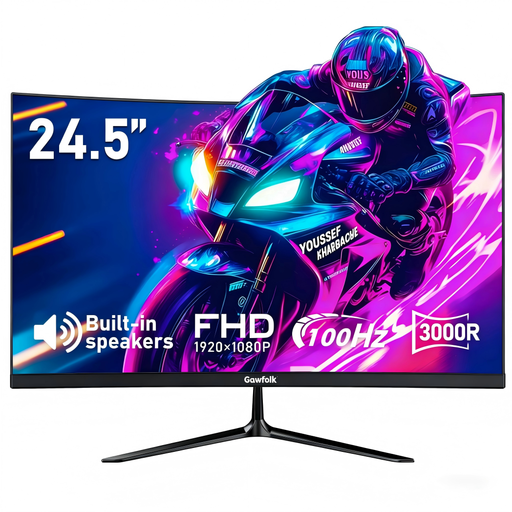 No image available
Consider this for a single external screen where a 24.5-inch monitor fits the work surface.
The title specifies FHD resolution, a curved display and an HDMI connection. Check the laptop’s output and confirm the monitor’s mounting pattern before selecting an arm.
No: the port and dock must support the required video, display arrangement and charging features. Anker specifies a full-function USB-C, USB4 or Thunderbolt connection with the relevant video and power capabilities for its A210B; check your laptop and the exact dock together.
Yes, if the particular dock supports a USB-A host connection and its software requirements work for your laptop. StarTech.com says its DK30CH2DPPDU needs a separately sold adapter for USB-A; in that mode it supports two displays and does not provide laptop Power Delivery.
If the equipment is intended to address your regular work setup, ask whether a display screen equipment assessment applies first. In Great Britain, the Health and Safety Executive says workers cannot be charged where an applicable assessment indicates action such as providing equipment; in Northern Ireland, the Health and Safety Executive for Northern Ireland says employers must assess display screen equipment risks at home or work and determine individual needs.
Check that the mount fits the monitor and can attach to the desk without obstructing its other uses. Leave access to the display and power connections, and consider whether the monitor will need to be moved when the table is shared.