Choose a laptop that runs your essential newsletter software and works with the display and input devices you plan to use at the standing desk. A compact model is easier to carry to local reporting locations, while more built-in screen space may matter when you edit away from your desk. For sustained desk work, assess screen position, lighting, keyboard and mouse placement as a complete workstation, in line with Health and Safety Executive guidance.
Who is this for?
Standing-desk newsletter writers
If you spend long periods drafting and editing at one desk, consider how the laptop will sit alongside your keyboard, mouse and lighting. The Health and Safety Executive advises assessing the whole display-screen workstation, not just the screen.
Mobile local reporters and editors
If you write at meetings or community venues as well as at your desk, carrying weight and a usable built-in display matter alongside connections for your desk equipment. Check the weight and display of the exact configuration you intend to buy.
Windows-dependent newsletter publishers
If publishing tools, administration software or a printer require Windows, establish compatibility before choosing by screen size or appearance. A Snapdragon-based Windows laptop also calls for a check of essential applications and device drivers.
What matters when choosing?
Start with the software and devices your newsletter requires, then decide how the laptop will work at your standing desk and on reporting trips. Think about the complete setup, not only the laptop.
| Concern |
What to check |
Who this matters to |
| Standing-desk setup |
Check whether you can position the screen comfortably while keeping a separate keyboard and mouse at a practical height. Account for lighting and desk space. |
If I write for long stretches at one desk, I need room to arrange the screen and input devices without awkward positioning. Around 38% of consumers would put workstation fit first. |
| Writing away from the desk |
Check the selected configuration’s weight and built-in display size against how often you will carry and use it without peripherals. |
When I draft at meetings or local venues, I need a laptop I can carry and use on its own. About 23% of consumers would make portability their primary concern. |
| Workflow compatibility |
Confirm your required operating system, publishing applications, plug-ins and printer drivers; check ARM compatibility for a Snapdragon model. |
If my newsletter depends on particular software or a printer, those tools need to work on the exact laptop I choose. Roughly 23% of consumers would prioritise workflow compatibility. |
| Complete setup |
Check the exact configuration and whether you will need a charger, stand, adapters or separate input devices. |
I want to know what else my desk arrangement requires before committing to a laptop. Around 16% of consumers would put the complete setup first. |
Buying pitfalls
-
Treating the laptop screen as the whole standing-desk setup
Raising a laptop screen also raises its built-in keyboard. Health and Safety Executive workstation guidance covers screen position, input devices, furniture and the surrounding environment.
Plan where the screen, keyboard and mouse will sit before choosing a laptop or stand, and check for reflections at the desk.
Your arrangement may call for a stand, separate input devices, a display or a dock.
-
Choosing by laptop family rather than exact configuration
Display, memory and included accessories can differ between configurations. Dell states that a charger is not included with the XPS 13 configuration described on its UK product page.
Compare the final listing’s display, memory, storage, ports, keyboard layout and included accessories before checkout.
-
Assuming every Windows application works on every processor
Microsoft lists Snapdragon X Plus and X Elite options for the 13.8-inch Surface Laptop. Essential applications and peripheral drivers need checking for the selected ARM-based configuration.
List the publishing software, plug-ins, printer and scanner you rely on, then confirm compatibility with that configuration before buying.
Brands to consider for this workflow
These laptop lines illustrate different routes for newsletter work; the right choice depends on your software, carrying needs and desk arrangement.
Apple
The MacBook Air is a compact macOS route for writers whose newsletter tools work on that operating system.
- Apple lists a 13.6-inch display and two Thunderbolt 4/USB-C ports for the MacBook Air line, relevant when planning a desk connection.
- Check your required applications and peripherals for macOS compatibility, and whether your existing devices need adapters.
Microsoft
The 13.8-inch Surface Laptop is a compact Windows route with a touchscreen.
- Microsoft lists Snapdragon X Plus and X Elite processor options for the 7th Edition.
- Confirm essential application and peripheral-driver compatibility with the ARM-based configuration you select.
Lenovo
The ThinkPad X1 Carbon Gen 13 is a business-laptop route for writers who frequently carry their computer.
- Lenovo describes the researched X1 Carbon Gen 13 configuration as weighing less than 1 kg.
- Check the exact display, keyboard layout and support terms; specifications vary by configuration, and low weight alone does not settle workstation comfort.
Dell
The XPS 13 is another compact Windows laptop line to assess against your software and desk equipment.
- Its compact format is worth considering if you regularly move between writing locations.
- Dell states that a charger is not included with the configuration described on its UK product page; check what the exact listing supplies.
Joybuy products for this setup
These choices include laptops for drafting and editing a local newsletter, plus an adjustable table for arranging a laptop at a work surface. Check your software and desk layout against the exact item before buying.
 No image available
ASUS Vivobook 14 X1407QA-LY003W Copilot+ PC, Snapdragon X, 16GB, 512GB, Quiet Blue
Consider this 14-inch laptop if you write both at a desk and elsewhere. Its Snapdragon X processor makes compatibility with your essential newsletter applications and peripheral drivers an important pre-purchase check.
If you plan to connect a display or separate input devices, confirm the connections on the final listing.
View on Joybuy
 No image available
HP OmniBook Ultra Flip 14-fh0006na 2-in-1, 16GB, 1TB, Windows 11 Home
This 2-in-1 is an option if you want a Windows laptop for newsletter work and value a convertible format. The named configuration has 16GB memory and 1TB storage.
Confirm the exact ports on the final listing before planning a monitor or dock connection.
View on Joybuy
 No image available
Lenovo LOQ Essential 15ARP11, Ryzen 7 170, 16GB, 1TB, RTX 5050, 15.6-inch 144Hz FHD
Consider this model if built-in screen space matters more to you than choosing a smaller laptop for trips. Although sold as a gaming laptop, its named configuration can also be assessed for writing and newsletter production.
Check that its size and carrying weight suit your reporting routine, and plan the screen and keyboard positions for sustained desk use.
View on Joybuy
 No image available
Acer Aspire Lite AL15-36P-C29Z, 15.6-inch FHD, Intel N150, 8GB DDR4, 128GB SSD, Silver
This laptop offers a 15.6-inch built-in display for drafting away from an external monitor. Its named configuration has 8GB memory and 128GB storage; decide whether those capacities fit the files and applications you use.
Confirm the exact Windows 11 Home software-installation mode before buying if your newsletter work requires desktop applications outside the default selection.
View on Joybuy
 No image available
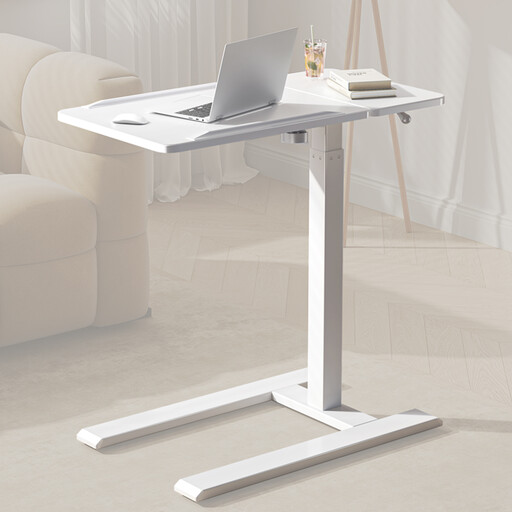
SIHOO D01 height- and tilt-adjustable overbed table with wheels, White
This is a table accessory, not a laptop. Its height and tilt adjustments may be useful when arranging a laptop work surface; check its dimensions and stability against your equipment and available space.
Plan separate keyboard and mouse placement if you intend to raise the laptop screen for sustained writing.
View on Joybuy
Common questions
Do I need a larger laptop screen for a standing desk?
No: a larger built-in screen is most relevant when you work without a separate display. At a regular standing workstation, assess screen height, keyboard and mouse placement, desk space and lighting together, as described in Health and Safety Executive guidance. If you raise a smaller laptop, plan how you will use separate input devices.
What should I check before choosing a Snapdragon laptop for newsletter work?
Confirm that your essential publishing applications, browser extensions, printer or scanner drivers and other peripherals work with the exact ARM-based Windows configuration. Microsoft lists Snapdragon X Plus and X Elite options for its 13.8-inch Surface Laptop; do not assume compatibility from the Windows name alone.
What should I keep after buying a laptop?
Keep the product listing, configuration details, order record and warranty terms so you can identify what you bought if a problem arises. Check the seller’s change-of-mind return terms separately from remedies for goods that are faulty or misdescribed; GOV.UK explains that consumer rights apply to goods bought remotely or in person.


