Workers carrying one computer between locations
If you use the same machine at home and elsewhere, consider how often you carry it, what equipment is available at each desk and whether your work software is approved on that machine.


Choose a laptop if the same computer must travel between home and another workplace. A desktop makes more sense when your work is concentrated at one desk and another approved arrangement covers work elsewhere; a laptop with a dock can serve both locations if its charging, display and peripheral connections work together. Whichever route you favour, confirm your employer’s device and software requirements before buying.
If you use the same machine at home and elsewhere, consider how often you carry it, what equipment is available at each desk and whether your work software is approved on that machine.
If demanding tasks happen at a permanent desk and you do not need to take the same computer elsewhere, a desktop configuration may fit your workspace. Work away from that desk still needs an approved arrangement.
If you need one computer to travel but want displays, Ethernet and peripherals waiting at home, check the exact laptop, dock, cable and monitor combination before choosing a dock.
Decide whether the computer itself must travel, then check employer approval and the equipment your work needs at each location. A portable monitor can add screen space to an existing laptop, but it does not replace the decision about the primary computer.
Choose it when: the same approved computer needs to go between work locations.
Accept that: a portable computer may need separate desk equipment where you work for longer periods.
Choose it when: your main work stays at a fixed desk and you can plan the computer around that workstation.
Accept that: it cannot be the same computer you take to another workplace.
Choose it when: one travelling laptop also needs to connect to a more permanent home desk.
Accept that: the desk setup depends on the capabilities of the particular laptop, dock and connections.
| Concern | What to check | Who this matters to |
|---|---|---|
| Employer approval and software | Ask whether a personal device is permitted and confirm the required operating system, applications and security tools. | If my employer requires particular software or controls, the computer must meet those requirements before its form factor matters. Around 29% of consumers would put work-device compatibility first. |
| Portability | Check the computer’s stated weight and what you must carry with it, then establish what equipment is available at each location. | When I work in more than one place, I need my main computer to come with me without an impractical carried setup. For around 29% of consumers, that mobility would be the primary concern. |
| Fixed-desk work | Match the exact configuration to your applications and confirm its display outputs against the monitors you intend to use. | If most demanding work stays at my home desk, I can give the stationary setup more attention than travel. Around 18% of consumers would prioritise that fixed-desk need. |
| One laptop at a home desk | Compare the laptop and dock specifications for charging power and the intended monitor count, resolution and connections. | I want to carry one laptop, then reconnect it to my home displays and peripherals without rebuilding the desk each time. That desk connection would come first for around 24% of consumers. |
A personally owned laptop or desktop may not meet an employer’s access and security requirements. The Information Commissioner’s Office advises organisations to consider controls for personal devices and to use approved technology when handling personal data at home.
Ask your employer which devices, operating systems, applications and security tools are permitted before choosing a computer.
If the device cannot be used for the intended work, you may need a different approved computer.
Charging and external-display support depend on the computer, dock and connections. Microsoft notes that a display splitter duplicates a signal rather than creating independent extended displays.
Check the exact laptop’s display and charging capabilities against the dock, cable and monitors you plan to use.
A different cable, adapter or dock may be needed if the planned connections do not work together.
A desktop can anchor a home workstation, but it cannot accompany you when the same computer is required at another workplace.
Map where you actually work. If another location requires a computer, confirm whether a separate approved device or remote-access arrangement is available.
Lenovo and Dell list model-specific charging, display and port configurations for their docks; those figures do not establish what every connected laptop can use.
Choose the computer and dock as a pair, checking the connections needed for your displays, wired network and peripherals.
Relevant if you are considering a ThinkPad-oriented laptop and dock or another USB-C or USB4 dock for a home desk.
Relevant if dock power delivery, displays, Ethernet and operating-system support are central to a laptop-based workstation.
Relevant if you are comparing a business laptop with a fixed home desktop configuration.
These computers cover portable laptops and a compact desktop for a fixed desk. If you plan to dock a laptop, check its exact connections alongside the dock and monitors you intend to use.
 No image available
Consider this 2-in-1 laptop if your main computer needs to move between locations. The named configuration has 16GB RAM, a 1TB SSD and Windows 11 Home; confirm that your work applications and employer requirements suit it, and check battery runtime for work away from power.
 No image available
This laptop is an option if you need a travelling computer with the specified graphics, memory and storage configuration for your applications. Its named configuration includes an AMD Ryzen AI 9 HX 370, NVIDIA GeForce RTX 5080 16GB, 64GB RAM, a 2TB SSD and Windows 11 Home. Check the carried size, battery runtime and exact dock-and-monitor support for your work pattern.
 No image available
Consider this 14-inch laptop if you want one computer to carry between work locations. The named configuration has a Snapdragon X processor, 16GB RAM and a 512GB SSD. Confirm that your required applications and employer security tools work with the exact platform, and check battery and external-display requirements separately.
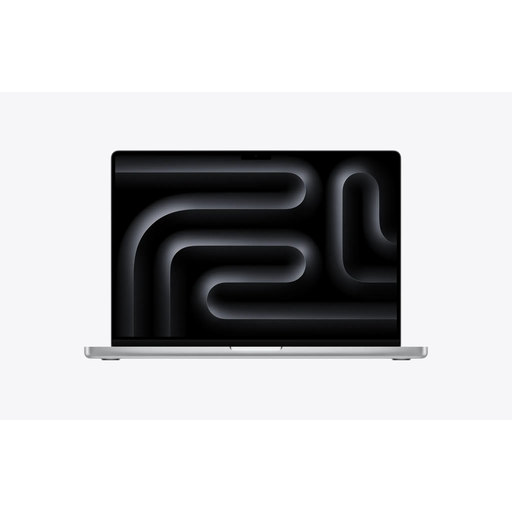 No image available
This laptop offers a single computer for travel and desk work if macOS meets your work requirements. The named variant has an M5 Max with an 18-core CPU and 32-core GPU, 36GB unified memory and a 2TB SSD. Check its carrying weight, unplugged use and intended external-display arrangement before choosing it for frequent moves.
 No image available
Consider this mini desktop when your primary setup stays at one desk and work elsewhere is covered by another approved arrangement. The named configuration has an Intel Core 5 processor, 16GB RAM and a 512GB SSD. Confirm its display connections and whether the monitor, keyboard and mouse you need are supplied.
Only if it meets your employer’s rules for personal devices and work systems. The Information Commissioner’s Office advises organisations to address the security risks of personal-device use; ask which operating systems, access methods and security controls your employer permits before buying.
Not necessarily: the laptop’s display capabilities, the dock and the connections must support the intended arrangement. Microsoft explains that a splitter duplicates a display signal rather than creating two independent extended displays, so check the exact computer’s supported monitor count and display modes.
Confirm the employer’s required applications and security tools as well as the computer’s Windows 11 compatibility. Microsoft’s baseline hardware requirements include 4GB memory and 64GB storage, but meeting operating-system minimums does not establish that an employer’s VPN, management tools or specialist software will work.