What should you check before choosing?
Confirm the work your course requires before weighing up what is convenient to carry or use for notes. Then plan how the device will be charged and used at each study location.
| Priority | What to check | Your needs |
|---|
| Course compatibility |
Check required applications, assessment tools and your department’s minimum specification. Confirm operating-system and processor support, particularly for specialist software. |
I need coursework and assessments to work on my own device. The University of Bath identifies Windows-only engineering software, so course rules matter more than a general preference for Windows or macOS. |
| Portable work |
Compare the stated size and weight with your daily journey. Check that the screen, keyboard and connections suit work away from a fixed desk. |
I will carry my primary computer between teaching spaces and home, but still need to write assignments comfortably. The University of Warwick recommends a laptop for study across campus, residences and home. |
| Tablet use |
Check the exact apps, document tasks and assessment arrangements before relying on a tablet. Consider whether you will have regular access to a laptop or desktop. |
Handwritten notes and reading matter to me, but I cannot assume a tablet and keyboard will replace a computer. UCL advises regular laptop or desktop access, and Loughborough University notes limits to tablet software. |
| Power and files |
Check the exact model’s charging method and required power before choosing a spare charger. Set up a backup method for coursework files. |
My work moves with me, so I want a charging plan for longer days and another copy of important files. A USB-C plug by itself does not establish a charger’s suitability for my laptop. |
| Home desk |
Check the laptop’s display connections before choosing a monitor or hub. Decide which accessories will stay at the desk and which must travel. |
If I regularly work at one desk, an additional screen or hub may be useful there; I would still need a setup I can take to campus. |
Portable laptops on Joybuy
These laptops are options for students choosing a primary computer to carry between study locations. Compare each one with your course requirements; a touchscreen or portable size does not, by itself, settle software compatibility.
 No image available
ASUS Vivobook 15 X1504VA, 15.6-inch, Core 5 120U, 24 GB, 1 TB SSD
A laptop option for coursework in more than one location. Its listed configuration has an Intel Core 5 120U processor, 24 GB memory and a 1 TB SSD; check your course’s software requirements and how you will charge it during longer days.
View on Joybuy
 No image available
Lenovo IdeaPad Slim 3 83K7009MUK, 15.3-inch, Ryzen 5 7535HS, 24 GB, 512 GB SSD
Consider this Windows 11 Home laptop if you need a primary device for assignments at campus and home. The listed Ryzen 5 7535HS, 24 GB memory and 512 GB SSD should be compared with your department’s requirements; check the charging arrangement for your journey.
View on Joybuy
 No image available
HP OmniBook X Flip 16-as0004na, 16-inch touchscreen, Core Ultra 5 226V, 16 GB, 512 GB SSD
The touchscreen convertible format is worth considering if you want different ways to use one laptop for reading and typed work. This Windows 11 Home configuration lists 16 GB memory and a 512 GB SSD; confirm course compatibility, carrying practicality and charging needs.
View on Joybuy
 No image available
ASUS Vivobook 14 X1407QA-LY003W, Snapdragon X, 16 GB, 512 GB SSD
A 14-inch laptop option for carrying between study locations, with a listed Snapdragon X processor, 16 GB memory and 512 GB SSD. Confirm that your required course applications and peripherals work with this ARM-based Windows configuration before relying on it as your primary device.
View on Joybuy
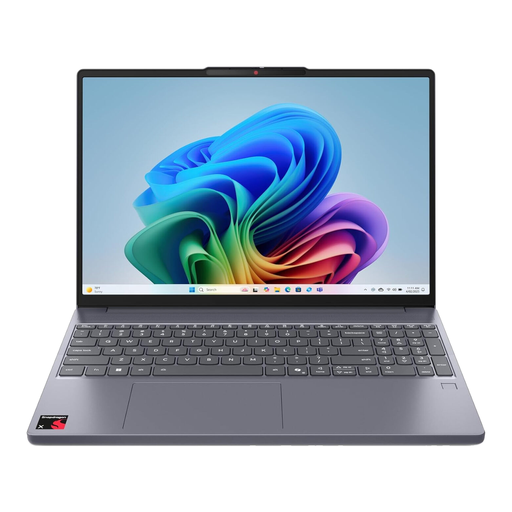 No image available
Lenovo IdeaPad Slim 3 15Q8X10 83N30029UK, 15.3-inch, Snapdragon, 16 GB, 256 GB SSD
This laptop offers a 15.3-inch option for work across locations, with listed 16 GB memory and a 256 GB SSD. Check whether that storage meets your course needs and whether required applications and peripherals work with its Snapdragon-based Windows configuration.
View on Joybuy
Frequently asked questions
Can a tablet replace a laptop for university study?
Use a tablet as your only device only if your course confirms that its required apps and assessments work on it. UCL advises regular access to a laptop or desktop, while Loughborough University notes that tablets have a more limited range of software.
Should I choose Windows or macOS?
Choose the operating system that supports your course requirements. The University of Bristol recommends a Windows or macOS laptop for the majority of students, but the University of Bath identifies Windows-only software in mechanical engineering. Check departmental guidance before deciding.
Do I need to replace a laptop I already own?
Not if your existing laptop meets your course requirements and remains practical to use between locations. Compare its supported operating system and hardware with departmental guidance, then check its battery condition and charging arrangement for your routine.
What matters when choosing a spare USB-C charger?
Check the exact laptop model’s supported charging method and required power, not just the connector shape. Apple’s UK specifications, for example, state USB-C Power Delivery support and a 30W minimum for the listed MacBook Air; that requirement should not be applied to a different laptop.


