What matters when choosing a study device?
Establish what your course requires for software and assessments first; then choose a format and specification that work for study in both locations.
Laptop
Choose when: Your primary device must handle substantial coursework or installed applications and assessments that require a laptop or desktop.
Check carefully: Windows and macOS are not interchangeable for every course; Loughborough University identifies engineering software that does not work on Apple devices.
Tablet with a keyboard
Choose when: Your work is mainly reading, notes and lighter tasks, and your provider confirms that the tablet supports required coursework and assessments.
Bear in mind: A keyboard does not add desktop software support; UCL says a tablet alone cannot meet its full study requirements.
Chromebook
Choose when: Your course confirms that its applications, assessments and peripherals work on ChromeOS.
Bear in mind: The University of Edinburgh warns that some degree-programme software will not run on Chromebooks; the Open University does not support them for its cited online-proctored exams.
| Priority |
What to check |
Your needs |
| Course software |
Get the application list and supported operating-system versions. Compare the course’s memory and storage requirements with the device, particularly for specialist work. |
I need to run the applications used for my assignments, not just open the learning platform. UWE Bristol advises choosing a device around the software required for the course. |
| Assessments |
Check the exam platform, supported browser, installation permissions and any required camera or microphone. Test access before an assessment where your provider allows it. |
I need to complete assessed work on my own device. The Open University’s cited online-invigilation setup does not support tablets or Chromebooks. |
| Working between locations |
Compare screen and keyboard arrangements for lengthy writing. Check the model’s weight, charging arrangements and ports against what you will carry and connect. |
Moving between home and classes, I want a setup I can carry that still works for longer documents and online sessions. |
| Access and security |
Confirm supported updates, account sign-in requirements and connectivity for institutional services. Check any security settings your provider requires. |
I need to sign in to course systems and join online teaching from both study locations without relying on an unsupported setup. |
Joybuy laptop options for blended study
These five options are laptops for a laptop-led study setup, including one convertible model. Compare each device with your course’s software, assessment and hardware requirements before choosing.
 No image available
ASUS Vivobook 15 X1504VA, 15.6-inch, Core 5 120U, 24 GB RAM, 1 TB SSD
For laptop-led coursework, weigh the 15.6-inch format against how often you will carry it between study locations. Check your course software and assessment requirements against this model before buying.
Joybuy
 No image available
HP OmniBook X Flip 16-as0004na, 16-inch touchscreen, Core Ultra 5 226V, 16 GB RAM, 512 GB SSD
The 2-in-1 touchscreen format is an option if you want a laptop-led setup with a convertible screen. It runs Windows 11 Home; confirm course software and exam compatibility, and keep ventilation areas clear when using it in folded positions.
Joybuy
 No image available
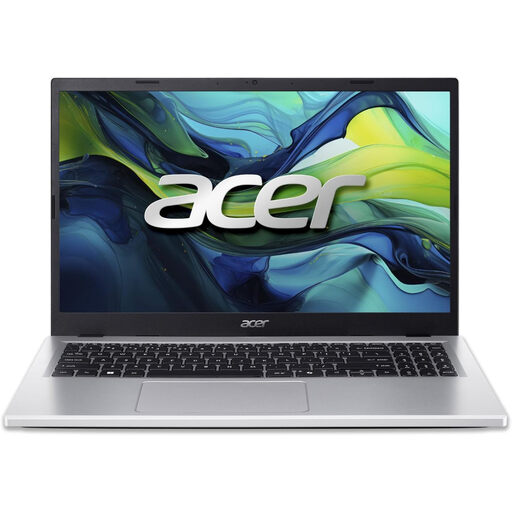
Acer Aspire Go 15 AG15-71P, 15.6-inch Full HD, Core i5-13420H, 8 GB RAM, 256 GB SSD
This Windows 11 Home laptop is an option for written coursework and online sessions. Check whether its 8 GB RAM and 256 GB SSD meet your course’s recommended specification, as well as its software and assessment rules.
Joybuy
 No image available
ASUS Vivobook 14 X1407QA-LY003W, Snapdragon X, 16 GB RAM, 512 GB SSD
The 14-inch format is worth comparing if you carry your laptop between locations. Its Snapdragon X processor makes Windows-on-ARM compatibility a specific check for every required course application, exam tool and peripheral.
Joybuy
 No image available
Lenovo IdeaPad 1, 15-inch Full HD, Ryzen 3 7320U, 8 GB RAM, 128 GB SSD, Windows 11 Home in S Mode
For general laptop-based coursework, check whether your required applications can be installed and run with Windows 11 Home in S Mode. Compare its 8 GB RAM and 128 GB SSD with your programme’s recommended specification.
Joybuy
Frequently asked questions
Can a tablet with a keyboard replace a laptop for blended study?
Yes, if your provider confirms that the tablet supports every required application, assessment platform and peripheral for your course. A keyboard helps with typing but does not resolve software restrictions. UCL says a tablet alone cannot meet its study requirements, so do not assume the same answer applies across institutions.
Is a Chromebook suitable for university or college work?
A Chromebook may suit a course that explicitly supports ChromeOS for its coursework and assessments. Check the exact programme requirements: the University of Edinburgh warns that some degree-programme software will not run on Chromebooks, and the Open University does not support them for its cited online-proctored exams.
What should I ask my education provider before buying?
Ask for the required applications, supported operating systems and browsers, recommended hardware specification and digital-assessment rules. Also check any security, camera, microphone and peripheral requirements, plus whether your chosen device can receive the support needed for your course.
Do I need external storage or an adapter?
Only if your course files, network connection or peripherals call for one. Check the device’s ports, available local storage and the connections required where you study before choosing accessories; they cannot fix incompatible course software.


