Choose a laptop as your primary device if your course requires desktop applications or substantial document work, especially while its software requirements are still unclear. A keyboard-equipped tablet can suit reading, annotation and lighter coursework, but only if your department confirms that its required applications and assessment tasks work on that platform. Check the complete setup you would need, including accessories and any software or device support available through your university.
Who each device may suit
Students using specialist software
If your modules involve engineering or design tools, programming environments or substantial document production, start with the department’s device requirements. The University of Warwick and the University of York both advise checking course-specific guidance; Loughborough University also warns that tablet software availability is limited.
Students doing everyday coursework
For learning platforms, browser-based resources, assignments and online classes, check whether a device you already own can complete the work before replacing it. Also check your university’s software provision: the University of Nottingham, for example, provides Microsoft 365 and specialist software to its students.
Students who read and annotate on the move
A tablet may appeal if your study involves reading, handwritten notes and annotation between home and campus. Confirm that its apps can also handle assessed work, and check whether you will need a keyboard or stylus. A Windows 2-in-1 is another format to consider if you need both laptop and touch use.
What to check before choosing
For online teaching, coursework systems and personal files, establish your course requirements first. Then compare how each device would handle your own study routine.
| Concern |
What to check |
Who this matters to |
| Course software and assessments |
Ask your department which operating systems, applications and device specifications your modules require. Check how assessed work must be created and submitted. |
If my assignments require a particular application, I need a device that can run it, not just open the course website. About 36% of consumers put course compatibility first. |
| Everyday coursework fit |
Check whether your existing device meets the course requirements and whether your university provides the software you need. Compare memory and storage against your actual work. |
For mainly browser-based study and written assignments, I want a dependable setup without choosing specifications my work will not use. About 29% of consumers make that practical fit their primary concern. |
| Portable notes and reading |
Try the required reading, annotation and assignment tasks on the intended platform. Check keyboard and stylus compatibility if those are part of your routine. |
Moving between study locations makes a compact device and handwritten annotation useful to me, provided I can still complete assessed work. For about 21% of consumers, portable note-taking is the main priority. |
| Remote-class readiness |
Check your camera, microphone, headset connection, charging arrangements and home internet connection for online sessions. |
When teaching takes place online, I need to join and participate reliably rather than rely on the device alone. Remote-class readiness comes first for about 14% of consumers. |
Common buying mistakes
-
Treating general university guidance as the course requirement
A university-wide recommendation may not cover a department’s specialist applications or higher device requirements. The University of Warwick and the University of York both direct students towards course-specific guidance.
Ask your department for its current device and software requirements before settling on Windows, macOS, a tablet or a 2-in-1.
-
Comparing a tablet alone with a ready-to-use laptop
If you need to type substantial assignments or make handwritten annotations, the tablet may also need a suitable keyboard or stylus.
Check which accessories work with the exact tablet and which ones are included before deciding whether it covers your whole workflow.
-
Assuming every Windows 2-in-1 runs every course application
The Windows name does not, by itself, establish that a particular processor, configuration or peripheral will work with specialist course software.
Give your department the exact model and processor details, along with the applications you must use, before choosing a convertible device.
-
Overlooking university software and device support
Support differs between institutions. The University of Nottingham describes software provision for its students, while UCL and the University of Strathclyde describe device-support schemes with their own conditions.
Check your university’s IT, library and student-support information, without assuming that a loan or other support will be available to you.
Relevant brands to compare
Apple
MacBook Air is a laptop route; iPad Air is a tablet route with Apple Pencil and Magic Keyboard accessory options.
- Apple describes a MacBook Air configuration with 16GB unified memory and 512GB storage. Check the configuration of the model you select.
- Do not assume either device supports your course software. Loughborough University specifically identifies the engineering application NX as incompatible with Apple devices.
Microsoft Surface
Surface Pro offers a Windows 2-in-1 format for students considering both laptop work and tablet-style use.
- Microsoft describes laptop use with an optional Surface Pro keyboard.
- Check the exact model’s course-software compatibility and which keyboard, pen and power accessories are included.
Lenovo
IdeaPad includes conventional laptops and 2-in-1 models, rather than one uniform study-device specification.
- Lenovo lists IdeaPad Slim, Pro and 2-in-1 families, giving students different formats to compare with their study routine.
- Processor, memory, storage, ports and operating system depend on the chosen configuration. Check the exact model against department requirements.
Joybuy laptop selections
These laptops include conventional and convertible formats for students considering a primary device for online study and coursework. Confirm the exact model against your course requirements; a laptop’s specifications alone do not establish application compatibility.
 No image available
ASUS Vivobook 15 X1504VA, 15.6-inch, Cool Silver
Consider this conventional laptop if your coursework involves substantial typing and you prefer a 15.6-inch screen. Its listed configuration has an Intel Core 5 120U, 24 GB memory and a 1 TB SSD. Confirm support for your course applications before choosing it.
View on Joybuy
 No image available
HP OmniBook X Flip 16-as0004na, 16-inch
This 2-in-1 format is worth considering if you want laptop work and touchscreen use in one device. The named configuration includes an Intel Core Ultra 5 226V, 16 GB RAM, a 512 GB SSD and Windows 11 Home. Check course-application support and whether a stylus is included if pen input matters to you.
View on Joybuy
 No image available
Lenovo Legion Pro 7 16IAX10H, 83F5000UUK
Consider this configuration only if your course requirements call for its listed hardware and the required applications support it. The 16-inch laptop is named with an Intel Core Ultra 9 processor, 64 GB RAM, a 2 TB SSD, NVIDIA GeForce RTX 5090 graphics and Windows 11 Home. Check its carrying weight and battery life if you regularly study away from a power socket.
View on Joybuy
 No image available
ASUS Vivobook 14 X1407QA-LY003W, Quiet Blue
The 14-inch format may suit a student who carries a laptop between study locations. This Snapdragon X configuration is named with 16 GB RAM and a 512 GB SSD. Confirm that the processor and exact device support every required course application before relying on it as your primary device.
View on Joybuy
 No image available
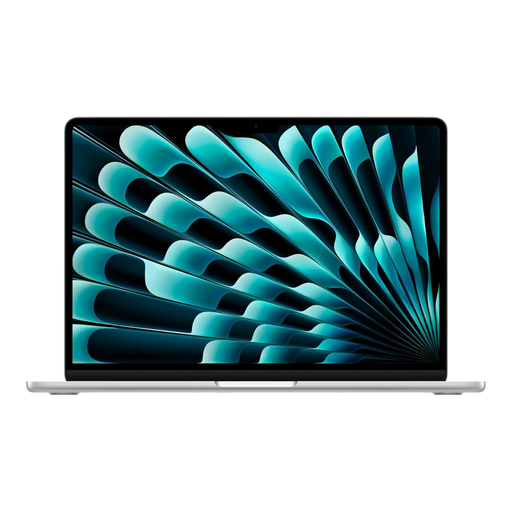
Apple 13-inch MacBook Air (2026), M5, Silver
Consider this 13-inch laptop for a portable study setup after confirming that your course applications work on the exact model. Its named configuration has an M5 chip with a 10-core CPU and 8-core GPU, 16 GB memory and a 512 GB SSD. Check your department’s operating-system requirements before choosing it.
View on Joybuy
Frequently asked questions
Should I buy a device before my department publishes its requirements?
If your course may use specialist software, request its written device requirements before committing to a platform. The University of Warwick and the University of York advise students to follow course-specific guidance where it differs from general recommendations.
Can a tablet replace a laptop for university work?
A tablet can serve as your primary device only if your course confirms that its applications, document tasks and assessment submissions work on that platform. Loughborough University cautions that the range of software available on tablets is limited, so test the required workflow rather than judging by reading and note-taking alone.
Do I need separate software for assignments?
Check your university account and course guidance first. The University of Nottingham provides Microsoft 365 and specialist software to its students, but the software and access arrangements you can use depend on your own institution and course.
Can I rely on a university laptop loan instead of buying?
Check the scheme’s eligibility and availability before treating a loan as your study-device plan. UCL describes a student laptop loan scheme, and the University of Strathclyde describes a digital-inclusion scheme; neither establishes access for students at other institutions.


