Who needs which setup?

Colour-critical gallery editor

If you edit photographs locally and judge colour and detail before publishing, examine the exact laptop panel as well as its memory and SSD configuration. ASUS and Lenovo publish display specifications for particular models or configurations, not a promise that every variant has the same panel.

Shared-office gallery coordinator

If you organise images, maintain the gallery and move between desks, check the connection to your office display, the way you import files and who can access shared folders. Microsoft notes that people given Edit access to a shared OneDrive folder can see all its contents.

Mobile creative producer

If you update galleries away from a fixed desk and also use demanding creative applications, balance carrying size against the memory and local storage your software needs. Consider a graphics-equipped configuration when your actual applications call for it, rather than choosing one from its product-family name alone.

What matters when choosing?

Creator-focused laptop

Consider it when: You edit and inspect detailed images on the laptop display itself.

Trade-off: Display and graphics claims may vary between configurations, so a product-family specification is not enough to establish what you are buying.

Mobile workstation

Consider it when: The gallery project also involves demanding rendering, complex creative applications or a large local asset library.

Trade-off: Workstation-level options, such as those HP lists for the ZBook Studio G10, may be more than a lightly edited or browser-based gallery needs.

Portable office setup

Consider it when: You mainly select, upload and maintain images while moving between shared desks and using an external display for final review.

Trade-off: Confirm the monitor connection, media-import method and editing-software requirements before relying on a compact configuration.

Concern What to check Who this matters to
On-laptop image review Check the chosen panel’s stated resolution and colour gamut; do not apply a product-family display claim to every variant. If I make final colour decisions on the laptop, I need to know what its actual panel can show. Around 33% of consumers put dependable on-laptop image review first.
Editing and local storage Compare memory and free SSD space with your applications and asset library. Adobe recommends at least 16 GB RAM, a fast internal SSD and 100 GB of available disk space for Photoshop. Large source files and local editing make room for applications and active images my main concern; around 27% of consumers likewise prioritise editing and storage capacity.
Shared-office connections Match display ports or a dock to the office monitor, check the camera-media import method and set folder access deliberately. When I move files between a camera, colleagues and a shared display, the desk setup must work without exposing the whole library. Controlled connectivity is the primary need for around 20% of consumers.
Portable everyday work Consider carrying size alongside the exact memory, SSD and external-monitor connection needed for gallery maintenance. If I mostly upload, caption and organise images between desks, I do not want to carry a configuration chosen for rendering I rarely do. Around 20% of consumers put proportionate, portable gallery work first.

Mistakes to avoid

  • Buying to the minimum Photoshop requirement

    Adobe lists 8 GB as the minimum memory but recommends 16 GB or more, together with a fast internal SSD and 100 GB of available disk space. The minimum alone is a poor basis for planning work with large local image files.

    If Photoshop is central to the gallery, compare the exact memory and SSD configuration with its recommended requirements and the space your images will occupy.

  • Assuming every variant has the advertised display

    A panel or graphics specification associated with a laptop family need not describe the particular configuration in your basket. ASUS describes configuration-dependent ProArt options, and Dell warns that changing an XPS option can change other specifications.

    Record the exact model and confirm its panel, memory, SSD, graphics, operating system and ports before ordering.

  • Sharing the whole image library with Edit access

    Microsoft says recipients with Edit permission on a shared OneDrive folder can see all its contents and add that folder to their own OneDrive.

    Use a separate review or delivery folder, share it with the intended people and give view-only access when they do not need to change files.

  • Assuming warranty terms are the same across listings

    Joybuy UK lists a two-year manufacturer warranty for its ASUS ProArt P16 H7606WW-SE006W listing and a one-year manufacturer warranty for a MacBook Pro M5 Pro listing with an 18-core CPU, 20-core GPU, 24 GB memory and 2 TB storage. Those statements apply to those listings, not to every configuration in either range.

    Check the warranty, seller, support route and return terms on the page for the exact laptop you intend to order.

Relevant brands to consider

ASUS

The ProArt range is relevant if you want a Windows creator laptop and plan to review images on its own display.

  • ASUS lists a 16-inch 4K OLED option for the ProArt P16 H7606 family, with configurations reaching 64 GB memory and 4 TB SSD storage.
  • Those are family-level options; check the display, memory, storage and graphics of the exact variant.

Apple

MacBook Pro is an option for a gallery team whose applications and file workflow suit macOS.

  • Apple’s UK MacBook Pro specifications include Liquid Retina XDR displays and configurable unified-memory and SSD options.
  • Confirm the selected configuration and compatibility with office software, plug-ins and peripherals.

HP

ZBook Studio is relevant when gallery creation is part of a more demanding Windows creative or technical workflow.

  • HP lists configuration-dependent ZBook Studio G10 options reaching 64 GB DDR5 memory and 4 TB NVMe storage, alongside Thunderbolt 4 and a microSD reader.
  • Check which options the chosen configuration includes; this level of equipment may be unnecessary for light gallery maintenance.

Lenovo

ThinkPad X1 Carbon is worth considering for a portable shared-office setup where the exact display and monitor connection matter.

  • Lenovo lists model 21NS0171UK with 32 GB memory, a 1 TB SSD and a 14-inch 2.8K OLED display specified at 100% DCI-P3.
  • Those details belong to that configuration; check other X1 Carbon variants separately.

Dell

XPS 16 is a larger-screen Windows option to examine if you want a creator-oriented laptop for work across shared desks.

  • Dell offers processor and operating-system choices for the XPS 16.
  • Dell warns that selecting an option can change other specifications, so assess the complete chosen configuration.

Joybuy laptop choices

These laptops cover several ways of working on a shared-office gallery, from desk-based local editing to smaller laptops for moving between desks and a MacBook Pro for a macOS workflow. Choose by the tasks, connections and software you actually need rather than treating the list as one interchangeable specification.

MSI Stealth 18 AI Studio A1VGG-001UK laptop

MSI Stealth 18 AI Studio A1VGG-001UK, 32 GB, 2 TB SSD, RTX 4070

Consider this 18-inch configuration if gallery creation involves substantial local editing at a desk. Its listed Intel Core Ultra 9, 32 GB RAM, 2 TB SSD and GeForce RTX 4070 identify the variant; check that its size and your camera-media import method suit the shared-office setup.

View on Joybuy

ASUS ProArt P16 H7606WW-SE006W laptop

ASUS ProArt P16 H7606WW-SE006W, 64 GB, 2 TB SSD, RTX 5080

This 16-inch Windows creator configuration is relevant when you edit and inspect images on the laptop. Its title specifies a 4K OLED touchscreen, Ryzen AI 9 HX 370, 64 GB RAM, 2 TB SSD and GeForce RTX 5080 16 GB. Confirm the exact panel’s colour-gamut specification before relying on it for final colour decisions.

View on Joybuy
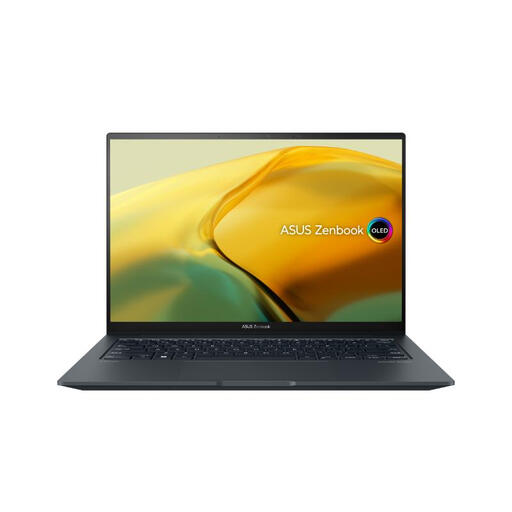
ASUS ZenBook UX3404VC-M3130W laptop

ASUS ZenBook UX3404VC-M3130W, 16 GB, 1 TB SSD, RTX 3050

This 14.5-inch Windows laptop is an option for gallery work that moves between desks. Its listed OLED touchscreen, Core i9, 16 GB RAM, 1 TB SSD and RTX 3050 distinguish this variant. Check the panel’s colour specification for final image review and whether camera-media import needs a separate reader.

View on Joybuy

Apple MacBook Pro 14.2-inch M5 Pro, 24 GB, 2 TB, Silver

Apple MacBook Pro 14.2-inch M5 Pro, 15-core CPU, 16-core GPU, 24 GB, 2 TB, Silver

Consider this MacBook Pro for a gallery workflow built around macOS-compatible applications and peripherals. The named variant has 24 GB unified memory and a 2 TB SSD; confirm your team’s plug-ins, file-sharing procedures and display requirements before switching platforms.

View on Joybuy

MSI Summit 16 AI Evo, 32 GB, 1 TB SSD laptop

MSI Summit 16 AI Evo, Core Ultra 7 255H, 32 GB, 1 TB SSD

This 16-inch configuration is worth checking for gallery organisation and local editing between shared desks. Its title specifies a QHD+ 165 Hz display, Intel Arc graphics, 32 GB LPDDR5 RAM and a 1 TB SSD. Confirm the panel’s colour specification, external-display connection and camera-media import method for your office.

View on Joybuy

Common questions

Is 16 GB of RAM enough to build a photo gallery?

It can be a starting point for a Photoshop-based workflow: Adobe recommends 16 GB or more, as well as a fast internal SSD and 100 GB of available disk space. Plan the exact memory and storage around your local image library, layered files and other applications used at the same time.

Do I need a discrete GPU for gallery work?

Not for every gallery workflow. If you mainly select, caption and upload images, check your editing software, memory, storage and display setup first; consider the graphics options offered in creator laptops or workstations when your actual applications involve more demanding graphics or rendering work.

How should colleagues share gallery images?

Share a dedicated folder with the people who need it and give Edit access only when they must change its files. Microsoft explains that recipients with Edit access to a shared OneDrive folder can see all its contents and add it to their own OneDrive.

What should I check about returns and rights when ordering a laptop?

Check the seller’s change-of-mind terms separately from your rights if the laptop is faulty or misdescribed. Coventry City Council Trading Standards explains that, under the Consumer Rights Act 2015, goods must be as described, fit for purpose and of satisfactory quality; keep the order confirmation and the specification of the configuration you chose.

What should I do with an old laptop?

Treat it as electrical equipment rather than putting it in general waste. GOV.UK explains that the Waste Electrical and Electronic Equipment Regulations 2013, as amended, underpin UK measures for the recovery, reuse and recycling of electrical products and components.