What to prioritise when buying
Check application compatibility first, then match the computer to your footage; decide on portability and storage around where you edit and keep your projects.
For consumers choosing a computer in the UK for personal photo editing and short travel videos, the table focuses on each person’s primary buying concern.
| Concern |
What to check when buying |
Who this matters to |
| Application compatibility |
Check the chosen applications’ supported operating systems, processors and memory requirements. Microsoft recommends at least 8 GB of RAM for Clipchamp and prefers 16 GB or more. |
If I cannot install my chosen editor on the laptop, its other features will not solve the problem. Consumers who put application and operating-system compatibility first make up about 36% of this decision group. |
| Footage and project complexity |
Check your footage’s resolution, format, clip lengths and number of simultaneous streams against the requirements for your editor. Adobe distinguishes Premiere’s HD minimum from its recommendations for HD, 4K and higher-resolution editing. |
If my projects move beyond short, straightforward clips, I want to match the computer to the footage rather than assume every editing workload is alike. Consumers whose main concern is footage and project complexity make up about 29%. |
| Portability and connections |
Check the exact laptop’s size, charging arrangement and ports against your camera media, card reader and drives. If you edit only at home, consider whether a fixed desktop would suit your setup. |
If I need to import footage or edit while travelling, carrying the computer and connecting my media both matter. Consumers who prioritise portability and connections make up about 21%. |
| Project storage and setup |
Compare the exact internal SSD capacity with your files and project needs. For iMovie on Mac, Apple documents external USB or Thunderbolt storage formatted as APFS or Mac OS Extended (Journaled); check included accessories for the chosen configuration. |
If my footage and projects need room, I want to know whether internal storage or a suitable external-drive setup fits the way I work. Consumers who put project storage and a workable setup first make up about 14%. |
Joybuy laptop options
These Joybuy options are portable Windows and Mac laptops for personal photo editing and short travel-video projects. Match each exact configuration to your applications and footage; higher specifications are not automatically necessary for basic edits.
 No image available
Apple MacBook Pro 14.2-inch (M5 Pro), 24 GB, 2 TB
Consider this Mac if your chosen editing applications run on macOS and you want the stated local storage capacity. The title specifies an M5 Pro chip, 15-core CPU, 16-core GPU, 24 GB unified memory and a 2 TB SSD; a compatible power adapter is required and sold separately.
Joybuy
 No image available
ASUS Vivobook 14 X1407QA-LY003W Copilot+ PC, 16 GB, 512 GB
Consider this Windows laptop if your chosen editor supports its configuration. The listed specifications include Windows 11 Home, 16 GB RAM and a 512 GB SSD; check the application’s requirements and whether its storage suits your projects.
Joybuy
 No image available
ASUS ROG Zephyrus G14 GA403WR-QS088W, 32 GB, 2 TB
Compare this Windows 11 Home laptop’s listed configuration with your editor’s requirements rather than assuming its components are necessary for short clips. The title specifies an AMD Ryzen AI 9 HX 370, 32 GB memory, a 2 TB SSD, a 14-inch WQXGA+ display and an NVIDIA GeForce RTX 5070 Ti.
Joybuy
 No image available
Apple MacBook Pro 16.2-inch (M5 Max), 36 GB, 2 TB
Consider this Mac if your applications run on macOS and the stated configuration fits your work. The title specifies an M5 Max chip, 18-core CPU, 32-core GPU, 36 GB memory and a 2 TB SSD; a USB-C power adapter of at least 70 W is required and sold separately.
Joybuy
 No image available
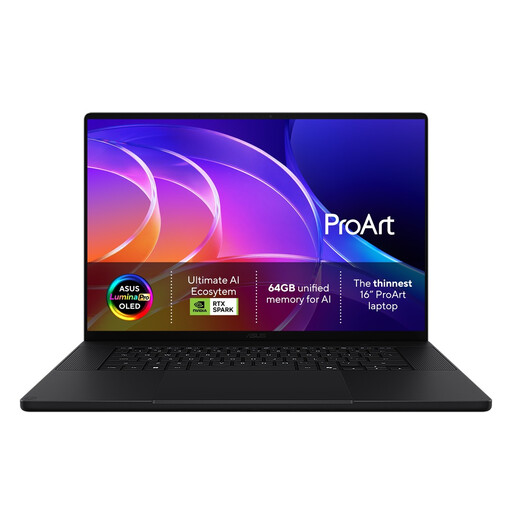
ASUS ProArt H7607BA-SE033W 16-inch 4K OLED Creator Laptop
Consider this Windows laptop if its exact configuration meets your editing application’s requirements. The title identifies a 16-inch 4K OLED display; check the full configuration and the formats supported by your chosen editor before relying on it for a particular workflow.
Joybuy
Frequently asked questions
Do I need a dedicated graphics card for short travel-video edits?
Not simply because the task involves video editing. Microsoft’s Clipchamp guidance discusses the processor, graphics and project complexity without setting a universal dedicated-graphics requirement; check the specifications for the editor and footage you plan to use.
Is the minimum RAM listed for an application enough?
A stated minimum is not a promise about performance for every project. Microsoft recommends at least 8 GB of RAM for Clipchamp and prefers 16 GB or more, while Adobe’s Premiere guidance distinguishes its HD minimum from its recommendations for HD, 4K and higher-resolution work. Use the requirements for your chosen application and footage.
Can I keep an iMovie library on an external drive?
Yes, if the drive meets Apple’s stated conditions: Apple documents moving an iMovie library to an external USB or Thunderbolt device formatted as APFS or Mac OS Extended (Journaled). Apple advises backing up first and does not recommend an SD card, USB flash drive or shared network storage for the library.
What should I check on a refurbished Windows laptop?
Check the installed operating system, application compatibility, battery condition and seller’s description; if a Windows 11 upgrade is proposed, verify eligibility for that specific device. Microsoft ended standard Windows 10 support on 14 October 2025, and its PC Health Check can assess Windows 11 eligibility for a particular Windows 10 device.
What UK rights apply if an online laptop is faulty or I change my mind?
GOV.UK says a trader must offer a full refund for goods that are faulty, not as described or do not do what they are supposed to. For an applicable distance sale, a customer can tell the trader within 14 days of receipt that they wish to cancel and then has another 14 days to return the item; the change-of-mind cancellation period is distinct from remedies for faulty goods.


