What matters when buying
Settle software compatibility before comparing display and connection options. Extra memory and storage matter most when image editing joins the browser-based workflow.
| Concern |
What to check |
Who this matters to |
| Design-tool access |
Confirm that the operating system, intended browser and WebGL support meet Figma’s current requirements. |
If my homepage work lives in Figma, I need to open and review files reliably on the machine I carry to work. Around 31% of consumers put design-tool compatibility first. |
| Image-editing headroom |
For Photoshop work, check RAM and internal SSD capacity against Adobe’s requirements; confirm whether the exact laptop’s memory can be expanded. |
When I edit portfolio images while keeping design files and other apps open, I need capacity for that combined workload. Roughly 31% of consumers make image-editing headroom their primary concern. |
| Screen for layout review |
Compare the exact panel’s size, resolution and aspect ratio with your workspace; check colour claims against the needs of client-facing work. |
I want enough room to inspect typography, spacing and images without relying on an external monitor at every desk. Around 23% of consumers prioritise the built-in screen for layout review. |
| Moving and connecting |
Check weight and the ports needed for your shared displays and accessories; confirm whether any required adapter is included. |
When I change desks, carrying the laptop and connecting to the available equipment must stay manageable. Approximately 15% of consumers put shared-office mobility and connections first. |
Joybuy laptop choices for portfolio design
These laptops cover different priorities within the same portfolio-design task: space for asset work, a portable macOS setup, or Windows options for working across shared desks. Compare each exact configuration with your apps, screen needs and office connections.
 No image available
ASUS ProArt P16 H7606WW-SE006W, 16-inch 4K OLED Touchscreen
Consider this configuration if portfolio images and detailed layouts are a substantial part of your work. It lists an AMD Ryzen AI 9 HX 370, NVIDIA GeForce RTX 5080 16GB, 64GB RAM, a 2TB SSD and Windows 11 Home. Check the panel against any colour-critical requirements and assess operating noise if your shared workspace needs to stay quiet.
View on Joybuy
 No image available
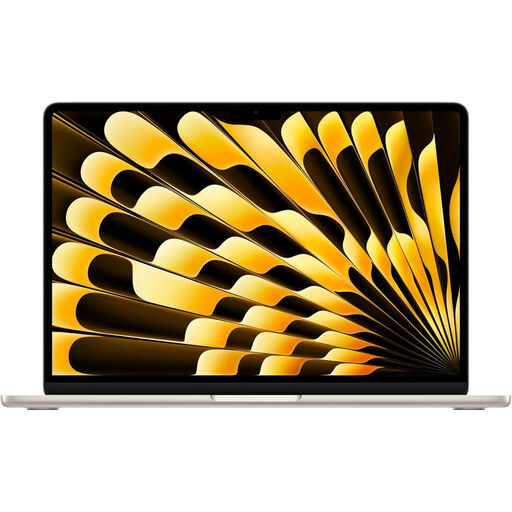
Apple 15-inch MacBook Air (2026), M5, 16GB, 512GB, Starlight
This is a macOS choice for browser-led design when you also want a 15-inch built-in screen. The stated M5 variant has a 10-core CPU and 10-core GPU, with 16GB memory and a 512GB SSD. Before buying, confirm the supplied macOS version supports your required design and image-editing apps.
View on Joybuy
 No image available
ASUS Vivobook 14 X1407QA-LY003W, Snapdragon X, 16GB, 512GB
Consider this 14-inch Windows option if you want a compact machine for moving between desks. Its named configuration has a Snapdragon X processor, 16GB RAM and a 512GB SSD. Confirm that your browser and any Photoshop workflow run as required on this processor, and check the display if accurate colour review matters.
View on Joybuy
 No image available
Lenovo LOQ Essential 15ARP11, 15.6-inch FHD, 16GB, 1TB
This configuration may suit work that combines homepage design with locally stored portfolio assets. It names an AMD Ryzen 7 170, GeForce RTX 5050, 16GB RAM, a 1TB SSD and a 144Hz FHD display. If you move desks often, check its carrying weight and operating noise against your routine; also confirm whether its memory capacity leaves room for future work.
View on Joybuy
 No image available
Microsoft Surface Laptop 7, 15-inch, Snapdragon X Elite, 16GB, 256GB
The 15-inch PixelSense touchscreen gives this Windows option a built-in space for reviewing layouts. Its named configuration has a Snapdragon X Elite processor, 16GB RAM and a 256GB SSD. Check that the storage suits your local assets, that required apps work on this processor and that your office monitor or dock can connect as intended.
View on Joybuy
Common questions
Do I need a dedicated GPU to design a portfolio homepage in Figma?
A dedicated GPU need not be your starting criterion for a mainly browser-based Figma workflow. Figma describes its graphical requirements as low and says it uses WebGL; check that your intended browser and laptop support the tool before paying for graphics capability intended for other work.
When is 16GB RAM worth prioritising?
Prioritise 16GB or more when Photoshop is a regular part of preparing portfolio assets, particularly alongside browser tabs and other apps. Adobe recommends at least 16GB for current Photoshop desktop releases; that recommendation is not a universal minimum for a simple Figma-only workflow.
Can I change my mind about a laptop bought online?
For an eligible UK online purchase, GOV.UK says you normally have 14 days from receiving the item to tell the seller you want to cancel. Check the return instructions and handling conditions before ordering. Remedies for a laptop that is faulty or misdescribed are separate from a change-of-mind cancellation.
Should a laptop for England, Scotland or Wales have a UKCA mark?
A UKCA mark is not the only marking recognised for applicable products placed on the Great Britain market: the Department for Business and Trade says CE marking continues to be recognised alongside or in place of UKCA marking where the relevant product regulations apply. That Great Britain guidance covers England, Scotland and Wales; check the applicable information separately for delivery to Northern Ireland.
What should I check when the laptop arrives?
Check the workflow you bought it for: open a representative Figma file, connect to the office display or dock you expect to use, and confirm that Photoshop installs if you need it. Also check the supplied charger and the laptop’s condition, following the seller’s return instructions while keeping change-of-mind conditions distinct from your rights if the goods are faulty or misdescribed.


