Small-desk web designers
You need room for your mouse, keyboard or notebook as well as the laptop. A compact screen may work for everyday editing, provided you plan how to review layouts when you need more screen space.


For a portfolio homepage designed at a small desk, start with a compact 13- or 14-inch laptop, enough memory and storage for your project files, and a screen and connections that suit how you review layouts. Choose a smaller built-in screen if desk space comes first, a 14-inch display if you work mainly on the laptop screen, or a graphics-focused machine if demanding local creative work is also part of the job. Figma describes its graphics requirements as low, so a dedicated GPU need not drive a Figma-centred purchase.
You need room for your mouse, keyboard or notebook as well as the laptop. A compact screen may work for everyday editing, provided you plan how to review layouts when you need more screen space.
You inspect imagery, typography and colour on the laptop before checking the finished page on other screens. Compare the display specification of the exact configuration you intend to buy, not just its product family.
Your portfolio work includes local video, large images or graphics-accelerated tools alongside page design. Check the requirements of those applications before choosing a laptop for its graphics hardware.
Decide whether the laptop will usually share your small desk with a monitor or serve as your main design screen. Then check whether your work extends beyond browser-based design into demanding local applications.
Consider it when: Keeping the desk clear matters most and you can connect a larger screen for longer layout reviews.
Trade-off: A 13-inch built-in screen leaves less room for side-by-side panels; check the exact laptop’s display outputs and your monitor connection.
Consider it when: You expect to review most layouts and imagery on the laptop rather than adding a monitor.
Trade-off: An OLED or wide-gamut specification describes that laptop’s panel, not how your published page will appear on every visitor’s screen.
Consider it when: Local video, 3D or other graphics-heavy applications are a substantial part of your workflow.
Trade-off: Figma says using a dedicated GPU can increase battery consumption; ordinary page layout alone does not establish a need for one.
| Concern | Buying checks | Who this matters to |
|---|---|---|
| Desk space and expansion | Check the laptop’s dimensions, display outputs and ports against the monitor and peripherals you plan to use. | If my desk is already crowded, I want a compact laptop that can connect to a larger screen when needed. Around 42% of consumers choosing for this task would put desk space and expansion first. |
| On-screen visual review | Check the exact panel’s size, resolution and stated colour range; assess its finish if reflections matter in your workspace. | When the laptop is my main design screen, I need room to inspect images, type and spacing before testing elsewhere. For around 33% of consumers, on-screen review would be the primary concern. |
| Demanding local work | Compare the requirements of your local applications with the exact laptop’s memory, storage and graphics configuration. | If I also edit demanding assets locally, I need a machine suited to those applications, not just browser-based page design. Local-workload headroom would come first for around 25% of consumers. |
A compact laptop frees desk space, but side-by-side design panels and browser previews can feel cramped on its built-in display.
List the monitor and peripherals you use, then check the exact laptop’s display-output support and port types.
Using a monitor may also require a compatible cable, adapter or dock.
A stated colour range applies to a particular laptop panel; visitors may view your page on different displays, browsers and settings.
Check the panel configuration when buying, then review the published page at multiple viewport widths and on other representative screens.
Figma describes its graphics requirements as low and says a dedicated GPU can increase battery consumption, even though it may improve performance.
Identify the local applications and assets that need graphics hardware before making it a purchasing priority.
Display, memory and storage can differ between models in one laptop range. Dell’s cited XPS 13 product page also states that a charger is not included with that particular listing.
Read the exact product’s panel, memory, storage, included-items and charging details before checkout.
MacBook Air is a compact macOS option for a small desk, particularly if you may connect external displays.
Yoga Slim 7i 14-inch models offer a Windows route when the built-in screen will be your main workspace.
Swift Go 14 is another 14-inch Windows option for consumers comparing built-in display configurations.
ProArt PX13 is a compact convertible to examine if portfolio design accompanies more demanding local creative work.
These laptops offer different ways to work on a portfolio homepage: conventional and dual-screen formats for on-laptop review, a larger 15.6-inch option to weigh against desk space, and models with discrete graphics for additional local creative work. Check each configuration against your desk, applications and peripherals.
 No image available
Consider this 2-in-1 if you want a laptop format for designing and reviewing your portfolio. Its product name specifies 16GB RAM, a 1TB SSD and Windows 11 Home. Check the exact display, graphics configuration and included accessories before choosing it for a particular workflow.
 No image available
Its dual-screen format may appeal if you want separate space for design panels and a preview; check how the arrangement and keyboard fit your desk. The product name specifies dual 14-inch OLED touchscreens, an Intel Core Ultra 7 255H, 16GB RAM and a 1TB SSD. Confirm the exact display resolution before buying.
 No image available
Consider this model only if its larger built-in screen and discrete graphics suit work you do beyond portfolio-page layout; measure the space available on your desk first. The product name specifies a 15.6-inch FHD 144Hz display, AMD Ryzen 7 170, 16GB RAM, a 1TB SSD and GeForce RTX 5050. Check its display outputs against your intended monitor.
 No image available
This is a 14-inch option to assess if you also use demanding local creative applications; ordinary Figma page design does not establish a need for its discrete GPU. The product name specifies a WQXGA+ display, AMD Ryzen AI 9 HX 370, 32GB RAM, a 2TB SSD and GeForce RTX 5070 Ti. Confirm its dimensions and keyboard layout for your desk and typing needs.
 No image available
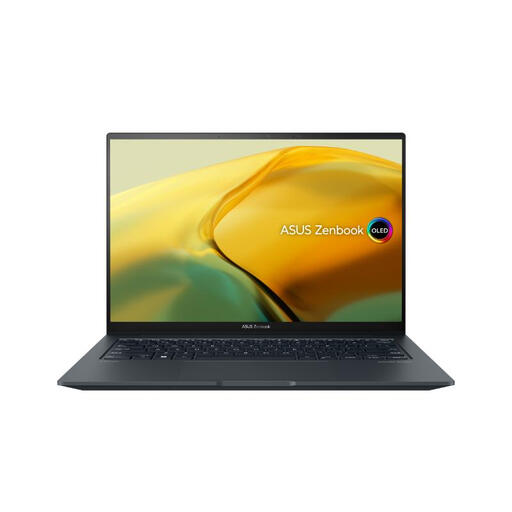
Its 14.5-inch touchscreen offers another built-in display size to consider if you would rather review layouts on the laptop than add a monitor. The product name specifies a 2.8K OLED panel, Intel Core i9, 16GB RAM, a 1TB SSD and RTX 3050. Check the ports needed for your peripherals; the graphics hardware is most relevant if your other local applications require it.
No, not for Figma-based page design alone: Figma describes its graphics requirements as low. It says a dedicated GPU can improve performance but increase battery consumption, so check whether your other local creative applications actually call for one.
Either can suit Figma-centred work, provided your other applications, fonts, testing tools and peripherals are compatible. Figma lists macOS 12 or later and 64-bit Windows 10 or later for its desktop app; check the requirements of the other software you intend to use.
For most UK online purchases, a change-of-mind cancellation right applies within 14 days of receiving the goods, subject to the applicable conditions and exceptions, according to Coventry City Council Trading Standards. That is separate from remedies for a laptop that is faulty, damaged or not as described; check the seller’s return instructions without treating its voluntary policy as a replacement for statutory rights.
Arrange for reuse or electrical-equipment recycling rather than putting it in ordinary household waste. UK government guidance explains that waste electrical and electronic equipment rules encourage recovery, reuse and recycling; check the retailer’s take-back arrangements or your local authority’s service, and erase your personal data before handing the laptop over.