For a portfolio homepage built mainly in Figma, choose a laptop that runs your required browser and course applications, has a screen you can use comfortably in your room and offers 16GB RAM if you expect to multitask or edit images. A colour-focused display may help with visual review, but its finish matters in a bright room. For regular Photoshop work, Adobe recommends 16GB or more RAM, a fast internal SSD and sufficient available storage; Figma says its full workflow needs an internet connection.
Who is this laptop for?
Figma-first student designer
You build homepage layouts and prototypes in Figma while keeping browser research and coursework open. Figma describes its software as predominantly browser-based, so check browser and course-app compatibility before treating a dedicated graphics card as essential.
Visual portfolio editor
You also edit portfolio images in Photoshop. Adobe recommends 16GB or more RAM, a fast internal SSD and ample available disk space for that work, making the exact memory and storage configuration important.
Small-room, plug-light worker
You move between a student-room desk, bed and other study spaces. Consider where the screen will face, which peripherals you use and what charging equipment comes with the exact laptop configuration.
What matters when choosing?
Start with the applications you will actually use, then assess the screen in your room and the equipment needed for your desk setup. Figma describes modest graphical requirements, while Adobe recommends more memory and free disk space for Photoshop.
| Concern | What to check | Who this matters to |
|---|
| Multitasking and storage |
Compare the exact RAM and SSD configuration. For regular Photoshop use, allow for Adobe’s recommended 16GB or more RAM and 100GB of available disk space. |
If I will keep design files, reference tabs and image-editing work open together, I need enough working room without relying on the laptop family name. Around 42% of consumers put multitasking capacity first. |
| Screen for visual review |
Check the exact panel’s size, resolution, colour-coverage claim and finish; consider where room lights or a window will reflect. |
When I inspect homepage spacing and portfolio images, I need a screen I can see clearly at my usual desk. For around 33% of consumers, screen and colour review are the primary concern. |
| Portability and setup |
Check weight, the ports needed for your peripherals and whether suitable charging equipment is supplied. Plan for internet access if Figma is central to your work. |
I move my laptop between study spaces and want my charger, connections and Figma workflow to work wherever I settle. Around 25% of consumers prioritise this practical setup. |
Mistakes to avoid
-
Choosing 8GB RAM solely because Figma is lightweight
Figma’s modest graphical requirements do not describe a full workload of browser tabs, local assets and possible Photoshop editing. Adobe recommends 16GB or more RAM for Photoshop.
If image editing or frequent multitasking is part of your plan, compare exact 16GB configurations and SSD capacity rather than judging a laptop by its series name.
-
Assuming a charger comes with every laptop
Dell’s researched XPS 13 DX13260 listing states that a charger is not included. That detail applies to the listing, not to every XPS configuration or seller.
Check the exact box contents, required charging specification and plug before choosing your room setup.
-
Choosing a glossy screen without checking the light
Lenovo lists the researched Yoga Slim 7i Aura Edition OLED panel as glossy. Reflections may interfere with visual review if your desk faces a window or strong lamp.
Consider your desk position and compare display finishes if you cannot control reflections.
-
Planning to use Figma as a fully offline tool
Figma says an internet connection is needed for full functionality and that it does not offer a fully featured offline mode.
Arrange reliable access for active design sessions, and export important deliverables before anticipated outages or travel.
Relevant brands to consider
Apple
The 13-inch MacBook Air with M5 is a compact macOS option for browser-based design and study. Apple’s UK specification lists 16GB unified memory and a 512GB SSD for the starting configuration.
- Apple specifies a 13.6-inch P3 display, two Thunderbolt 4 ports and support for up to two external displays.
- Consider whether the 13.6-inch workspace suits simultaneous design and preview, and whether your USB-A or HDMI accessories need adapters.
Dell
The XPS 13 DX13260 is a compact Windows option. Dell’s researched UK configuration lists Windows 11 Home and an Intel Core 5 320 processor.
- Its 13-inch format may suit a student who regularly carries a laptop between study spaces.
- Dell’s researched listing says a charger is not included; confirm the exact configuration, box contents and required connections.
Lenovo
The Yoga Slim 7i Aura Edition Gen 10 is a Windows option for buyers considering a 14-inch OLED screen for visual work.
- Lenovo’s researched UK configuration lists 16GB LPDDR5X memory, a 512GB SSD, a 14-inch OLED panel with 100% DCI-P3 coverage and a 1.19kg weight.
- The listed panel is glossy. Choose the memory configuration carefully at purchase and consider reflections at your desk.
Joybuy laptops for this task
These Windows laptops offer different screen sizes, memory and storage configurations for designing a portfolio homepage. Choose by your software, room lighting and carrying needs; check course-specific application compatibility before committing to a Snapdragon model.
 No image available
Lenovo IdeaPad Slim 3 83K7009MUK
Consider this configuration if you want 24GB RAM while working across design files and browser tabs.
15.3-inch WUXGA display; AMD Ryzen 5 7535HS; 24GB DDR5 RAM; 512GB PCIe SSD; Windows 11 Home.
Check the display’s colour coverage and the ports needed for your peripherals. If you use Photoshop, check available SSD space after setup.
View on Joybuy
 No image available
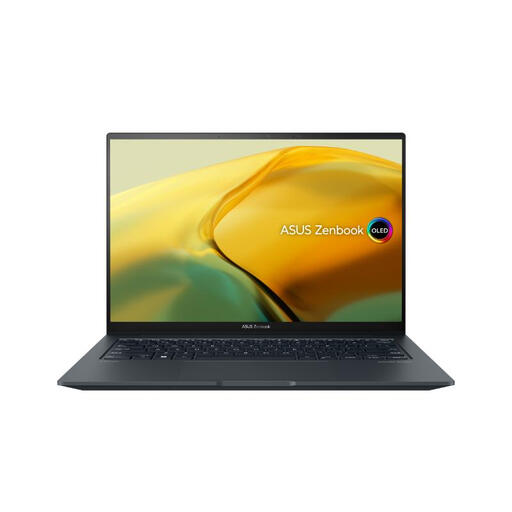
ASUS ZenBook UX3404VC-M3130W
Consider this configuration if an OLED touchscreen and local storage are priorities for your portfolio work.
14.5-inch OLED touchscreen; Intel Core i9; 16GB RAM; 1TB SSD; RTX 3050; Windows 11 Home.
Figma does not make a dedicated GPU a default requirement for ordinary layout work. Check the screen finish and colour coverage for your room and visual-review needs.
View on Joybuy
 No image available
ASUS Vivobook 15 X1504VA
Consider its 15.6-inch format if you prefer more on-laptop space for layouts and previews.
Intel Core 5 120U; 24GB RAM; 1TB SSD; Cool Silver.
Check the exact display finish and colour coverage if room reflections or image review matter. Confirm charger details for your desk setup.
View on Joybuy
 No image available
Lenovo LOQ Essential 15ARP11
Consider this configuration if you also have a use for its dedicated graphics hardware; ordinary Figma layout alone does not require it.
AMD Ryzen 7 170; 16GB RAM; 1TB SSD; GeForce RTX 5050; 15.6-inch 144Hz FHD display.
Check its carrying weight against your daily route. A listed colour-coverage figure, if important to you, is not by itself a colour-accuracy test.
View on Joybuy
 No image available
ASUS Vivobook 14 X1407QA-LY003W Copilot+ PC
Its 14-inch format may suit a compact study space, provided the applications and plugins required by your course run on this Snapdragon Windows configuration.
Snapdragon X; 16GB RAM; 512GB SSD; Quiet Blue.
Check software compatibility before purchase and assess whether the display’s colour coverage suits your visual-review work.
View on Joybuy
Frequently asked questions
Do I need a dedicated graphics card for a Figma portfolio homepage?
Usually not for ordinary homepage layout and prototyping in Figma. Figma says its graphical requirements are low; it also notes that a dedicated GPU can improve performance on a dual-GPU laptop while increasing battery use. Judge that trade-off against your other applications rather than assuming every design task needs dedicated graphics.
What if I will edit portfolio photos in Photoshop?
Prioritise memory and available local storage as well as the screen. Adobe recommends 16GB or more RAM, a fast internal SSD, 100GB of available disk space and a display of at least 1920 × 1080 for Photoshop; these recommendations do not promise identical performance with every project.
Can I rely on Figma if my student-room internet fails?
Not for Figma’s full workflow. Figma says full functionality needs an internet connection and that it does not offer a fully featured offline mode. Export important deliverables ahead of a planned period without access.
What should I check about a laptop and charger supplied in Great Britain?
Check that the product and supplied charging equipment are intended for your setup, including the plug and charging specification. GOV.UK guidance on the Electrical Equipment (Safety) Regulations 2016 concerns equipment supplied in or into Great Britain and notes continuing recognition of certain EU-compliant goods for many products; it does not make a marking alone a substitute for checking the item you receive. Northern Ireland has different provisions under the Windsor Framework.


